command line for opening xml file in translator (1 Viewer)

huha

Extension Developer
January 3, 2008
890
556
Home Country
Germany Germany
Thanks a lot for the great tool. I am new and just started to learn it.
Is there a trick to open a new xml file using a command line option e.g.
translator -open newsettings.xml ?
I would like to define different xml profiles for the translator and then switch between them in a batch file before starting the application without using the GUI. This would allow me to have a separate remote configuration for different applications.
 

and-81

Retired Team Member
  • Premium Supporter
  • March 7, 2005
    2,257
    183
    Melbourne
    Home Country
    Australia Australia
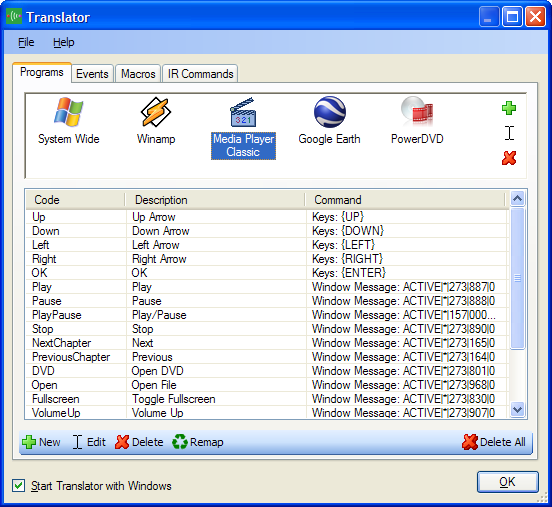
    You should be able to add all your applications in one lot of settings for Translator... Like the screenshot attached.

    But I will add a command line option to load with a different config. Expect to see it available in 1.4.2 final.

    Something like:

    Translator.exe -Config <Config File Path>

    Eg.

    Translator.exe -Config "C:\Config Files\Config2.xml"

    Keep an eye on the changelog, it should be available within a few days.

    If I need you to test it I'll post a copy here.

    Cheers,
     

    Attachments

    • programs.png
      programs.png
      39.8 KB

    huha

    Extension Developer
    January 3, 2008
    890
    556
    Home Country
    Germany Germany
    • Thread starter
    • Moderator
    • #3
    Aaron, thanks for your response and the picture. From that I understood immediately what i missed.
    If i can help you on testing I will be happy to do so. This program is terrific.
    :D
     

    and-81

    Retired Team Member
  • Premium Supporter
  • March 7, 2005
    2,257
    183
    Melbourne
    Home Country
    Australia Australia
    Any problems you have or things you find that don't seem right, please let me know and if it's something I can fix I will do my best.

    Cheers,
     

    huha

    Extension Developer
    January 3, 2008
    890
    556
    Home Country
    Germany Germany
    • Thread starter
    • Moderator
    • #5
    Aaron,
    after your response I first thaught I would not need the commandline option anymore.
    But working a few more weeks with your great tool, I still would like to ask
    you for implementing the command line option. It would allow me to define
    one buttom on the remote as a shift button and nearly double the available keys.

    I would then assign the Shift button with the run command

    Translator.exe -Config "C:\Config Files\Config_Shift.xml"

    I could use this xml file to assign a full layer of additional commands and switch back to the main layer by
    using the same button with the run command

    Translator.exe -Config "C:\Config Files\Config.xml"

    where Config.xml describes the original main layer functions.


    Another variation of this idea would be to assign a small script to a "Shift" Button like

    Translator.exe -Config "C:\Config Files\Config_Shift.xml"
    Sleep(2000)
    Translator.exe -Config "C:\Config Files\Config.xml"


    This script would activate for 2s the shift layer and then switch back to the original layer. It would allow
    to define special functions by using the shift key and another key on the remote.


    Independent of that i do have a second question. Is it possible to transfer the current active application and the
    xml file as a parameter when assigning a program start from the translator?
    I am writing right now an autoit script for displaying the key assignment when pushing a help button on the remote.
    This script is evaluating the translator xml file and displaying the actual key assignment of the remote for the active application.

    Right now I am calling this script by defining a key and use the application name and the xml file name as an argument to the autoit script.
    For that i need to define the remote help button for each application separately. If there would be a variable in the translator e.g. STR_APPLICATION
    and STR_XMLFILE it would be possible to assign this button only once in the system wide settings.
     

    and-81

    Retired Team Member
  • Premium Supporter
  • March 7, 2005
    2,257
    183
    Melbourne
    Home Country
    Australia Australia
    huha:

    I will try to add "Input Layers" to the next version of translator. Features like that should be included in the application.

    What you've talked about in regards to variables and such will be implemented in version 1.5. The current road map is:

    * Release 1.4.2 RC 1 within a day or so.
    * Release 1.4.2 RC 2 or 1.4.2 Final depending on how well RC 1 goes.
    * Release 1.4.3 within a month.
    * Release 1.5.0 RC 1 within two months.

    Now let me explain the different versions:

    1.4.3 will include some new features but will try to be a minor upgrade from 1.4.2. I will include the layer suggestion if it can be done without breaking too many things.

    1.5.0 will be a major upgrade.
    It will break compatibility with old macros and configurations.
    It will default to the Abstract Remote Model setting.
    It will have some changes to the way Translator works (eg. Profile selection criteria will be changed and expanded).
    The whole command system will be overhauled (I've already written most of the code for this), there will be more powerful macros (including Variables, a stack, commands to perform math and string manipulations, commands to interact with the environment variables and clipboard, etc ...)

    So hopefully what you want to do with Translator for example will be available soon. In the meantime I'll try to include as many new features and command line options as I can so long as they don't break any existing functionality.

    Cheers,
     

    huha

    Extension Developer
    January 3, 2008
    890
    556
    Home Country
    Germany Germany
    • Thread starter
    • Moderator
    • #7
    Aaron,
    you are awesome. If you could implement in 1.4 just the command line option for opening a new .xml file
    Translator.exe -Config <Config File Path>
    I believe all the items above can be done already by the users without the need of a special input layer in your program. I am volunteering for testing.

    Thanks again for your great work and your support of the users.
     

    Users who are viewing this thread

    Top Bottom