
How do i map those two left keys??
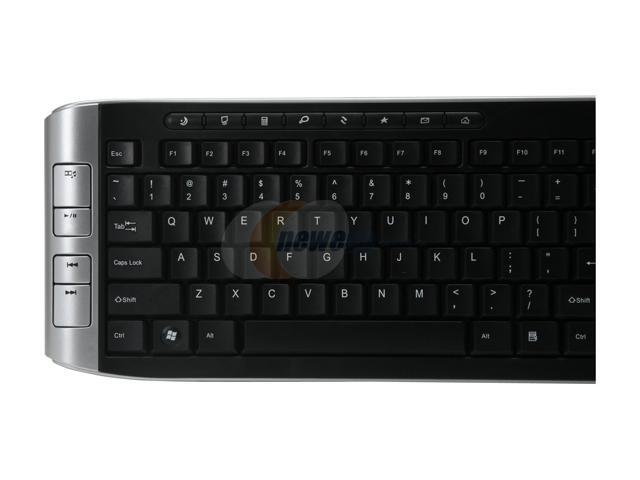
keyboard model: kb5500w by gear head
to the left of that keyboard pictured (if you can see the pic) are some keys i'd like to configure. when i use "media player classic" they register when i set items to vk_next and vk_prev but in MediaPortal i am unable to bind them.
I have tried going to the "keys and sounds" section and i added a new entry under Global and when i push either one of those keys it makes a weird symbol in the key box.. and then i assume that it must be registering and then i go to load MediaPortal up and when i push those keys they do nothing.
so then i deleted those entries and decided to try the "remotes" section and i went to the second tab that says "General HID" (for the keyboard) but when i click the mapping button to see this huge list of stuff to map it doesn't let me click in the "Key" section to put any keystrokes attached to any actions. the fields are greyed out.
so i dont know what to do. seems a shame to let two main buttons like that go to waste in mediaportal.
i'd like to set them to do "action_next_item",.. the equivalent of pressing F8 or F7 to skip through my playlists.
i know these keys must be mappable since it proved to me they can when i use Media Player Classic
anyone know the answer?
*i'm using the stable release of media portal and the operating system is windows Vista sp1
thanks
keyboard model: kb5500w by gear head
to the left of that keyboard pictured (if you can see the pic) are some keys i'd like to configure. when i use "media player classic" they register when i set items to vk_next and vk_prev but in MediaPortal i am unable to bind them.
I have tried going to the "keys and sounds" section and i added a new entry under Global and when i push either one of those keys it makes a weird symbol in the key box.. and then i assume that it must be registering and then i go to load MediaPortal up and when i push those keys they do nothing.
so then i deleted those entries and decided to try the "remotes" section and i went to the second tab that says "General HID" (for the keyboard) but when i click the mapping button to see this huge list of stuff to map it doesn't let me click in the "Key" section to put any keystrokes attached to any actions. the fields are greyed out.
so i dont know what to do. seems a shame to let two main buttons like that go to waste in mediaportal.
i'd like to set them to do "action_next_item",.. the equivalent of pressing F8 or F7 to skip through my playlists.
i know these keys must be mappable since it proved to me they can when i use Media Player Classic
anyone know the answer?
*i'm using the stable release of media portal and the operating system is windows Vista sp1
thanks