1.37 DefaultWideHD - Reloaded (4 Viewers)

1.37

Anthony Vaughan

MP Donator
  • Premium Supporter
  • June 25, 2015
    633
    333
    Home Country
    United Kingdom United Kingdom
    OK, will change that ;)

    Will change that, too ;)

    Hmm, most of the date/time labels come from import of common.time.xml, where posX is always = 45, there are a very few instances where we needed to put the date/time label directly into the skin file, but I checked those and they are also correct with posX = 45 :confused:
    Yes. I noticed that. For some reason, on my development machine, I have had to change the values of 45 to 50 to stop the recording image from overlapping the timer and date field in BasicHome.xml and mytvguide.xml.
    Thanks for the TVGuides.zip file. I'll get back to you tomorrow witht eh results and screenshots.
     

    Anthony Vaughan

    MP Donator
  • Premium Supporter
  • June 25, 2015
    633
    333
    Home Country
    United Kingdom United Kingdom
    Please find attached images of the Main Menu, TV Guide and Videos.
    For Main Menu and TV Guide I have set posX=50. I haven't changed Videos so I assume it is set to 45.
    I think that the Videos example shows the recording image being uncomfortably close to the Time even though, I agree, that they do not actually overlap. I think that the MainMenu example is more satisfying. I accept that is only my view.
     

    Attachments

    • TimeAndData.zip
      3.3 MB

    Anthony Vaughan

    MP Donator
  • Premium Supporter
  • June 25, 2015
    633
    333
    Home Country
    United Kingdom United Kingdom
    Please find attached an image of the 18 line version of your changes and that is exactly as it was before (except for the change of duration from minutes to hours and minutes). This image also shows posX=50.
    The other image shows the current behavior of the Exit text showing above the image. This corrects itself when navigation buttons are pressed but returns to that shown in the image after about 30 seconds. Hope this helps to identify the issue.
     

    Attachments

    • NewTVGuide.zip
      1.9 MB

    Anthony Vaughan

    MP Donator
  • Premium Supporter
  • June 25, 2015
    633
    333
    Home Country
    United Kingdom United Kingdom
    OK, will change that ;)

    Will change that, too ;)

    Hmm, most of the date/time labels come from import of common.time.xml, where posX is always = 45, there are a very few instances where we needed to put the date/time label directly into the skin file, but I checked those and they are also correct with posX = 45 :confused:
    I've found the attribute that affects the Videos and Music and Pictures screens; namely common.time.xml - the Date control. Thanks for pointing me to that. Now, with posX=50, all of the pages display the time and date in the same position with a slight space between the recording image and the time. Of course, posX=45 works as well, though I think that makes things a bit cramped. I'll leave that to you to decide;).
     

    TLD

    Portal Pro
    October 26, 2007
    995
    418
    Rainy Washington
    Home Country
    United States of America United States of America
    In windowed mode Moving Pictures throws an error when trying to enter.

    I did the upgrade when installing and used existing skin GefaultWideHD.

    I will upload logs later when I have time.
     

    Anthony Vaughan

    MP Donator
  • Premium Supporter
  • June 25, 2015
    633
    333
    Home Country
    United Kingdom United Kingdom
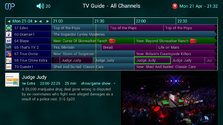
    I am trying to reconcile what I am seeing in the TV Guide and the configuration settings.
    Please see the attached files that show the TV Guide with no genre colors, as well as the configuration options for the skin.
    By my reckoning, the background color for now programs should be gray while the future background colors should be black and the selected should be blue. Instead you can see that the background for the whole grid is some shade of blue. Where should I look to check the TV Guide grid background colors?
     

    Attachments

    • TVGuideColors.zip
      363.2 KB

    Anthony Vaughan

    MP Donator
  • Premium Supporter
  • June 25, 2015
    633
    333
    Home Country
    United Kingdom United Kingdom
    Okay. I've figured it out. The background color for TV Guide buttons is coming from the C:\ProgramData\Team MediaPortal\MediaPortal\skin\DefaultWideHD\Media 'tvguide_button_<position>.png' images. I also needed to recompile the application after changing the images to those from 1.36 before the changes would take effect to get the background colors I like..
     

    2BitSculptor

    Super Moderator
  • Team MediaPortal
  • January 23, 2008
    2,046
    994
    South Central Wisconsin
    Home Country
    United States of America United States of America
    Okay. I've figured it out. The background color for TV Guide buttons is coming from the C:\ProgramData\Team MediaPortal\MediaPortal\skin\DefaultWideHD\Media 'tvguide_button_<position>.png' images. I also needed to recompile the application after changing the images to those from 1.36 before the changes would take effect to get the background colors I like..
    Can you post a pic of your changes?

    I'm finding we can't tolerate the guide genre color backgrounds, so we turned it off. Besides, there's a lack of real-estate on the screen to display (and be able to read) the genre color key, without over-crowding. I'd like to change the grid backgrounds as well. It's an issue of contrast on our TV. With Guide colors turned on, the background color of the channel column and channel-group button are fine. The dark-cyan color of the current programs background with the white text is more difficult to read (I'd like to experiment with that one). And finally, the non-current programs background should be a shade darker than the Channel column, so they can be differentiated when scrolling left to see future programs.

    I'm having some difficulty in figuring out the logic for the guide colors (non genre colors), and which .pngs to change for each, ie. Channel column; current program; non-current program.

    Just a few of my rambling thoughts.
     
    Last edited:

    CyberSimian

    Test Group
  • Team MediaPortal
  • June 10, 2013
    3,351
    2,213
    Southampton
    Home Country
    United Kingdom United Kingdom
    I'm having some difficulty in figuring out the logic for the guide colors (non genre colors), and which .pngs to change for each, ie. Channel column; current program; non-current program.
    Recently I have been revising the EPG in my "Clarity" skin, and I have been investigating the colouring. As far as I understand it, there are effectively three colouring modes for the EPG:

    (1) Coloured genres.
    The programme cells are coloured with the appropriate genre colour.

    (2) Coloured buttons, but without coloured genres.
    The EPG cells are coloured with one of four colours: "channel name", "on earlier", "on now", or "on later".
    You define the colours to be used in "SkinSettings.xml". The colours for "on now" and "on later" are the pair of colours defined by the "defaultgenre" entry in the skin-settings file. The "channel name" colour is "guidecolorchannelbutton", and the "on earlier" colour is "guidecolorprogramended". You can choose any colours that you want for these, remembering that the text is always white. All of these buttons use the same texture, which is plain white, with a separate gradient overlay texture that gives the convex "3-D" effect.

    (3) Self-coloured buttons.
    The EPG programme cells are coloured, but the colours cannot be changed easily. This is because the textures are self-coloured. This is the original way that colours were applied to the EPG, before support for genres was added. To change a button colour, you need to modify the texture file, and then remember to delete the skin's image cache before restarting MP. If you want the 3-D effect, you also have to apply the overlay to each button as you edit it.

    There are some unfortunate interactions between things in the EPG, which means that you cannot always get the result that you want. The easiest choice is (2) above, because you can change colours simply by modifying the skin-settings file. However, (2) is not implemented for the radio EPG. So if you want TV and radio EPGs to look similar, you have to use (3). I don't use (1) because the broadcast EPG in the UK does not provide sensible genres.

    For your delectation, here is my "Clarity" TV EPG (which uses choice (2) above); the buttons coloured green are programmes that are scheduled to record (I prefer the entire cell to be coloured, in addition to the red dots being suffixed to the programme name):

    clarity_tv_epg.png

    -- from CyberSimian in the UK
     

    Users who are viewing this thread

    Top Bottom