
Dreambox users, good news! (1 Viewer)

riadmelb

Portal Pro
July 9, 2006
218
7
Melbourne
Home Country
Hi all,

The included "Dbox tuner" is very limited, and it doesn't give you an option to pass the remote control presses, it only passes channel numbers. I really needed to have full control of the remote, so I looked around and found a better solution: Dreambox: Sending Remote Control Commands via Network | Riad’s Blogs

IR Server Suite - Test Build 1.4.2.2096 still doesn't recognizes Dreambox remote codes in Translator, so you need to use a different remote. I'm using the remote control of my old VCR and it works fine (or you can use a learning remote).
 

srt8100

Portal Member
March 10, 2007
19
0
Home Country
Spain Spain
Thanks!!!

This solution looks nice, it's posible integrate comands with ir server suite???
Dbox tuner no works for me, I don't know the problem, I think it's my XP, spanish language have diferent folder names.

Thanks and wait a solution for my problem!!!

Salu2
 

riadmelb

Portal Pro
July 9, 2006
218
7
Melbourne
Home Country
Yes you can integrate the commands in IR Server Suite, but you need to use a different remote. (any old remote that you don't use)
 

srt8100

Portal Member
March 10, 2007
19
0
Home Country
Spain Spain
Sorry riadmelb, but I don't know your explication.

It's posible you write howto, step by step?????

I have MP RC3, hvr-1300 and dreambox s-vhs conected, MCE remote and keybord.

Sorry for my bad english!!!

Salu2
 

riadmelb

Portal Pro
July 9, 2006
218
7
Melbourne
Home Country
Instructions

No problem,

MediaPortal setup:
1. Connect the Dreambox to PC1 (acting as the TV server) via s-video.
2. Make sure you can select and view the s-video channel in PC1.
3. PC2 (acting as a client) needs to be configured and able to select and view the s-video channel of PC1.

Dreambox setup:
1. Connect the Dreambox to the network and make sure it has and IP address.

IR Server Suite setup:
1. Install on PC2 (you only need Input Server + Translator).
2. Get an old remote control (a remote that you no longer use).
3. Learn the commands of this remote in Translator under Programs tab.
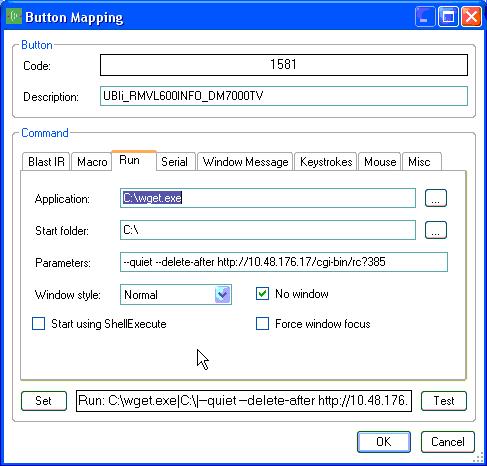
4. For every command you learn, enter the correct ip address and code for the Dreambox, have a look at the screenshot.

Notes:
1. We don't need to install IR Server Suite on PC1.
2. If old remote doesn't learn in Translator, try another.
 

Attachments

  • Dreambox.JPG
    Dreambox.JPG
    46.9 KB

srt8100

Portal Member
March 10, 2007
19
0
Home Country
Spain Spain
Very Thanks Riadnelb!!!

I have questions:

1- PC2: you have 2 remotes??? 1 for mediaportal and 1 for change dreambox via ir server suite.
2- Its posible install ir server suite on PC1 (server) and change dreambox chanels via PC2(client)
3- You learn remote codecs with MCE remote o Other translator.

Thanks

Salu2
 

riadmelb

Portal Pro
July 9, 2006
218
7
Melbourne
Home Country
Ok,

1. Yes you need two remotes, one to control MediaPortal, and the other one to control DreamBox. Or you can purchase a universal learning remote control.
2. You don't need to install IR Server Suite on PC1 because no blasting is needed. But you need to install it on PC2 to configure Translator.
3. You need to use the other remote when learning the codes with Translator, the MCE remote is only to control MediaPortal.
 

srt8100

Portal Member
March 10, 2007
19
0
Home Country
Spain Spain
Riadmelb sorry I reply this post 2 months later :sorry::sorry:

This sistem work very well, simply and fast.

1 Note if you have pasword in your dream, the line is this:

C:\wget.exe --quiet --delete-after http://user:pasword@dreambox-ip/cgi-bin/rc?x

Many thanks Riadmelb

:D

I tested wget with IR server suite, and works. This sistem don't need translator and a second remote, only change channel don´t have all fuctions.
It´s other posible sistem.
 

Users who are viewing this thread

Top Bottom