Ongoing HTPC connected to Samsung 40" LCD (1 Viewer)

AndreasHaas

Portal Member
September 22, 2007
25
0
Home Country
Germany Germany
sorry i dont know :sorry:

  • but which CCC driver version do u use. I use 8.12

  • how do u connect ur plasma (HDMI2HDMI or DVI2HDMI) ?

  • do u use the native resolution for ur plasma TV?

  • Please insert ur system specs
 

bouke

Portal Member
January 13, 2009
15
0
Home Country
Netherlands Netherlands

  • but which CCC driver version do u use. I use 8.12
got the same version.

  • how do u connect ur plasma (HDMI2HDMI or DVI2HDMI) ?
hdmi2hdmi connection

  • do u use the native resolution for ur plasma TV?
euhmm when using desktop i set reso to 1024*768, when starting MP setting it to 1920*1080

  • Please insert ur system specs
My specs are, gigabyte ga-ma78g-ds3h amd 4850 2gb memory intergrated ati hd3200 video (sharing 512 mb)
My samsung is a 42 inch plasma ps42a410


hope you have enough info.
 

Tim_Buktu

MP Donator
  • Premium Supporter
  • October 26, 2007
    37
    6
    Braunschweig
    Home Country
    Germany Germany
    Andreas

    Guten Morgen und Sorry wenn ich mich hier mal dazwischen drängele. Vielleicht kann ich Dir mit dem deinterlacing helfen. Ich selbst habe auch einen LE40N87BD und habe mich auch recht lange mit einem naja sagen wir mal nicht ganz so tollem Bild rumgeplakt (vor allem Laufschrift war nicht wirklich gut zu lesen). Habe jetzt auf ffdshow mit Deinterlacingmethode "bob" umgestellt und das Bild ist wirklich viel besser geworden gerade was Laufschrift angeht. Allerdings habe ich WinXP mit SP und benutzte den alten Renderer und weiß daher nicht ob die Einstellungen auch für Dich so nützlich sind.....aber probieren geht über studieren und wenn man das Plugin Setup aktiviert hat geht das sogar alles von der Couch aus :D


    P.S. sorry für den deutschen Post hier:oops:
     

    AndreasHaas

    Portal Member
    September 22, 2007
    25
    0
    Home Country
    Germany Germany
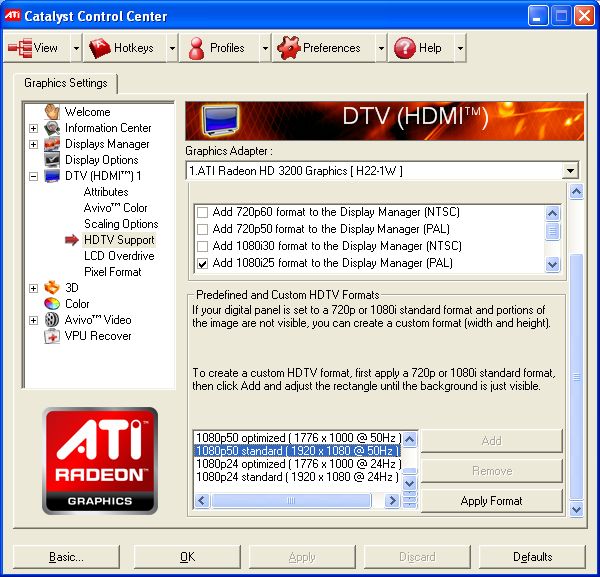
    Ok, try the following

    In CCC go to DTV (HDMI) and select HDTV Support.
    Select a HDTV Format that is supported by your TV.
    Press the Apply Button
    and now the Scaling Option should be enabled.

    Hope i could help u
     

    Attachments

    • ccc1.jpg
      ccc1.jpg
      94.9 KB

    bouke

    Portal Member
    January 13, 2009
    15
    0
    Home Country
    Netherlands Netherlands
    it seems to me a bug in my mainboard, i have a hd camera which displays full screen, but as soon as i boot my htpc, it has a smaller reso than the screen can handle.

    mailing with gigabyte about this problem right now.
     

    Users who are viewing this thread

    Top Bottom