
[no Bug] No LAV deinterlacing? (1 Viewer)

Pat Clark

Portal Pro
April 25, 2012
264
34
Wisconsin
Home Country
United States of America United States of America
I have fallback deinterlacing set to best.

I had LAV MPEG properties as delivered except for hardware decoding set to DXVA native. No deinterlacing. I set LAV to aggressive deinterlacing. Still not working. Progressive scan channels got virtually zero drops and steady graphs in "!" function. Interlaced channels got hundreds of drops and unsteady graphs.

Then I used ffdshow raw to deinterlace in post-processing, and all is well.

I've tried all deinterlacing options I can find, and only ffdshow seems to help, except I also tried setting the video renderer to VMR9 -- it was very smooth but it wasn't doing any alpha channel stuff and I don't have any performance data. I didn't mess with it any more than that.
 

Owlsroost

Retired Team Member
  • Premium Supporter
  • October 28, 2008
    5,539
    5,038
    Cambridge
    Home Country
    United Kingdom United Kingdom
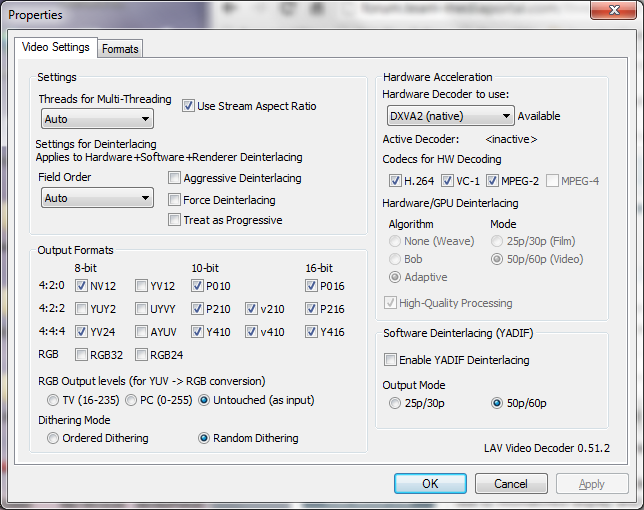
    My LAV video settings are below - note the 'Output Formats' settings for 8 bit.

    Is this with HD or SD video? (your AMD 3000 IGP isn't very powerful, so it will probably struggle with hardware deinterlacing for HD - FFDShow deinterlacing is in software).

    The fact that the GPU is dropping frames etc. indicates that it's trying to deinterlace the video but it's running out of performance. Try turning down the deinterlacing quality level in Catalyst control centre.

    Tony
     

    Attachments

    • LAV_video.png
      LAV_video.png
      82.3 KB
    Last edited:

    Pat Clark

    Portal Pro
    April 25, 2012
    264
    34
    Wisconsin
    Home Country
    United States of America United States of America
    They're HD: the interlaced channels are 1080i (1920x1080). The progressive ones are 720p (1280x720). The CPU usage is very high with ffdshow running, as you would expect, but the 1080i is essentially perfect, as long as the CPU is lightly used. (I just noticed that comskp is enough to disrupt the video.)

    I can't get a "modern" CCC to install, and the previous one which is now missing, was useless. (I've tried every which way to get CCC, but install fails -- AMD is no help, Google is no help.)

    I would hate to put more money in this system, since it's fairly old already. But if I did spring for a video card, what would be a minimum one that could move to a modest future machine. Not a gamer.

    The fact that the GPU is dropping frames etc. indicates that it's trying to deinterlace the video but it's running out of performance.Tony

    As it was, the achieved FPS was near 40, when only 29+ would be needed. I don't understand. It seems to me it was trying to do 1080p rather than 1090i. (With ffdshow running, the ! reports 29+ FPS.)

    As an experiment, I lowered Windows' screen resolution on the off-chance that it would reduce the GPU's workload. It worked. At one notch below 1920x1080, the drops were considerable reduced. At 2 notches below (1777x1000) the drops were gone.
     
    Last edited:

    Owlsroost

    Retired Team Member
  • Premium Supporter
  • October 28, 2008
    5,539
    5,038
    Cambridge
    Home Country
    United Kingdom United Kingdom
    Hardware deinterlacing (assuming a 50/60Hz display) will normally convert 50i/60i to 50/60p i.e. each input video field (there are two interlaced fields per frame) is converted to an output frame - so there are twice as many output frames as input frames.

    A bit of googling should turn up the registry settings AMD uses to control deinterlacing, so that may be a way to control it without using CCC

    As for a new video card, an AMD HD 6450 is probably the baseline minimum, but 1080i to a 1080p @ 60Hz screen is pushing it quite hard (so you have to turn off all the noise reduction/sharpening etc. in CCC video settings). I run an nVidia GT430 (GT530 & GT630 are basically re-badged versions).

    Tony
     

    Pat Clark

    Portal Pro
    April 25, 2012
    264
    34
    Wisconsin
    Home Country
    United States of America United States of America
    Thanks for your attention to my problem. Your 2nd reply crossed with my edit. It may be helpful to others in marginal situations.

    I'll try the registry settings route.

    I had decided, after I wrote the above, that ! was reporting half-frames (fields) when it was deinterlacing.

    At 1777x1000, the screen is far better than DVD quality, if not full HD. I was a bit surprised it had any effect -- MP itself has about the same CPU usage, but ffdshow is not needed. This will work (for me with my setup) until I decide what to do. I understand that some TVs would not look very good at 1777x1000, but mine looks fine.
     

    Pat Clark

    Portal Pro
    April 25, 2012
    264
    34
    Wisconsin
    Home Country
    United States of America United States of America
    I continued to experiment and found a very good solution. It turns out that deinterlacing is not required at all, from what I see. I set the LAV property "Treat as Progressive" and I restored Windows resolution to the max This apparently reduced the load on the GPU a lot. (I also have the Output section set as you describe above, but it doesn't seem to have much (any?) effect on GPU load or the output.)

    So now everything is smooth. Neither 1080i nor 720p shows any significant number of drops, and the display is HD without noticeable artifacts. The ! function report 29.xxx FPS for interlaced HD. The result is so much better than anything else I've tried that I think the MP community should be made aware of it, at least for 1.3.0 and above.
     

    Users who are viewing this thread

    Top Bottom