Switzerland
Hi, here go again with a new beginning... 
Version 0.9
the tool is created with autohotkeys from AutoHotkey - Free Mouse and Keyboard Macro Program with Hotkeys and AutoText.
How to install it?
...easy
ATTENTION:
PowerDVD and MediaPortal must be installed in the path %PROGRAM FILES%\Team MediaPortal\ and %PROGRAM FILES%\Cyberlink
Otherwise should the Script (HD_Starter_autohotkey_source.rar) changed and new compiled!
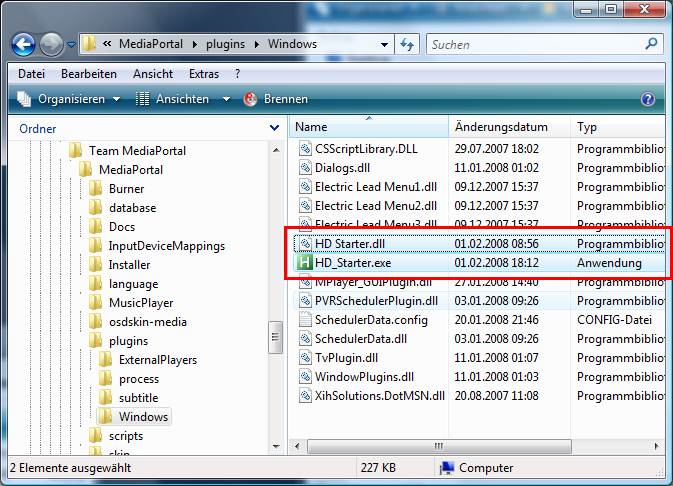
1. Copy the files HD Starter.dll and HD_Starter.exe in the MediaPortal plugins\Windows directory
2. Execute the DLLFix in the plugins\Windows directory
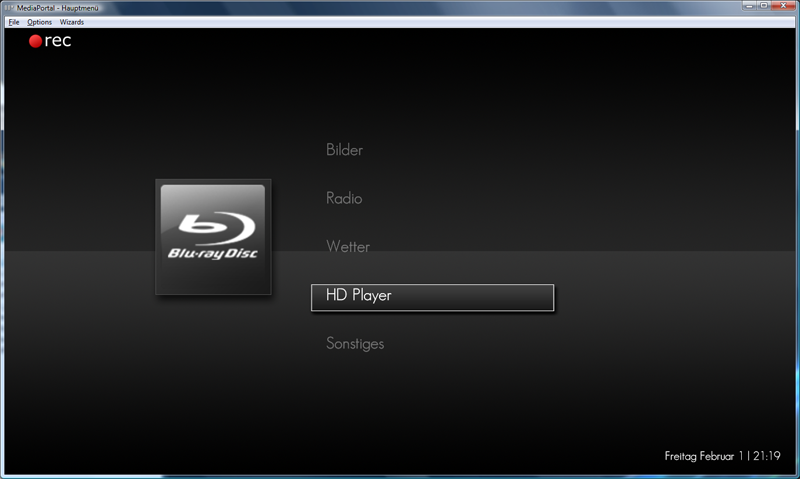
3. Copy the MediaPortal Skin Image in the desired Skin\Media folder
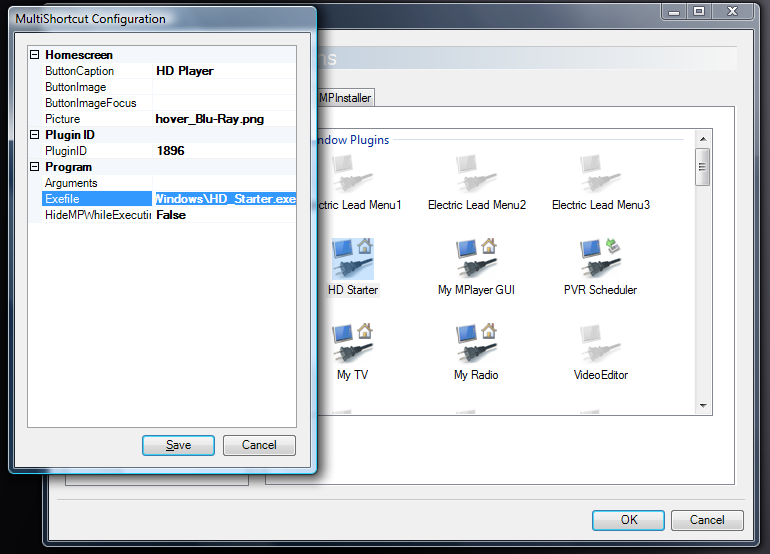
4. Open the MP Config and choose the HD Starter plugin (its a MultiShortCurt plugin), select the desired icon and the HD_Starter.exe path
5. Enter the needed settings like in the Screenshot
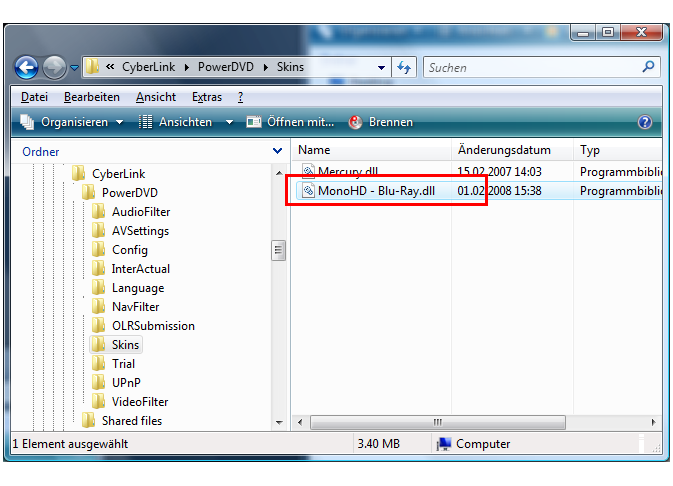
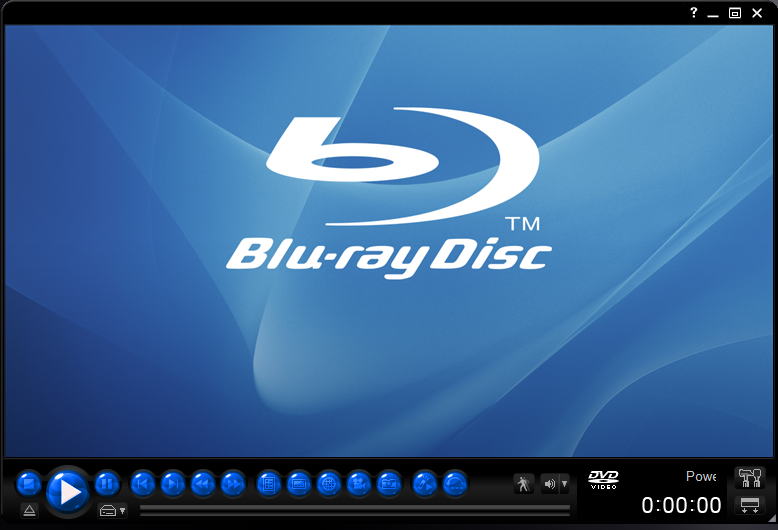
6. Copy if needed the PowerDVD Skin file in the PowerDVD installation folder %PROGRAM FILES%\Cyberlink\PowerDVD\Skin
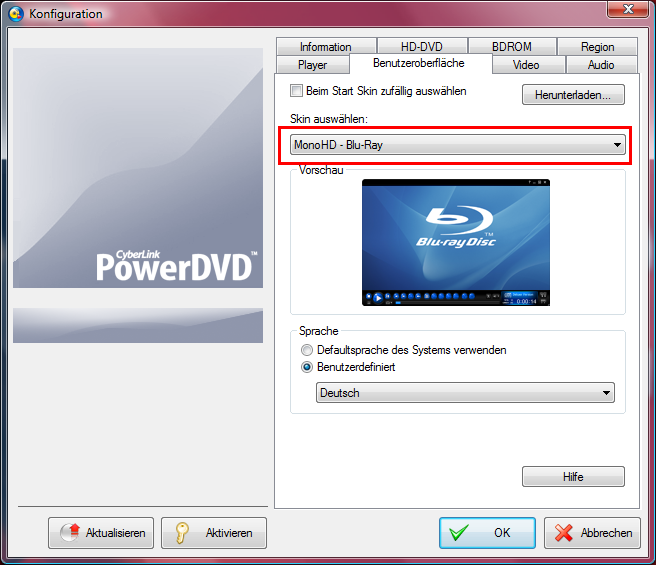
7. Select in PDVD Config the new Skin
8. You can now use the HD Player
notice:
the switch to 24p mode is done by CTRL+SHIFT+4 back to 50hz mode is CTRL+SHIFT+5!
You should define this profiles in you ATI Catalyst Manager, for NVidia i dont know how to do that
GERMAN / DEUTSCH
Das Tool ist mit autohotkeys von AutoHotkey - Free Mouse and Keyboard Macro Program with Hotkeys and AutoText erstellt worden.
Wie installieren?
...leicht
ACHTUNG:
PowerDVD und MediaPortal müssen in den Pfaden %PROGRAMME%\Team MediaPortal\ and %PROGRAMME%\Cyberlink installiert sein
Ansonsten muss das Skript (HD_Starter_autohotkey_source.rar) geändert (Pfade) und neu compiliert werden!
1. Die Dateien HD Starter.dll und HD_Starter.exe in das MediaPortal Verzeichnis plugins\Windows kopieren
2. Die DLLFix im MediaPortal Verzeichnis plugins\Windows ausführen
3. Die Skin Image Bilder in das benutzte Skin\Media Verzeichnis kopieren
4. MP Config öffnen und das HD Starter plugin auswählen (ist das MultiShortCurt plugin), gewünschtes Icon und den Pfad zur HD_Starter.exe
5. Weitere Einstellungen wie im Screenshot einstellen
6. Falls gewünscht den PowerDVD Skin in den Ordner %PROGRAMME%\Cyberlink\PowerDVD\Skin kopieren
7. In der PDVD Config den gewünschten Skin auswählen
8. Der HD Player kann jetzt benutzt werden
Hinweis:
Die Umschaltung der Grafikkarte in den 24p Modus wird durch die Tastenkombination CTRL+SHIFT+4 gemacht der 50hz Modus ist mit CTRL+SHIFT+5 geregelt!
Hierzu muss im ATI Catalyst Manager 2 Profile eingerichtet werden damit dies Wirkung zeigt, für NVidia...keine Ahnung wie das dort geht.
thx
MoPhat
More Contents:
Blue3Wide Icons > https://forum.team-mediaportal.com/blue3-skin-feedback-293/blue3-skin-fuer-powerdvd-66003/ from ELba

Version 0.9
the tool is created with autohotkeys from AutoHotkey - Free Mouse and Keyboard Macro Program with Hotkeys and AutoText.
How to install it?
...easy
ATTENTION:
PowerDVD and MediaPortal must be installed in the path %PROGRAM FILES%\Team MediaPortal\ and %PROGRAM FILES%\Cyberlink
Otherwise should the Script (HD_Starter_autohotkey_source.rar) changed and new compiled!
1. Copy the files HD Starter.dll and HD_Starter.exe in the MediaPortal plugins\Windows directory
2. Execute the DLLFix in the plugins\Windows directory
3. Copy the MediaPortal Skin Image in the desired Skin\Media folder
4. Open the MP Config and choose the HD Starter plugin (its a MultiShortCurt plugin), select the desired icon and the HD_Starter.exe path
5. Enter the needed settings like in the Screenshot
6. Copy if needed the PowerDVD Skin file in the PowerDVD installation folder %PROGRAM FILES%\Cyberlink\PowerDVD\Skin
7. Select in PDVD Config the new Skin
8. You can now use the HD Player
notice:
the switch to 24p mode is done by CTRL+SHIFT+4 back to 50hz mode is CTRL+SHIFT+5!
You should define this profiles in you ATI Catalyst Manager, for NVidia i dont know how to do that
GERMAN / DEUTSCH
Das Tool ist mit autohotkeys von AutoHotkey - Free Mouse and Keyboard Macro Program with Hotkeys and AutoText erstellt worden.
Wie installieren?
...leicht
ACHTUNG:
PowerDVD und MediaPortal müssen in den Pfaden %PROGRAMME%\Team MediaPortal\ and %PROGRAMME%\Cyberlink installiert sein
Ansonsten muss das Skript (HD_Starter_autohotkey_source.rar) geändert (Pfade) und neu compiliert werden!
1. Die Dateien HD Starter.dll und HD_Starter.exe in das MediaPortal Verzeichnis plugins\Windows kopieren
2. Die DLLFix im MediaPortal Verzeichnis plugins\Windows ausführen
3. Die Skin Image Bilder in das benutzte Skin\Media Verzeichnis kopieren
4. MP Config öffnen und das HD Starter plugin auswählen (ist das MultiShortCurt plugin), gewünschtes Icon und den Pfad zur HD_Starter.exe
5. Weitere Einstellungen wie im Screenshot einstellen
6. Falls gewünscht den PowerDVD Skin in den Ordner %PROGRAMME%\Cyberlink\PowerDVD\Skin kopieren
7. In der PDVD Config den gewünschten Skin auswählen
8. Der HD Player kann jetzt benutzt werden
Hinweis:
Die Umschaltung der Grafikkarte in den 24p Modus wird durch die Tastenkombination CTRL+SHIFT+4 gemacht der 50hz Modus ist mit CTRL+SHIFT+5 geregelt!
Hierzu muss im ATI Catalyst Manager 2 Profile eingerichtet werden damit dies Wirkung zeigt, für NVidia...keine Ahnung wie das dort geht.
thx
MoPhat
More Contents:
Blue3Wide Icons > https://forum.team-mediaportal.com/blue3-skin-feedback-293/blue3-skin-fuer-powerdvd-66003/ from ELba