[Finished] - New Default Wide Skin

Discussion in 'Area 51 - Testing Area' started by catavolt, January 15, 2012.

Thread Status:
Not open for further replies.
    • Team MediaPortal
    • Administrator

    catavolt Design Group Manager

    System Specs
    Hi folks,
    it´s time to introduce the further enhanced Default Wide skin to be tested by the public ;)
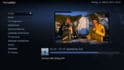
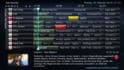
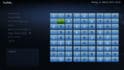
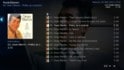
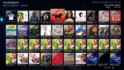
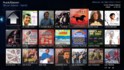
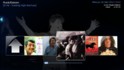
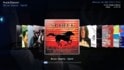
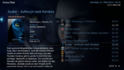
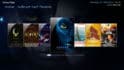
    As you can see from the screenshots it has a new styled background, better visible buttons and list items etc. and fully supports the latest version 0.4.7 of the new World Weather (with Hourly and Graphic preview).
    What you can do: Just drop the content of the attached zip file into your Default Wide skin folder (overwrite).
    What you should do:
    • Copy the skin folder DefaultWide into a new skin folder, e.g. DefaultWideNEW.
    • Then just drop the content of the attached zip file into your new DefaultWideNEW skin folder (overwrite).
    General changes:
    • New background
    • New icons on BasicHome (see first screenshot)
    • New button and list GFX
    • Resized menu BG
    • Adapted the colours of all dialog BGs to fit the new theme
    • New colours in listviews for watched/unwatched/selected items
    • New tile colours for EPG
    • Some font size changes (especially in MyVideos)
    • Better layout for TV Home screen
    • In BasicHome now automatically the Radio icon or the Weather icon is shown, depending on World Weather plugin is installed/enabled or not (replacing the original MP Weather plugin)
    • Coloured the tiles in Sudoku for better readability of numbers
    • When playing music now only the music cover is shown (with access to MyMusic)
    • Additions for latest World Weather 0.5.0 RC (World Weather Media folder *not* included)
    • Rework of MyMusic xmls (now allowing direct access to Radio, Last.FM, Search Music and Lyrics, if these are installed/enabled)
    • Some bugfixing in MyPictures
    • New GFX for picture cover and picture cover mask (smaller rounded edges, therefore nearly no cropping of picture/cd cover content)
    • Rework of all facades for Videos, Pictures and Music
    • Rework of NowPlaying screens
    • New splashscreen
    • New media info logos
    • more media info logos displayed in video osd
    Pls note: These changes will also be applied to Default (4x3) skin, but for testing purposes I only concentrate on DefaultWide.

    Let me know what you think about this new look ;)

    12-11-39 16-55-16 17-13-03 17-14-05 18-55-41 ] 13-40-36 13-40-53 13-41-01 13-41-26 13-41-37 10-31-46 10-31-56 10-32-05 10-32-17 10-32-30 03-10-54 12-54-08 splashscreen

    Attached Files:

    • Like Like x 29
  1. Jelmo Portal Pro

    System Specs
    AW: New Default Wide Skin

    So this skin is working with 1.2.2 ?

    Is it also possible to create a secound folder ( Blue Wide 2 ) for example ? If so we can test the new skin, without breaking the working Skin.
    • Team MediaPortal
    • Administrator

    catavolt Thread Starter Design Group Manager

    System Specs
    AW: New Default Wide Skin

    OFC it works with 1.2.2. And yes, if you want just copy the complete DefaultWide folder to e.g. DefaultWide2, then copy the content of the zip file into this new skin folder ;)
    BTW: The new content from the zip file won´t break anything...
  2. Nemulate Portal Pro

    Re: AW: New Default Wide Skin

    Yes I quite like the look of it! Looks a bit more professional and classy than the current one although still not keen on the basic home icons personally, then just look a bit 'clunky' to me but it's definitely a move in the right direction, good work!
    • Premium Supporter

    Dudu666 MP Donator

    At first thank you and the team members for providing us a new Default Wide skin:D

    I will download the provided test files and test it in next days. But I can say that I like the darker background look of updated skin :)
  3. Jelmo Portal Pro

    System Specs
    AW: New Default Wide Skin

    Catavolt are you able to provide also an updated skinfile for Moving-Pictures ? I think the most MePoUsers will use this Plugin.
  4. Iceman89610 Portal Pro

    Re: AW: New Default Wide Skin

    Yes, and also a new icon for the MPAA ratings would be good :D
  5. Jelmo Portal Pro

    System Specs
    AW: New Default Wide Skin

    Tested yesterday ... looks great. Maybe a little bit too dark.
    In Case of dark Channel-Logo´s ... you will be unable to discover the Logo´s
    • Team MediaPortal

    emphatic Design Group

    System Specs
    Looks great!

    Emph
    • Team MediaPortal

    ysmp Design Group

    Hi catavolt , i did not test it yet ... during install i notest some file's place in wrong folder ..;)

    WorldWeather.xml , WorldWeatherImage.xml , WorldWeatherGeoClock.xml , WorldWeatherHolidays.xml , WorldWeatherStarrySky.xml are in 2 place in skin folder and in media folder . (wonder wich are the most update... or they are the same ?)

    and yahoo.png , google.png are in 2 place also 1 time in media and 1 time in Media\WorldWeather\Provider folder.

    from screenshots look to me little bit to dark skin , but better i test first in action... :)

    :D
    • Like Like x 2
Thread Status:
Not open for further replies.

Share This Page

Users Viewing Thread (Users: 0, Guests: 0)

Running the latest version?

V1.3.0 FINAL - released March 2013
Releasenews | Download
Changelog
 | Requirements
HTPC
Team-MediaPortal
 
About
Contact |  Press
Partners