- December 23, 2007
- 291
- 97
- Home Country
-
 Austria
>>> Actual Version: V1.6 <<<
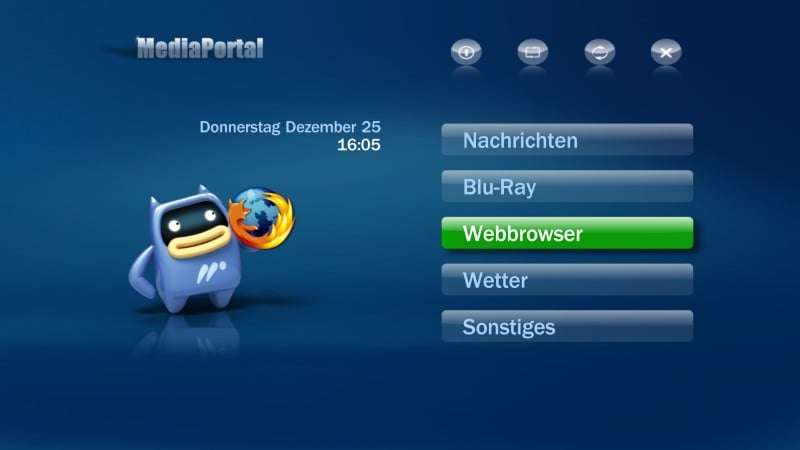
Integrate Firefox webbrowser into MediaPortal!
Features:
- Start Firefox 3 from MediaPortal home menu in full screen mode (F11)
- Operate in Firefox with your remote controller as in MediaPortal
- Adjust Firefox zoom level with your remote controller
- Get full mouse control inside Firefox with your remote controller
- Enter text inside Firefox like SMS typing on your mobile phone
Installation instructions:
1) Firefox (Version 3) and MediaPortal have to be installed in their default directories
2) Copy FirefoxIntegrator.exe and FirefoxIntegrator.dll
from \plugins\windows\ to C:\Program Files\Team MediaPortal\MediaPortal\plugins\Windows\
3) If you use Blue3, Blue3wide, Monochrome or Indigo Skin
copy skin\...\Media\hover_FirefoxIntegrator.png to C:\Program Files\Team MediaPortal\MediaPortal\skin\...\Media\
4) Download and install MultiShortcut plugin
5) Run DLLFix.exe in C:\Program Files\Team MediaPortal\MediaPortal\plugins\Windows\
6) Start MediaPortal Configuration
7) Select "Plugins" - "FirefoxIntegrator" - "Config"
8) Fill out following fields (see \doc\FirefoxIntegrator_MultiShortcutConfig.jpg)
ButtonCaption "Webbrowser" (or alternative text)
Picture "hover_FirefoxIntegrator.png" (or alternative picture; take a look in your \skin\...\Media\ directory)
Exefile "C:\Program Files\Team MediaPortal\MediaPortal\plugins\Windows\FirefoxIntegrator.exe"
Optional you are able to add some Firefox command line arguments,
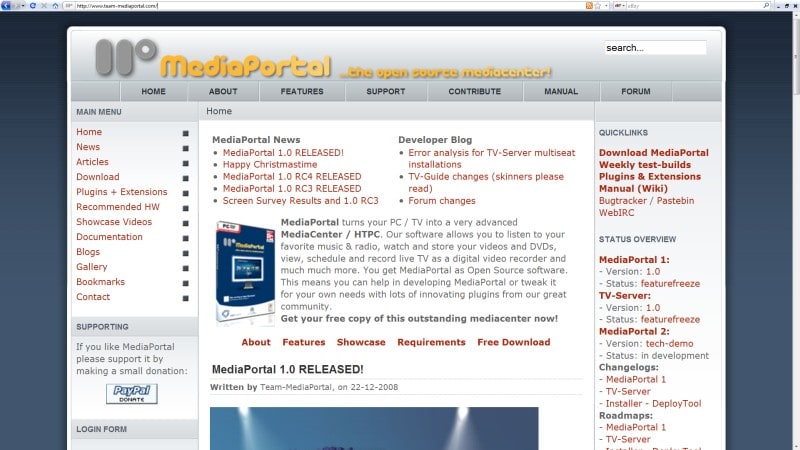
e.g. with the argument "www.team-mediaportal.com" Firefox will open the MediaPortal homepage.
9) Select "Save" and close MediaPortal Configurator with "OK"
*) Soundgraph iMon users: Add "firefox" into iMON Manager to your programs and
import the same MediaPortal.imo file which you use for MediaPortal!
If you use WinXP maybe it is necessary to change FirefoxIntegrator - MultiShortcut Konfiguration - "Hide MP While Executing"
from "False" to "True" if iMon Manager is not able to detect that Firefox is the most foreground window!
Update instructions:
Copy FirefoxIntegrator.exe from \plugins\windows\ to C:\Program Files\Team MediaPortal\MediaPortal\plugins\Windows\
Tip:
You can create multiple FirefoxIntegrator's by making copies of FirefoxIntegrator.exe and FirefoxIntegrator.dll,
for example:
FirefoxIntegrator1.exe FirefoxIntegrator1.dll
FirefoxIntegrator2.exe FirefoxIntegrator2.dll
FirefoxIntegrator3.exe FirefoxIntegrator3.dll
After running DLLFix.exe every FirefoxIntegrator shortcut can be configured individual,
for example:
FirefoxIntegrator1: Exefile "FirefoxIntegrator1.exe", ButtonCaption "Google News", Arguments "news.google.com"
FirefoxIntegrator2: Exefile "FirefoxIntegrator2.exe", ButtonCaption "TV Program", Arguments "www.tvinfo.de"
FirefoxIntegrator3: Exefile "FirefoxIntegrator3.exe", ButtonCaption "Ebay", Arguments "www.ebay.com"
Remarks:
This is not a classical plugin, it is a tool which run your "normal" installed Firefox out of MediaPortal,
translate your remote controller commands to Firefox hotkeys, emulate full mouse control with
your remote controller and give you SMS like text input without a need of a keyboard.
This tool was created with AutoHotkey, the source file is included.
MultiShortcut Plugin v1.4 is needed for MediaPortal 1.0.2,
MultiShortcut Plugin v1.7 is needed for MediaPortal 1.1.0!
Actual version tested with:
- Win7
- MediaPortal 1.1.0
- Firefox 3.6.8
- MultiShortcut Plugin 1.7
- Skins Blue3wide, Monochrome, Indigo, Black Glass
- iMon VFD remote receiver (MCE mode)
Control keys:
Standard keys:
[1],[2],[3],[4],[6],[7],[8],[9] ...Mouse cursor move to all directions
[5] ...Mouse click left
[0] ...Mouse click right
[F5] (Rewind) ...Firefox zoom out
[F6] (Fast Forward) ...Firefox zoom in
[x] (Full Screen) ...Firefox default zoom
[F7] (Play Previous/Ch+) ...Firefox previous page
[F8] (Play Next/Ch-) ...Firefox next page
[p] (Play) ...Firefox reload page
(Stop) ...Firefox stop loading page
[Space] (Pause) ...Firefox start page
[y] (Show/Hide OSD) ...Firefox show/hide bookmarks
[r] (Record) ...Firefox add bookmark
[d] (DVD Menu) ...Toggle between SMS like text input and mouse control
[F3] (Info) ...Switch through all input modes
[h] (Home) ...Firefox minimize and go back to MediaPortal Home menue
[Esc], [Del], [Backspace] ...Firefox exit
SMS like text input keys:
[1] ..."1" "." "," "-" "?" "!" "'" "@" ":" ";" "/" "\" "(" ")" "*"
[2] ..."a" "b" "c" "2" " AND "
[3] ..."d" "e" "f" "3"
[4] ..."g" "h" "i" "4"
[5] ..."j" "k" "l" "5"
[6] ..."m" "n" "o" "6" " OR " " NOT "
[7] ..."p" "q" "r" "s" "7"
[8] ..."t" "u" "v" "8"
[9] ..."w" "x" "y" "z" "9"
[0] ..." " "Backspace" "0"
Version history:
V1.0 (23.11.2008):
- Initial release
V1.1 (25.12.2008):
- Startup of Firefox changed, because fullscreen command (F11) sometimes was not received by Firefox.
- Hide mouse cursor in exit sequence changed. Now cursor will be first moved to most right position.
- Colors of info messages changed to black background and white text.
- Appear time of info messages changed from 3sec to 1.5 sec.
- Added some screenshoots and hover images.
V1.2 (11.01.2009):
- Removed commands to stop media playing in MediaPortal. Now listening music and browsing in Firefox is possible.
- Removed minimizing of MediaPortal; not necessary and cause problems while TV is active.
- Added Firefox command line argument support. Now FirefoxIntegrator forwards command line arguments like a URL to Firefox.
V1.3 (24.01.2009):
- Added key command [h] "Home" to minimize Firefox and go back to MediaPortal Home menue.
At the next start of FirefoxIntegrator Firefox will only be maximized.
V1.4 (03.05.2009):
- Added new key command [F3] "Info" to switch through all input modes.
- New input mode created: "Keyboard input" mode.
In this mode all shortcuts are deactivated, except of F3, F5, F6, F7, F8 and Esc!
V1.5 (08.02.2010):
- Display characters at SMS like text input.
- Timer at SMS like text input will be reloaded at every keystroke, key input time changed from 1700 to 1200ms.
- Characters for key 1 SMS like text input changed.
- Keywords AND, OR and NOT added to SMS like text input keys 2 and 6.
- Startup of Firefox changed, because fullscreen command (F11) sometimes was not received by Firefox.
V1.6 (09.08.2010):
- Win7 was not always able to receive the correct keystrokes. Command SendPlay changed to SendInput.
Integrate Firefox webbrowser into MediaPortal!
Features:
- Start Firefox 3 from MediaPortal home menu in full screen mode (F11)
- Operate in Firefox with your remote controller as in MediaPortal
- Adjust Firefox zoom level with your remote controller
- Get full mouse control inside Firefox with your remote controller
- Enter text inside Firefox like SMS typing on your mobile phone
Installation instructions:
1) Firefox (Version 3) and MediaPortal have to be installed in their default directories
2) Copy FirefoxIntegrator.exe and FirefoxIntegrator.dll
from \plugins\windows\ to C:\Program Files\Team MediaPortal\MediaPortal\plugins\Windows\
3) If you use Blue3, Blue3wide, Monochrome or Indigo Skin
copy skin\...\Media\hover_FirefoxIntegrator.png to C:\Program Files\Team MediaPortal\MediaPortal\skin\...\Media\
4) Download and install MultiShortcut plugin
5) Run DLLFix.exe in C:\Program Files\Team MediaPortal\MediaPortal\plugins\Windows\
6) Start MediaPortal Configuration
7) Select "Plugins" - "FirefoxIntegrator" - "Config"
8) Fill out following fields (see \doc\FirefoxIntegrator_MultiShortcutConfig.jpg)
ButtonCaption "Webbrowser" (or alternative text)
Picture "hover_FirefoxIntegrator.png" (or alternative picture; take a look in your \skin\...\Media\ directory)
Exefile "C:\Program Files\Team MediaPortal\MediaPortal\plugins\Windows\FirefoxIntegrator.exe"
Optional you are able to add some Firefox command line arguments,
e.g. with the argument "www.team-mediaportal.com" Firefox will open the MediaPortal homepage.
9) Select "Save" and close MediaPortal Configurator with "OK"
*) Soundgraph iMon users: Add "firefox" into iMON Manager to your programs and
import the same MediaPortal.imo file which you use for MediaPortal!
If you use WinXP maybe it is necessary to change FirefoxIntegrator - MultiShortcut Konfiguration - "Hide MP While Executing"
from "False" to "True" if iMon Manager is not able to detect that Firefox is the most foreground window!
Update instructions:
Copy FirefoxIntegrator.exe from \plugins\windows\ to C:\Program Files\Team MediaPortal\MediaPortal\plugins\Windows\
Tip:
You can create multiple FirefoxIntegrator's by making copies of FirefoxIntegrator.exe and FirefoxIntegrator.dll,
for example:
FirefoxIntegrator1.exe FirefoxIntegrator1.dll
FirefoxIntegrator2.exe FirefoxIntegrator2.dll
FirefoxIntegrator3.exe FirefoxIntegrator3.dll
After running DLLFix.exe every FirefoxIntegrator shortcut can be configured individual,
for example:
FirefoxIntegrator1: Exefile "FirefoxIntegrator1.exe", ButtonCaption "Google News", Arguments "news.google.com"
FirefoxIntegrator2: Exefile "FirefoxIntegrator2.exe", ButtonCaption "TV Program", Arguments "www.tvinfo.de"
FirefoxIntegrator3: Exefile "FirefoxIntegrator3.exe", ButtonCaption "Ebay", Arguments "www.ebay.com"
Remarks:
This is not a classical plugin, it is a tool which run your "normal" installed Firefox out of MediaPortal,
translate your remote controller commands to Firefox hotkeys, emulate full mouse control with
your remote controller and give you SMS like text input without a need of a keyboard.
This tool was created with AutoHotkey, the source file is included.
MultiShortcut Plugin v1.4 is needed for MediaPortal 1.0.2,
MultiShortcut Plugin v1.7 is needed for MediaPortal 1.1.0!
Actual version tested with:
- Win7
- MediaPortal 1.1.0
- Firefox 3.6.8
- MultiShortcut Plugin 1.7
- Skins Blue3wide, Monochrome, Indigo, Black Glass
- iMon VFD remote receiver (MCE mode)
Control keys:
Standard keys:
[1],[2],[3],[4],[6],[7],[8],[9] ...Mouse cursor move to all directions
[5] ...Mouse click left
[0] ...Mouse click right
[F5] (Rewind) ...Firefox zoom out
[F6] (Fast Forward) ...Firefox zoom in
[x] (Full Screen) ...Firefox default zoom
[F7] (Play Previous/Ch+) ...Firefox previous page
[F8] (Play Next/Ch-) ...Firefox next page
[p] (Play) ...Firefox reload page
(Stop) ...Firefox stop loading page
[Space] (Pause) ...Firefox start page
[y] (Show/Hide OSD) ...Firefox show/hide bookmarks
[r] (Record) ...Firefox add bookmark
[d] (DVD Menu) ...Toggle between SMS like text input and mouse control
[F3] (Info) ...Switch through all input modes
[h] (Home) ...Firefox minimize and go back to MediaPortal Home menue
[Esc], [Del], [Backspace] ...Firefox exit
SMS like text input keys:
[1] ..."1" "." "," "-" "?" "!" "'" "@" ":" ";" "/" "\" "(" ")" "*"
[2] ..."a" "b" "c" "2" " AND "
[3] ..."d" "e" "f" "3"
[4] ..."g" "h" "i" "4"
[5] ..."j" "k" "l" "5"
[6] ..."m" "n" "o" "6" " OR " " NOT "
[7] ..."p" "q" "r" "s" "7"
[8] ..."t" "u" "v" "8"
[9] ..."w" "x" "y" "z" "9"
[0] ..." " "Backspace" "0"
Version history:
V1.0 (23.11.2008):
- Initial release
V1.1 (25.12.2008):
- Startup of Firefox changed, because fullscreen command (F11) sometimes was not received by Firefox.
- Hide mouse cursor in exit sequence changed. Now cursor will be first moved to most right position.
- Colors of info messages changed to black background and white text.
- Appear time of info messages changed from 3sec to 1.5 sec.
- Added some screenshoots and hover images.
V1.2 (11.01.2009):
- Removed commands to stop media playing in MediaPortal. Now listening music and browsing in Firefox is possible.
- Removed minimizing of MediaPortal; not necessary and cause problems while TV is active.
- Added Firefox command line argument support. Now FirefoxIntegrator forwards command line arguments like a URL to Firefox.
V1.3 (24.01.2009):
- Added key command [h] "Home" to minimize Firefox and go back to MediaPortal Home menue.
At the next start of FirefoxIntegrator Firefox will only be maximized.
V1.4 (03.05.2009):
- Added new key command [F3] "Info" to switch through all input modes.
- New input mode created: "Keyboard input" mode.
In this mode all shortcuts are deactivated, except of F3, F5, F6, F7, F8 and Esc!
V1.5 (08.02.2010):
- Display characters at SMS like text input.
- Timer at SMS like text input will be reloaded at every keystroke, key input time changed from 1700 to 1200ms.
- Characters for key 1 SMS like text input changed.
- Keywords AND, OR and NOT added to SMS like text input keys 2 and 6.
- Startup of Firefox changed, because fullscreen command (F11) sometimes was not received by Firefox.
V1.6 (09.08.2010):
- Win7 was not always able to receive the correct keystrokes. Command SendPlay changed to SendInput.