-
-
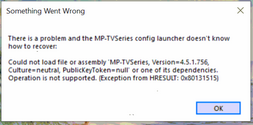
HSorry @Hakuna76, not sure why it didn't work by simply dropping in. Might be my build environment; could be an x64/x86 thing... Guess I will just have to create an official package.
-
HHakuna76 replied to the thread MP-TVSeries v4.3.6 Release [2020-01-24].Do I have to do something than just replacing the two files?
-
-
HI haven't made a release yet, but I made some changes today so you no longer need to add the TVDB file to your series directory. That is still the preferred way to get an exact match, though. The...
-
HHakuna76 replied to the thread MP-TVSeries v4.3.6 Release [2020-01-24].Got The Franchise in now, had only videos in sub-folders. But, alas, the files still in the sub folders are not recognized. Other videos with files in sub folders are found, can't find the pattern.
-
HHakuna76 replied to the thread MP-TVSeries v4.3.6 Release [2020-01-24].Got R.J. Decker in, by renaming the folder "R J Decker", there are points involved in the name. One should look at tvdb.com what the exact name is. Still can't get Star city #449146 to show up...
-
HI just added "VisionQuest" to TVSeries, added file 426606.tvdb in that folder, and MP (via GUI) recognized the series without any problems ;)
-
HHakuna76 replied to the thread MP-TVSeries v4.3.6 Release [2020-01-24].Tv series config, as there I can follow the progress. Don't know how well it works in mp. At least adding new episodes to existing series seems to work.
-
HHakuna76 replied to the thread MP-TVSeries v4.3.6 Release [2020-01-24].Now the error message is gone for some reason. However, I can't get the importer to recognize "Stuart Fails to Save the Universe #465664" and "RJ Decker", at least. Have removed their cache...
-
HHakuna76 replied to the thread MP-TVSeries v4.3.6 Release [2020-01-24].Removing the cache folder and dB row for each series solves almost everything! Had an issue with some files was not imported unless i moved them from the sub subfolder. Only first episode was...
-
HA new release has been published with fixes for a crash in the configuration tool and also resolves multiple series import via MediaPortal GUI. Thanks ponchick for submitting a fix.
-
HHakuna76 replied to the thread MP-TVSeries v4.3.6 Release [2020-01-24].Works much better now! Still problem with Chicago Med and PD, will try to delete their cache later.
-
HHakuna76 replied to the thread MP-TVSeries v4.3.6 Release [2020-01-24].Fantastic, will give it a try. Regarding the MediaInfo thing, I just found there is a Cache folder in ProgramData...Mp-Tvseries which has all the info, even if the database don't have the show...
-
HHakuna76 replied to the thread MP-TVSeries v4.3.6 Release [2020-01-24].Gave it a try, but it's very finnicky about the sequence of things. Would really hope someone could look into the .tvdb file implementation, and the MediaInfo lookup, and make it more stable...
-
HHakuna76 replied to the thread MP-TVSeries v4.3.6 Release [2020-01-24].I will test one thing later: Import one video+dvbt Move out the dvbt file only Repeat Having a severe man cold, so might take a while before I get back here.
-
HHakuna76 replied to the thread MP-TVSeries v4.3.6 Release [2020-01-24].Turns out it's not necessary to make new copies of the db when you do the MediaInfo update (repeat step 3-8 only) Seems files might have to be in the show sub folder, but I'm still testing. I...
-
-
Loading…
-
Loading…