ATI Remote wonder and mediaportal (1 Viewer)

Owlsroost

Retired Team Member
  • Premium Supporter
  • October 28, 2008
    5,539
    5,038
    Cambridge
    Home Country
    United Kingdom United Kingdom
    My first setup above worked OK until I made it a state of disorder. That was after watching Tonys setup, which looked and was ... advanced :D A tip here: Be careful with the function "Clear Pending Events" in EventGhost. Sometimes the macro doesn't catch up the actions you want to be done before they get cleared. Stay away from it until you see that you really need it.

    Ah - you've passed the advanced EG programming test :)

    Actually, it was the complexity of my setup file that stopped me from attaching it earlier - I thought it might confuse people rather than helping....

    FF and RW does work in MP with DVD's, but not chapters inside MKV containers. It did work earlier, when i used the inbuilt remote in MP. Theres allways something to fiddle with isn't it ? :p

    For next/previous chapter moves for MKV in MP, I use the standard MP keyboard emulation (F7/F8) and add next/previous chapter actions (mapped to F7/F8) to the Videos section in MediaPortal/Configuration/General/KeysAndSounds - MediaPortal Manual Documentation (the actions are already in the DVD section as standard).

    Tony
     

    Radioman

    MP Donator
  • Premium Supporter
  • June 17, 2009
    47
    6
    Stora Höga
    Home Country
    Sweden Sweden
    You just collected a thank you again Tony :)

    I have obviously overlooked those settings. Now that I know where to try/test it I will nail it:D
    I know that F7 and F8 doesn't work at all on my keyboard with MKV files.

    I'm at work now but this afternoon, when leaving, I will have two more weeks of vacation, to give pleasure to me ... in the rain :rolleyes:
    I presume it rains a lot in GB. as well :D

    Good for MP tinkering though :D
     

    bitsnbytes

    Portal Member
    July 20, 2009
    24
    0
    Home Country
    United Kingdom United Kingdom
    Thanks Owlsroost and Radioman :) Been really busy at work to try anything. However, I had a look at Radioman's EG script and it looked impressive :D

    I'm still pursuing the S510 media remote since it looks cool, I found it to be more responsive than the ATI RW. Nice feel to the buttons and nicely laid out. Not to mention that I can get away with only one usb dongle for my kb/mouse and remote :D

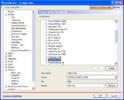
    I tried the setup with HID in mediaportal and it worked great for most of the actions. However, few keys are not programmed yet and TBH the HID remote configuration section still puzzles me. For example if I want to assign a key mapping from the remote to go to the dvd menu directly when the DVD s playing how do I do it? I mean, I can configure this in mediaportal, but how do I map the remote key to mediaportal? (please see attached pic which might hopefully make more sense of what I am saying :sorry:) I can try and assign the LaunchApp1 to go to the dvd menu when the dvd is playing, however how do I trigger the LaunchApp1? All it seems to have is an id (if that is what it is) of 17 :confused: Is this possible at all?

    Another thought I had was to use EventGhost with a keyboard plugin i.e. have my logitech remote output keystrokes using setpoint (for eg Ctrl+Alt+M to start mediaportal etc). However, when I press the remote button, this keycode is not recognized by EG, I know the keystrokes are being sent out since when I changed the mapping to Alt+F it does open the file menu, does this not work? If this works, it should be easy since I can then use Radiomans config and just replace the events with the keyboard events sent out from setpoint

    Sorry for the long post guys but I'd really like to use the media remote, I really like it

    For next/previous chapter moves for MKV in MP, I use the standard MP keyboard emulation (F7/F8) and add next/previous chapter actions (mapped to F7/F8) to the Videos section in MediaPortal/Configuration/General/KeysAndSounds - MediaPortal Manual Documentation (the actions are already in the DVD section as standard).

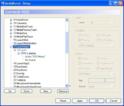
    Thanks owlsroost, I've attached a screenshot of my keys and sounds window, how is this differnent to the remote mapping config? When will this config be used?
    I wish there some more documentation about remote configuration for noobs like me :(
     

    Attachments

    • hid.JPG
      hid.JPG
      51.1 KB
    • keys.JPG
      keys.JPG
      73.4 KB

    Users who are viewing this thread

    Top Bottom