Big project htpc (1 Viewer)

F

fumg

Guest
Hi everybody,

I will move soon with my parents in a new house, and they said OK to built a htpc.

I can do what I want !! =P

I thing that I will use my computer as server/htpc

Config:
CPU: i7 860
4Go Ram
ATI HD5850
1,5 To hardrive

Does it worth to use it as htpc or it's really too much ?

I imagined the differents features I would have.

Watching the TV
Recording the TV
Watching movies which are on the computer
Listening music
Surfing on the web

Server side:
Impression server
Files server
domain server (not sure)

Additionnal features I would have:
Controlling the TV with phone/tablet and maybe laptop
Broadcast TV on each computer in the house and I would know if it's possible to broadcoast to the others TV ( I need a Tv connected to the network, but is it possible to have a mediaportal interface on each ? )
may be games

And maybe just for the fun in the side server:
use like a virtual machine, when you boot your computer in fact you juste have the screen, it's on the server the OS, applications...


I looked in the differents software and media portal sound the better for my needs.

Wath do you thing ? Somebody has already build a htpc like that, is realisable ?

I know, I have a lot of questions, it's not really clear, but I'm new in the HTPC and I don't really know something

Thank you at all
 

emphatic

Design Group
  • Team MediaPortal
  • August 25, 2006
    3,758
    1,250
    Alingsås
    Home Country
    Sweden Sweden
    If the HTPC case allows, better to have a small SSD disk for the system and use the bigger HDD for media storage. Loading videos or just showing a backdrop should be as smooth as possible to have a pleasant experience and IMHO, only a SSD disc is fast enough for that. My HTPC had a 2 TB disc (Green Technology = slow) and I felt that the whole computer was way too old etc, but then switched to an SSD and now it feels like greased lightning. :)

    Emph
     

    fumg

    Portal Member
    February 5, 2012
    5
    1
    Home Country
    Switzerland Switzerland
    Thank you for you really fast answer.


    In fact, it's 2 disks, one 500 Go 7200rpm for the OS/application and one 1To 5400rpm for the storage

    but I know it's by far slower than a SSD.

    I looked and find some 64Gb between 50$-100$, I will have a look.


    Another question, actually I have a tower as case. I can't save it ? I really need a htpc case ?


    :D
     

    emphatic

    Design Group
  • Team MediaPortal
  • August 25, 2006
    3,758
    1,250
    Alingsås
    Home Country
    Sweden Sweden
    Another question, actually I have a tower as case. I can't save it ? I really need a htpc case ?

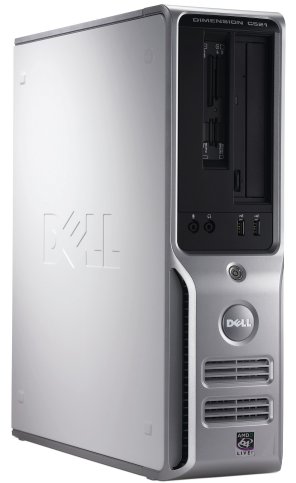
    No need to get a HTPC case, I have a DELL c521 and it looks quite nice along with my receiver and BluRay player:

    dell-c521.jpg

    Emph
     

    fumg

    Portal Member
    February 5, 2012
    5
    1
    Home Country
    Switzerland Switzerland
    I'm back

    so, I've looked and a majority of my problems are solve

    I will place the computer in the room behind the wall where will be the TV.

    So, no problem of noise, and I can save my box.

    But I still have some questions.

    Just for you understand, I want that we can just connect the TV without pass by the computer, if there are a problem. Little fast draw of the situation ^^
    574540270227_tv.jpg


    We need to do a hole in the wall to pass the cable.

    Which cables will pass there ?

    the TV cable
    the HDMI cable
    I don't know for the sound if I need to connect it at the computer or the Tv ?
    and I think that's it ?

    it exists some remote enough strong to pass trough the wall ? (20 cm large)
    and my last question, with just one TV card in the computer, it's possible to save and watch differents channels ? and watch on a computer, because I didn't understand this part ?
     

    FreakyJ

    Retired Team Member
  • Premium Supporter
  • July 25, 2010
    4,004
    1,427
    Home Country
    Germany Germany
    you know that you have to connect the Tv to a Computer to watch Tv over mediaportal?
    So if the computer is behind a wall you need either a wireless remote or some ir remote where the receiver is near the Tv ;)

    You setup sounds like a Singleseat + multiseat setup that means:
    Your Server is Sver & Client for the Tv in the livingroom
    Youzr Server is Server for other clients

    So you have to connect your Tv as described above^^

    To the Tv Card stuff:
    There are several things you have to look on :p
    If your Signal encrypted?! If yes you need a CI + CAM to decrypt that stuff... That is the most important thing to know.
    But basically you can encrypt a whole transponder with one TvCard => You can watch all channels on one transponder at the same time...
    If the channels are on different transponders you need one TvCard for each ;)
    Hopefully that helps, I would recommend a minimum of two, the DigitalDevices Cine CT6 (cable Tv) is a good one, but if you have an encrypted signal I would recommend a cardsharing server with this card or to choose a different one ;)
    So answer my questions and we can help you more^^
     

    fumg

    Portal Member
    February 5, 2012
    5
    1
    Home Country
    Switzerland Switzerland
    thank for the fast answer


    so yes I know I need to connect it to a computer. We will do a hole in the wall to connect them togheter.
    My server will be the server and the client for the TV in the livingroom

    I will do some search for the TV card because I really don't know. I just know that actually we just need to connect the cable to the TV and it works

    thank you again for you help
     

    fripsy

    Portal Pro
    December 11, 2008
    122
    63
    Grasse
    Home Country
    France France
    If I understand correctly, you would run a server OS with virtual machines?
    Running MP in a virtual machine is not a good idea and as far as I know it is not supported, also running MP on a server OS is not supported, some get it to work, most don't...
    It is recommended to use a dedicated computer as a HTPC, don't forget, watching live tv and record something on the side demands some power.

    I would forget about using that pc as a domain server, just run W7 and install MP.
    You can always do some disksharing on the side (I'm running that config).

    Everywhere you want to watch tv, you need a MP-client, meaning a pc connected to the network.
    It is not possible to connect a tv directly to the MP-server.

    Hope this clarifies things a bit.
    If you need more info, just ask!
     

    fumg

    Portal Member
    February 5, 2012
    5
    1
    Home Country
    Switzerland Switzerland
    Thank for your answer,

    I will forget my idea to use a virtual machine, and the domain server (y)

    and thank for the clarification for the others TVs, PCs

    And I looked for the encryption, and it's not

    And my last question, after I stop to disturbe you until a start my project and I will have problems :LOL:

    my home cinema
    images
    random picture

    How I need to do ?

    Can I connect directly the speakers to my compute or I need to pass by the central and after connect it to the computer ?
    Or it's better to connect it to my television directly ?


    Really, really thank to everybody for your help
     

    fripsy

    Portal Pro
    December 11, 2008
    122
    63
    Grasse
    Home Country
    France France
    You have to look at MediaPortal as the center of it all, everything (tv, radio, audio, video, pictures, ...) is handled by MP.
    In fact, your tv is not a tv anymore, it is just a big monitor. The same goes for your audio system, audio is handled by MP, so you connect the audio system directly to your computer.

    In a previous post, you talk about having some sort of backup, so in case MP stops working, you can watch tv. In this case you need to split the antenne cable before it goes to your computer, 1 end goes to the tv, the other to the computer.
    In this setup, when you switch your tv to the computer input, you get MP with all the bells and wissles, if you switch your tv in tv-mode, you just have a normal tv.

    Cheers.
     

    Users who are viewing this thread

    Top Bottom