Can't get a TV picture (1 Viewer)

rogerw

New Member
October 16, 2015
1
0
83
Home Country
United Kingdom United Kingdom
Hi, having moved to windows 10 I'm delighted to find everything works except of course mediacentre which is no longer included, so here I am trying to get its replacement to work.
I've worked my way through the setups and scans which show up plenty of channels and if you test a channel it works - I get a picture - but on opening MediaPortal1 and clicking on TV - no picture.
I'm sure I'm doing something stupid, any help greatly appreciated.
 

mm1352000

Retired Team Member
  • Premium Supporter
  • September 1, 2008
    21,544
    8,236
    Home Country
    New Zealand New Zealand
    Hello and welcome! :)

    Thank you for posting log files and filling in your system specifications - that's very much appreciated. (y)
    I've checked your log files. I don't see any errors, but I don't see any attempts to view TV either.

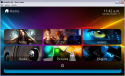
    When you first enter MediaPortal, you should be presented with the home screen:
    upload_2015-10-17_11-42-51.png

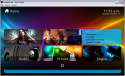
    If you select TV you'll be presented with a menu of choices:
    upload_2015-10-17_11-43-29.png

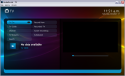
    If you select TV from that menu you're taken into the TV section.
    upload_2015-10-17_11-51-7.png

    To start TV from here, select "channel" and then select the channel you would like to view.

    If you're using a mouse...
    Some elements in the default skin ("Titan") don't work well with a mouse. Selecting items in the home screen TV menu is one of them. When you click on TV, you see the menu... but as soon as you move the mouse, the menu disappears. There are ways to work around this (for example, click on TV, then use the arrow keys on the keyboard + enter/return [while not moving the mouse] to select the menu item.... or alternatively, pressing "h" to switch to the alternative home screen). In general though, if you intend to use MediaPortal with a mouse, my advice would be to use a different skin. "DefaultWide" is a good choice to start off with. You can swap skins in MediaPortal configuration as shown here:
    http://wiki.team-mediaportal.com/1_...diaPortal_Configuration/13_GUI#Skin_Selection

    If none of this helps, please try to describe your problem in more detail.

    Regards,
    mm
     

    Users who are viewing this thread

    Top Bottom