Change Skip Forward and Skip Back Steps to allow different times (1 Viewer)

stilger

Portal Member
September 13, 2007
9
0
Started on: 2008-09-17
Last update: 2008-09-17

Summary: Change Skip Forward and Skip Back Steps to allow different times.

Area: Videos, TV

Description: This change will allow different times for Forward and Back skip steps. Alot of times you will skip forward and be to far ahead but not enough to want to skip back as far as you skipped forward.
 

pilehave

Community Skin Designer
  • Premium Supporter
  • April 2, 2008
    2,566
    521
    Hornslet
    Home Country
    Denmark Denmark
    I vote for that option too :)

    I come from a Humax STB that let's you use for example 15 sec step back, and 60 sec step forward. That is quite useful!
     

    Mew

    Portal Pro
    January 11, 2007
    356
    111
    55
    Hertfordshire
    Home Country
    England England
    Hi

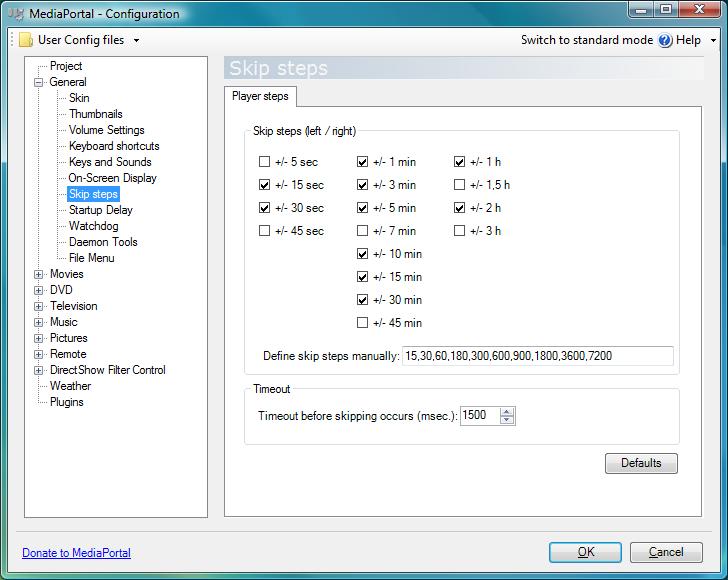
    Does this not already exist using the Skip steps?

    The default settings are first press of the right arrow on the remote sets the skip forward at 15 sec, second at 30 sec, third at a minute etc. Pressing the left arrow the same will skip back in the same way. The size of the the steps can be adjusted in configuration, either using the predefined steps or entering manually defined ones.

    Mew
     

    Attachments

    • Skip Steps.jpg
      Skip Steps.jpg
      59 KB

    stilger

    Portal Member
    September 13, 2007
    9
    0
    Mew,

    Yes it does exist in the skip steps but I only use one skip step to make it more like XBMC. I do not like the way it reacts when you have more then one skip step in there. There is a delay in it responding to your skip step.
     

    Marcusb

    Retired Team Member
  • Premium Supporter
  • February 16, 2005
    1,994
    29
    Melbourne
    I'm at work, so can't check it now, but I think you can change this by setting the on-screen delay time out or something similar in the General area of config. I don't normally go here though, as the default setting suits my needs.
     

    pilehave

    Community Skin Designer
  • Premium Supporter
  • April 2, 2008
    2,566
    521
    Hornslet
    Home Country
    Denmark Denmark
    Hi

    Does this not already exist using the Skip steps?

    The default settings are first press of the right arrow on the remote sets the skip forward at 15 sec, second at 30 sec, third at a minute etc. Pressing the left arrow the same will skip back in the same way. The size of the the steps can be adjusted in configuration, either using the predefined steps or entering manually defined ones.

    Mew

    Sure they exists, but they are the same steps for forward step and backwards step!

    I would like the possibility to set the skip steps individually for forward and backward:

    backward: 15,30
    forward: 60, 120

    this would make it easier to hit the right spot when stepping forward and backwards...
     

    stilger

    Portal Member
    September 13, 2007
    9
    0
    I'm at work, so can't check it now, but I think you can change this by setting the on-screen delay time out or something similar in the General area of config. I don't normally go here though, as the default setting suits my needs.

    I have this set at 5 for each of these setting under:

    Generel
    - On-Screen Display

    All 3 are set for would I would assume would be Seconds bases on the Description of:

    Display timeout (sec.):
    Zap delay (sec.):
    Zap timeout (sec.):

    When I skip forward or back using the skip steps immediately after i skip the onscreen display goes away. That does not give me time to figure out where in the video I am.
     

    Users who are viewing this thread

    Top Bottom