1.37 DefaultWideHD - Reloaded (17 Viewers)

1.37

Anthony Vaughan

MP Donator
  • Premium Supporter
  • June 25, 2015
    633
    333
    Home Country
    United Kingdom United Kingdom

    TLD

    Portal Pro
    October 26, 2007
    995
    418
    Rainy Washington
    Home Country
    United States of America United States of America
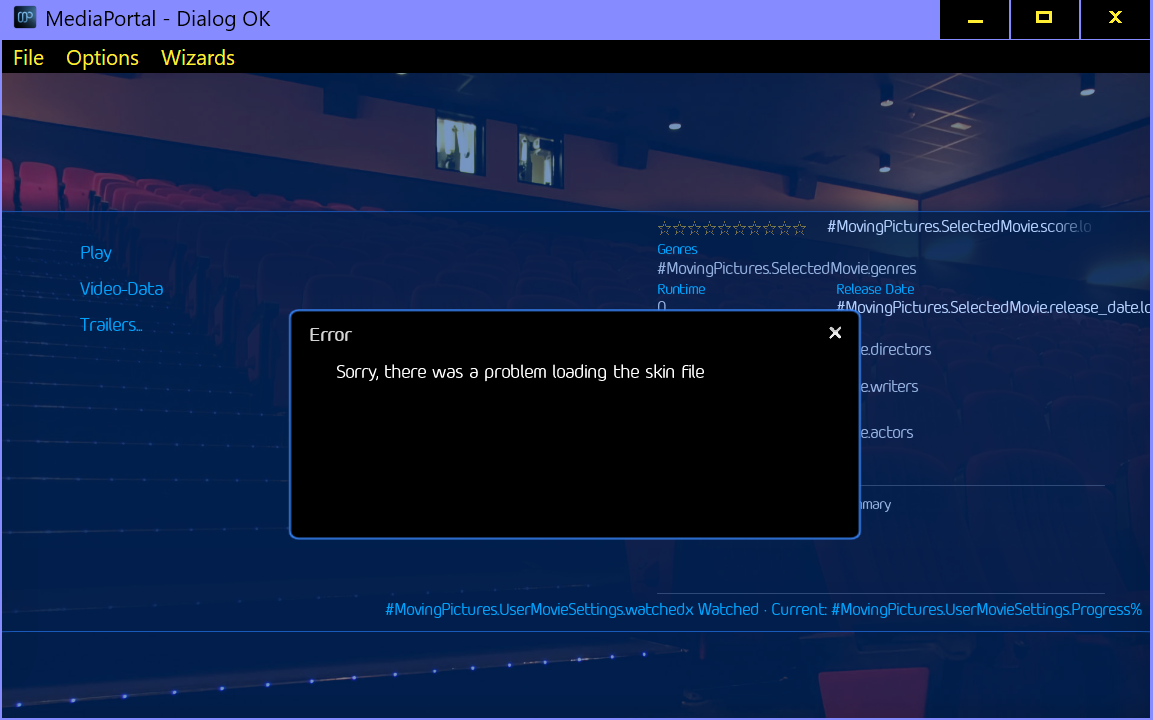
    In windowed mode Moving Pictures throws an error when trying to enter.

    I did the upgrade when installing and used existing skin GefaultWideHD.

    I will upload logs later when I have time.
     

    Attachments

    • No Mpics.png
      No Mpics.png
      357.9 KB
    • MP LOGs.zip
      631.1 KB

    catavolt

    Design Group Manager
  • Team MediaPortal
  • August 13, 2007
    15,074
    11,364
    Königstein (Taunus)
    Home Country
    Germany Germany
    • Thread starter
    • Moderator
    • #73
    @TLD: No problems here in windowed mode ;)
    See video:


    BTW: Could not find errors regarding your problem in logs ;)
     

    larry_S

    MP Donator
  • Premium Supporter
  • December 11, 2008
    1,457
    183
    Home Country
    Germany Germany
    I have the same Error-Message with Moving Pictures. With Titan-Skin Moving Pictures works. I use Full-Screen.

    Log Snippet:
    Code:
    [2025-04-24 20:56:28,803] [Log    ] [MPMain   ] [DEBUG] - WindowManager: unroute to MediaPortal.Dialogs.GUIDialogOK:2002->MediaPortal.Plugins.MovingPictures.MainUI.MovingPicturesGUI:96742
    [2025-04-24 20:56:28,834] [Log    ] [MPMain   ] [DEBUG] - Windowmanager: Goto previous window
    [2025-04-24 20:56:28,834] [Error  ] [MPMain   ] [ERROR] - OnMessage exception:System.NullReferenceException: Der Objektverweis wurde nicht auf eine Objektinstanz festgelegt.
       bei MediaPortal.Plugins.MovingPictures.MainUI.MovingPicturesGUI.OnPageDestroy(Int32 new_windowId)
       bei MediaPortal.GUI.Library.GUIWindow.OnMessage(GUIMessage message)

    Full Logs from Watch Dog attached.
     

    Attachments

    • MP_Logs_MSHTPC_25_04_24_20_56.zip
      102.5 KB

    catavolt

    Design Group Manager
  • Team MediaPortal
  • August 13, 2007
    15,074
    11,364
    Königstein (Taunus)
    Home Country
    Germany Germany
    • Thread starter
    • Moderator
    • #75
    Hmmm, for those who have problems with the start of MovPic:
    Pls open the skin settings and choose for the thumbview either Normal or Fanart Wall - maybe that´s the culprit ;)
     

    larry_S

    MP Donator
  • Premium Supporter
  • December 11, 2008
    1,457
    183
    Home Country
    Germany Germany
    Thanks. That helped.
    The problem probably exists after a fresh install. I'm not aware of any changes to this setting since the reinstall.
     

    Anthony Vaughan

    MP Donator
  • Premium Supporter
  • June 25, 2015
    633
    333
    Home Country
    United Kingdom United Kingdom
    I think there has been a change in the dialogs that handle Exit MediaPortal (Options) and many others (like Advanced Record).
    When you use the up and down navigation buttons, focus used to move between the items in the list. Now, when you navigate up, focus goes to the close button at the top right. Now, to get to the bottom of the list you have to navigate through all of the intervening options.
    The back button performs what the close button does.
    Do we need to navigate to the close button? Alternatively, I guess you could make navigation up go to the close button and then, when pressed again, go to the bottom item in the list.
    What do you think?

    Interestingly, repeatedly pressing the down navigation button ignores the close dialog button.
     
    Last edited:

    2BitSculptor

    Super Moderator
  • Team MediaPortal
  • January 23, 2008
    2,046
    994
    South Central Wisconsin
    Home Country
    United States of America United States of America
    Is it normal for the Genre and Similar Stations lists in the TuneIn Now Playing Hidden Menu to only be visible when you navigate into each of the catagories? I would think you would want the lists to both be seen whenever the hidden menu is visible. How would I change that?
     

    Users who are viewing this thread

    Top Bottom