
You are using an out of date browser. It may not display this or other websites correctly.
You should upgrade or use an alternative browser.
You should upgrade or use an alternative browser.
DTS Passthrough Stutter (1 Viewer)
- Thread starter booba5185
- Start date
 Denmark
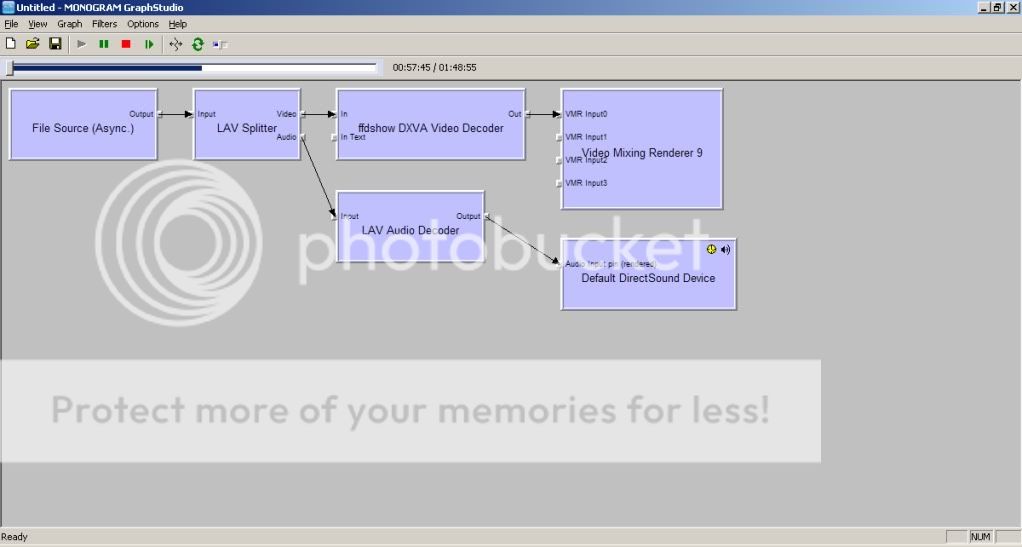
Rightclick on lav audio decoder and show us the settings..
Have you in any way been succesfull to bitstream with another application?
Have you in any way been succesfull to bitstream with another application?

Have you looked at the possibility of it being the sound card or its driver? Did you upgrade or downgrade the sound card driver from the time it was working to now (when you reformatted the PC)?
Here is a thread you might want to look at if you have not already:
https://vip.asus.com/forum/view.asp...d_id=21&model=Xonar+DX&SLanguage=en-us&page=1
good luck,
schumach
Here is a thread you might want to look at if you have not already:
https://vip.asus.com/forum/view.asp...d_id=21&model=Xonar+DX&SLanguage=en-us&page=1
good luck,
schumach
- Thread starter
- #16
So I had to reformat and this issue is back and more annoying than ever. I'm running windows 7 now, but the issue is mostly the same, the only difference is that sometimes I'll have very stuttery playback, but 95% of the time I have no passthrough at all. I've tried SAF6, SAF5, ffdshow, spdifer, and every driver available for my sound card, even an opensource "low latency" one. I've tried every combination of these codecs, and I have COMPLETELY uninstalled the codec before installing other codecs to try. Why in the world is it so FRUSTRATING and difficult to get DTS passthrough to work with Mediaportal? I've literally spend 8 hours straight working on this, with noting to show for it but the hair I've pulled out.
- Thread starter
- #17
Well now I have DTS passthrough but it is doing the stuttering thing again, no matter what setup I use. What am I doing wrong?
Edit: After turning off "Auto A\V sync" in LAV it seems to be working fine. Thank GOD. I'll update the thread if it continues to work or if I have any problems
Edit 2: That lasted a long time. Now the video won't even play, let along passthrough DTS. Why is this section of Mediaportal so finicky? The video I tried to play about 5 minutes ago just started playing and guess what? No DTS passthrough.
Edit: After turning off "Auto A\V sync" in LAV it seems to be working fine. Thank GOD. I'll update the thread if it continues to work or if I have any problems
Edit 2: That lasted a long time. Now the video won't even play, let along passthrough DTS. Why is this section of Mediaportal so finicky? The video I tried to play about 5 minutes ago just started playing and guess what? No DTS passthrough.
- Thread starter
- #18
I swear, I'm gonna take up smoking because of this. This is one of the most frustrating things I've ever done in my life. After a reboot I can get video to play, but no audio at all. I'm going to go beat my head on the wall for awhile.
Edit: So I uninstalled everything, sound card drivers, codecs, SAF, everything. Then I cleaned my registry and rebooted. I then installed the latest sound card driver, along with SAF and set LAV to the setting that worked a few minutes ago. I now have it working again, but it still stutters. It's still somewhat watchable, but I'd like to figure out what is causing all this nightmare so I can avoid it in the future.
Edit: So I uninstalled everything, sound card drivers, codecs, SAF, everything. Then I cleaned my registry and rebooted. I then installed the latest sound card driver, along with SAF and set LAV to the setting that worked a few minutes ago. I now have it working again, but it still stutters. It's still somewhat watchable, but I'd like to figure out what is causing all this nightmare so I can avoid it in the future.

- Thread starter
- #20
You read my mind, I ended up pulling the Xonar completly and I'm just using the onboard optical now. So far, it works fantastic. I ended up putting the Xonar into another PC I have running MP in my bedroom which is very similar to this one, but it seems to work perfectly there, too. Go figure.
Users who are viewing this thread
Online now: 2 (members: 0, guests: 2)