- August 9, 2007
- 70
- 3
- Home Country
-
 Sweden
I got myself an EB1501P few weeks ago and spent considerable time trying to make it work well, but have failed. The problem is a bit strange and difficult to understand. Well.. At least for me... 
First time around I was very confident about it given many positive reviews (general performance, not MP specifically) so I just went ahead and made a full install, starting with clean W7 install, necessary drivers, MP client, SAF and StreamedMP. Sat down to test it and it was terrible. Playback was choppy, regardless of what I played - 1080p, lowres video or SD TV. It was exactly the same issue both in MP, VLC, WMP and MPC-HC... Next round, I did a "staged approach", testing and backing up after each phase. Perfect playback of all the content until StreamedMP was installed... I then thought maybe StremedMP with Moving Pictures and TV Series was too heavy for it, so I "settled" for the default skin. Changed few "harmless" Windows settings and problems were back! Long story short, I did a lot of trial-and-error using clean installes and back-ups and the conclusion was that any "random" action could ruin the day and get me back to choppy playback. It could be something as simple as installing a MP plugin or changing the time before Windows sleeps, but there was no consistency to what or when would cause it.
Now, the other weird part... There is no way back to good performance! Uninstalling the plugin or changing the setting back to what it was previously would not help. (And yes, I would restart it...) Only help is restoring to a back-up from a point in time before the change. And if I don't change anything it would continue running fine. Had it running fine for three days without touching it as I wanted to make sure that those issues were actually caused but my changes and not only coinciding with them.
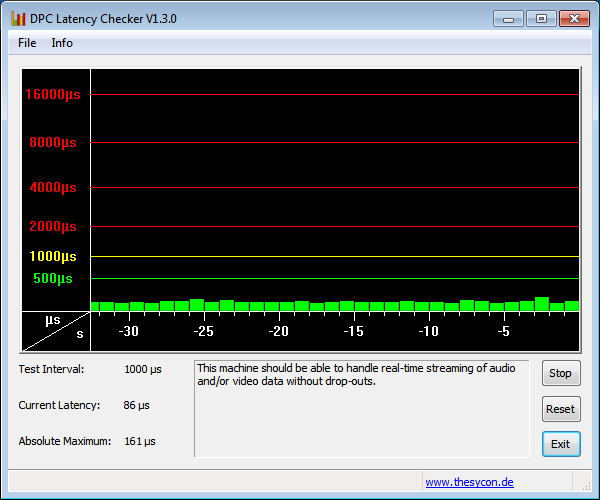
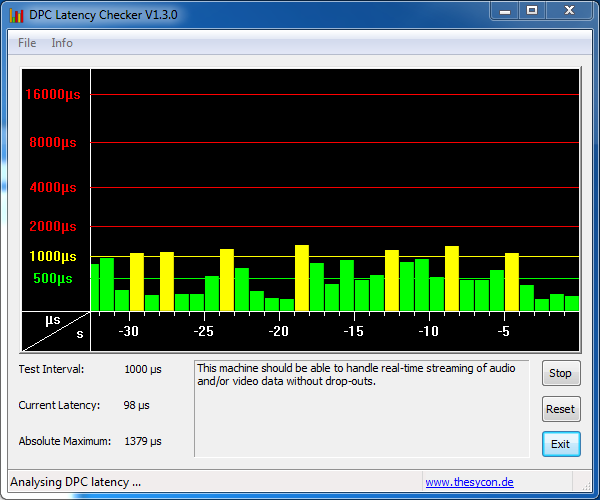
Potential "lead" may be latency... After a lot of forums browsing I installed DPC Latency Checker and it was obvious that my performance issues were correlated with significant latency increases compared to how it looked while performance was good. But again, there is that "no way back" issue. Once I get to bad performance state, I can uninstall all the progs I have, uninstall all the drivers and disable all the devices except the most essential ones but the latency stays high - and performance bad. I also tried "stripping down" W7, removing all not needed functionality and services but results were same...
I was thinking about potential HW issue, but it doesn't make sense either with the randomness and working fine after restoring the back-up...
All thoughts, ideas and suggestions are very much appreciated!
Also, if you have EB1501P (or any EB1501) and are happy with performance, could you please let me know if you have done anything special in terms of installation and drivers?
First time around I was very confident about it given many positive reviews (general performance, not MP specifically) so I just went ahead and made a full install, starting with clean W7 install, necessary drivers, MP client, SAF and StreamedMP. Sat down to test it and it was terrible. Playback was choppy, regardless of what I played - 1080p, lowres video or SD TV. It was exactly the same issue both in MP, VLC, WMP and MPC-HC... Next round, I did a "staged approach", testing and backing up after each phase. Perfect playback of all the content until StreamedMP was installed... I then thought maybe StremedMP with Moving Pictures and TV Series was too heavy for it, so I "settled" for the default skin. Changed few "harmless" Windows settings and problems were back! Long story short, I did a lot of trial-and-error using clean installes and back-ups and the conclusion was that any "random" action could ruin the day and get me back to choppy playback. It could be something as simple as installing a MP plugin or changing the time before Windows sleeps, but there was no consistency to what or when would cause it.
Now, the other weird part... There is no way back to good performance! Uninstalling the plugin or changing the setting back to what it was previously would not help. (And yes, I would restart it...
) Only help is restoring to a back-up from a point in time before the change. And if I don't change anything it would continue running fine. Had it running fine for three days without touching it as I wanted to make sure that those issues were actually caused but my changes and not only coinciding with them.Potential "lead" may be latency... After a lot of forums browsing I installed DPC Latency Checker and it was obvious that my performance issues were correlated with significant latency increases compared to how it looked while performance was good. But again, there is that "no way back" issue. Once I get to bad performance state, I can uninstall all the progs I have, uninstall all the drivers and disable all the devices except the most essential ones but the latency stays high - and performance bad. I also tried "stripping down" W7, removing all not needed functionality and services but results were same...
I was thinking about potential HW issue, but it doesn't make sense either with the randomness and working fine after restoring the back-up...
All thoughts, ideas and suggestions are very much appreciated!
Also, if you have EB1501P (or any EB1501) and are happy with performance, could you please let me know if you have done anything special in terms of installation and drivers?