United States of America
MediaPortal Version: 1.2.2.0
MediaPortal Skin: StreamedMP
Windows Version: Win 7 32-bit Premium
CPU Type: AMD 435 unlocked & OC'd to 14.5 x 240 = 3.48 GHz
HDD: Kingston 64GB SSD System + 4 (WD20EARS) 2-TB for files
Memory: G.SKILL 4GB (2 x 2GB) 240-Pin DDR3 SDRAM DDR3 1600 (PC3 12800)
Motherboard: GIGABYTE GA-MA785GMT-UD2H AM3 AMD 785G HDMI Micro ATX
Video Card: Gigabyte HD4550 512MB DDR3
Video Card Driver: CCC 11.5
Sound Card: On-board RealTek 889A
Sound Card AC3: SPDIF via ATi HDMI Audio & HD4550
Sound Card Driver: ATI HDMI & MicroSoft for optical SPDIF
1. TV Card: ATi HDTV-Wonder
1. TV Card Type: ATSC/NTSC + A/V
1. TV Card Driver: Win-7 located/installed
2. TV Card: AVerMedia A188C (open) White Box
2. TV Card Type: ATSC (dual tuner on PCI-e X1)
2. TV Card Driver: Win7 located/installed
3. TV Card: Hauppauge HVR-1600 (includes Remote Control)
3. TV Card Type: ATSC (dual tuner on PCI-e X1)
3. TV Card Driver: Win-7 located/installed (IR.exe from Hauppauge)
4. TV Card: ATi 650 Combo USB
4. TV Card Type: ATSC/NTSC + A/V
4. TV Card Driver: Win7 located/installed
MPEG2 Video Codec: PDVD10, DTV M$, MPC-VideoDec & PureVideo
MPEG2 Audio Codec: SPDIF via SPDIFer (an AC3Filter product)
h.264 Video Codec: MPCVideoDec
Satelite/CableTV Provider:
HTPC Case: Antec P180 Mini
Cooling: Scythe 92mm "KATANA3"
Power Supply: Antec EarthWatts Green 500W
Remote: Hauppauge 45-key
TV: Epson PowerLite Home Cinema 8350
TV - HTPC Connection: HDMI 1920x1080
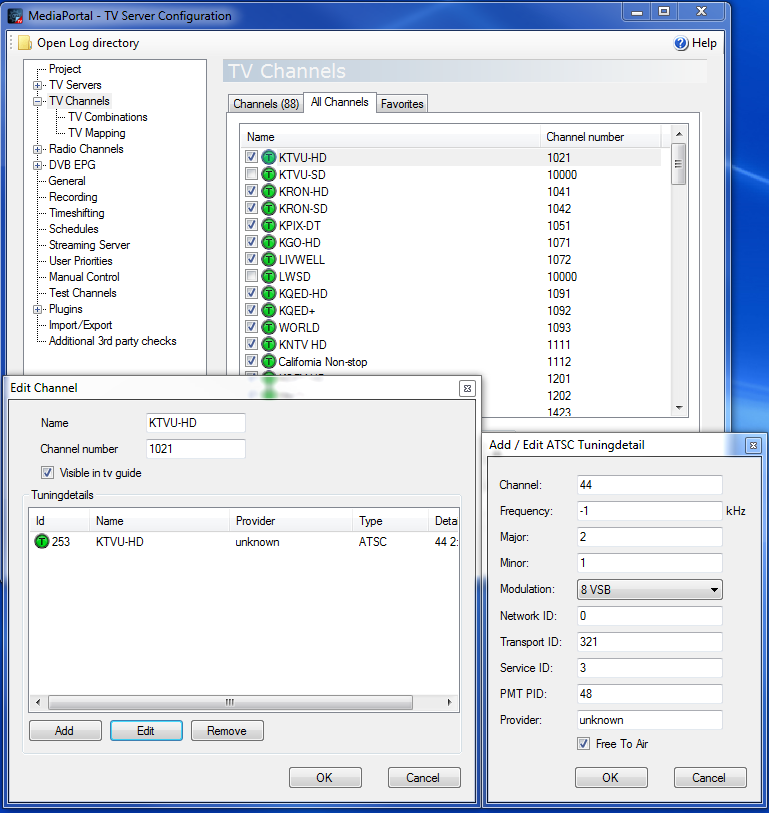
As a long-term user I stumbled across this when a local broadcaster changed their RF number. Specifically they had been on RF-49 and moved to RF-48. This is a simple adjustment made by editing the TV Channel, right? YES, it should be and I did this several years back when RF-59 moved to RF-19... a simple change and hit OK. Not so this time. When I attempted to save the change I got a pop-up saying I had an invalid frequency! This was a new error for me and I thought I should call it to your attention. Interestingly enough I wasn't editing that field, instead the RF field and, the values in the editable window do not list frequency values (even after scanning) but the "checking" that's done (when I hit the OK button) keep me from continuing. As for me, I had to reperform a full ATSC scan to detect the new RF-48 station.
This may be unique to ATSC tuning therefore not many folks are speaking of it. And, you have to be somewhat fluent in MediaPortal because it doesn't show itself during a normal scan or use of the TV Channels... it's a mismatch someplace that's been changed - maybe when they rewrote the scan code?
YES, I know it would be helpful to attach logs and screen-shots... my daughter is using the system now - I'll post details in an update. Just thought I'd mention this while it was on my mind.
MediaPortal Skin: StreamedMP
Windows Version: Win 7 32-bit Premium
CPU Type: AMD 435 unlocked & OC'd to 14.5 x 240 = 3.48 GHz
HDD: Kingston 64GB SSD System + 4 (WD20EARS) 2-TB for files
Memory: G.SKILL 4GB (2 x 2GB) 240-Pin DDR3 SDRAM DDR3 1600 (PC3 12800)
Motherboard: GIGABYTE GA-MA785GMT-UD2H AM3 AMD 785G HDMI Micro ATX
Video Card: Gigabyte HD4550 512MB DDR3
Video Card Driver: CCC 11.5
Sound Card: On-board RealTek 889A
Sound Card AC3: SPDIF via ATi HDMI Audio & HD4550
Sound Card Driver: ATI HDMI & MicroSoft for optical SPDIF
1. TV Card: ATi HDTV-Wonder
1. TV Card Type: ATSC/NTSC + A/V
1. TV Card Driver: Win-7 located/installed
2. TV Card: AVerMedia A188C (open) White Box
2. TV Card Type: ATSC (dual tuner on PCI-e X1)
2. TV Card Driver: Win7 located/installed
3. TV Card: Hauppauge HVR-1600 (includes Remote Control)
3. TV Card Type: ATSC (dual tuner on PCI-e X1)
3. TV Card Driver: Win-7 located/installed (IR.exe from Hauppauge)
4. TV Card: ATi 650 Combo USB
4. TV Card Type: ATSC/NTSC + A/V
4. TV Card Driver: Win7 located/installed
MPEG2 Video Codec: PDVD10, DTV M$, MPC-VideoDec & PureVideo
MPEG2 Audio Codec: SPDIF via SPDIFer (an AC3Filter product)
h.264 Video Codec: MPCVideoDec
Satelite/CableTV Provider:
HTPC Case: Antec P180 Mini
Cooling: Scythe 92mm "KATANA3"
Power Supply: Antec EarthWatts Green 500W
Remote: Hauppauge 45-key
TV: Epson PowerLite Home Cinema 8350
TV - HTPC Connection: HDMI 1920x1080
As a long-term user I stumbled across this when a local broadcaster changed their RF number. Specifically they had been on RF-49 and moved to RF-48. This is a simple adjustment made by editing the TV Channel, right? YES, it should be and I did this several years back when RF-59 moved to RF-19... a simple change and hit OK. Not so this time. When I attempted to save the change I got a pop-up saying I had an invalid frequency! This was a new error for me and I thought I should call it to your attention. Interestingly enough I wasn't editing that field, instead the RF field and, the values in the editable window do not list frequency values (even after scanning) but the "checking" that's done (when I hit the OK button) keep me from continuing. As for me, I had to reperform a full ATSC scan to detect the new RF-48 station.
This may be unique to ATSC tuning therefore not many folks are speaking of it. And, you have to be somewhat fluent in MediaPortal because it doesn't show itself during a normal scan or use of the TV Channels... it's a mismatch someplace that's been changed - maybe when they rewrote the scan code?
YES, I know it would be helpful to attach logs and screen-shots... my daughter is using the system now - I'll post details in an update. Just thought I'd mention this while it was on my mind.