everything stutters in MP, but plays fine without MP (1 Viewer)

mm1352000

Retired Team Member
  • Premium Supporter
  • September 1, 2008
    21,544
    8,236
    Home Country
    New Zealand New Zealand
    Hi again Snatz

    I see *tons* of dropped frames in the evr renderer logs, and also many discontinuities and late frames in TsReader. Is it possible you simply have bad quality signal? The alternative might be a networking or firewall/virus scanner problem. We need to figure out whether the problem is also on the TV Server side but TV Server logs aren't included since you're running a multi-seat system. Can you please test with TV Server (I can't help with Argus) and then post logs:

    1. Open TV Server configuration.
    2. Click open log folder in the top left hand corner.
    3. Zip all the files you find there and post them here.

    mm
     

    Paranoid Delusion

    Moderation Manager
  • Premium Supporter
  • June 13, 2005
    13,052
    2,978
    Cheshire
    Home Country
    United Kingdom United Kingdom
    Make sure you are using driver 11.4 for gpu, there have been issues with newer.

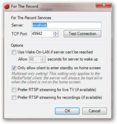
    Open MP config\plugins and select ftr tv, select config which should look like this.

    sshot-1.jpg

    Are you running comskip during recording or post recording, better after recording.

    After that have you any programs installed that could be monitoring folders, i would even turn off indexing.

    Have you got separate partitions on the HDD, if so copy a large file from 1 to the other, whats the transfer speed like.

    My setup is similar ie Argus + FTR and no problems here,, and as video is affected as well, tv is a red herring, so its something
    systemwide we need to find.

    ps check hdd fragmentation, if really bad could cause a problem as well.
     

    snatz

    Portal Member
    December 26, 2009
    35
    1
    Hi again Snatz
    Is it possible you simply have bad quality signal?
    As far as I know signal and cable are fine. Is there a way I can test my signal?

    Maby my Terratec Cinergy C HD isn't functioning well? Tried all drivers, only BDA drivers 601 and 701 work here.

    The alternative might be a networking or firewall/virus scanner problem.
    No I uninstalled Microsoft Security Essentials. I have no network with other PC's or something, but yes I have internet (not wifi but by cable). Maby it has something to do with MySQL ???? I did a Typical install of MySQL server 5.5

    We need to figure out whether the problem is also on the TV Server side but TV Server logs aren't included since you're running a multi-seat system. Can you please test with TV Server (I can't help with Argus) and then post logs
    Last week I uninstalled MP TV-Server. I am using FTR. I will reinstall MP TV-Server asap and post the logs this weekend.

    As far as I know I am single seat.


    Make sure you are using driver 11.4 for gpu, there have been issues with newer.
    Hmm strange didn't know that. I use the latest. I will try to roll back.

    Open MP config\plugins and select ftr tv, select config which should look like this.
    "Prefer RTSP streaming for live TV" was enabled. I disabled it now. The stuttering isn't over :( It's different per channel.

    Are you running comskip during recording or post recording, better after recording.
    No I am not using Comskip. What is that exactly?

    Indexing and defragmentation schedule was already turned off.

    Have you got separate partitions on the HDD, if so copy a large file from 1 to the other, whats the transfer speed like.
    Yes 2 partitions. C: with system, MP, MySQL and 4TR. And D: with movies. Transfer speed is about 30MB/second.
     

    Paranoid Delusion

    Moderation Manager
  • Premium Supporter
  • June 13, 2005
    13,052
    2,978
    Cheshire
    Home Country
    United Kingdom United Kingdom
    No I am not using Comskip. What is that exactly?

    Using it will skip advertisements.

    Still think the best bet is driver, dxva keeps getting broken.

    Just as a matter of interest how is your recording folder setup.

    my folders are

    E:\Recorded TV

    E:\Recorded TV\Timeshift
     

    snatz

    Portal Member
    December 26, 2009
    35
    1
    Still think the best bet is driver, dxva keeps getting broken.

    Which driver? Do you mean my DVB-C card (DBA driver Terratec) or my graphics card (Catalyst 11.4) ??

    Just as a matter of interest how is your recording folder setup.

    Recordings = D:\Recordings (however till so far I didn't do a recording because playback is awful)
    Timeshift = C:\Users\Public\Videos\For The Record Timeshift (original 4TR setting, if I timeshift to an other partition the TV still stutters)
     

    Paranoid Delusion

    Moderation Manager
  • Premium Supporter
  • June 13, 2005
    13,052
    2,978
    Cheshire
    Home Country
    United Kingdom United Kingdom
    Which driver? Do you mean my DVB-C card (DBA driver Terratec) or my graphics card (Catalyst 11.4) ??

    Only gpu

    Timeshift = C:\Users\Public\Videos\For The Record Timeshift (original 4TR setting,

    Timeshift folder has always been recommended to be inside recorded folder. on same drive, otherwise you are getting more read\write's to drive.
     

    snatz

    Portal Member
    December 26, 2009
    35
    1
    gpu 11.4 and your foldersettings did an improvement to my HTPC

    movies go ok and some tv-channels are fine now :)

    however the stuttering is not gone, most about 70% of the channels is not playing fine for watching, too many stutter :(
    the stutter all the time is now in the sound then screen then pauzes for a sec and then fast forwards to realtime

    codecsettings in MP for TV are:
    Microsoft DTV-DVD Decoder
    Microsoft DTV-DVD Decoder
    LAV
    LAV
    LAV
    Default DirectSound Device

    maby something with LAV audio decoder ?
    do I have to config things manually?
     

    snatz

    Portal Member
    December 26, 2009
    35
    1
    Could it be may ATI card?

    On several forum is written that ATI is not able to display h264 channels well (glitches/corruption). Think that may be the problem. I will try Nvidea though.
     

    Tony B

    Portal Member
    September 10, 2011
    7
    0
    Home Country
    United States of America United States of America
    I too am having problems with video stuttering in MP. If I go to the folder and play in Windows Media Player, it plays fine. It only seems to be in MP and only in TV series using MP-TV Series plugin. When I play a dvd file .vob file, in MP it lloks fine. When I play the .mkv tv series file, it stutters. (also audio is fine)

    I have attached a log file...

    Help, Please!
     

    mm1352000

    Retired Team Member
  • Premium Supporter
  • September 1, 2008
    21,544
    8,236
    Home Country
    New Zealand New Zealand
    Hi Tony B

    What I see in your logs is:
    1. The video is h.264 - should be okay in your system.
    2. Frame rate is 23.976 - possibly the problem as it doesn't look like you're using anything to match the frame rate with your 60 Hz monitor.
    3. The FFDShow DXVA and MPC-MPA audio codecs aren't being used (seems they can't handle the format). Instead, the FFDShow audio and Microsoft DTV-DVD video codecs are being used.

    I suspect that this is a refresh rate matching issue or codec issue.

    mm
     

    Users who are viewing this thread

    Top Bottom