Genius LuxeMate 810 Media Cruiser keyboard and MediaPortal, need help (1 Viewer)

patricon

Portal Pro
June 16, 2007
543
18
Home Country
Spain Spain
I've downloaded and installed MP latest SVN. I'm trying to configure and use this keyboard http://www.profil-marketing.de/imgbase/files/1441/Genius_LuxeMate810.jpg but MP doesn't get notified when i press special keys (like My music, My videos, Green button, etc). This keyboard is just like the Microsoft MCE Keyboard one, but it's wireless. I've tried with HIP, Girder, but no luck... also searching the web i've found this: http://www.freewebs.com/hobbyist/irprojecten.html this seems to be an interesting project for filter some codes from HID devices. There is no need to have any hardware to use it (at least it's what the creator says...) but i'm unable to get it to work... i can't understand how it works, i've installed the driver, the started the EXE file and it detetects all the keystrokes from my keyboard (even the green button, or other special keys) but i'm not sure about how to remap the keys or about how to use it among with MediaPortal... May be that there is somebody around here that could help me with this...

Thanks in advance, and best regards,

Patricon
 

stanik

Portal Pro
October 10, 2006
146
4
Home Country
Czech Republic Czech Republic
Simple question HOW??

I ve downloaded EventGhost but I dont undrstand how configure it.

Can you send me simple guide or example or PrintScreen or config file (plugin?) ??

THX
Stanik
 

patricon

Portal Pro
June 16, 2007
543
18
Home Country
Spain Spain
Basically you must add three instances of the HID plugin to the startup section in EventGhost (when you select the HID plugin, you should see four entries for Genius 810; one of them does not work, so you must try and error to have them working). Then, when you have added all three plugins, pressing a special key in the keyboard should be reflected in the left area in EventGhost, just drag and drop the apropiate event for desired key to the right, on your macro. For example, you can create a macro to launch MP. call it "Launch MP" then add into the macro the event generated when you press the green button, then add a launch app action and select mediaportal executable... You can also enhace this macro if before launching the executable you check for mediaportal window (just add a findwindow action to the macro), add a check mark to the option that says, stop the macro if window is not found (or something simmilar); that way if you press green button when MP is running it will not be launched again...

regards,
 

stanik

Portal Pro
October 10, 2006
146
4
Home Country
Czech Republic Czech Republic
Thank you.

Yesterday I spend some time with EventGhost and found similar solution. Start HID plugin and define Macros.
For Macro I have question: Do you use keyboard keystroke send for controling MP or other way to control.

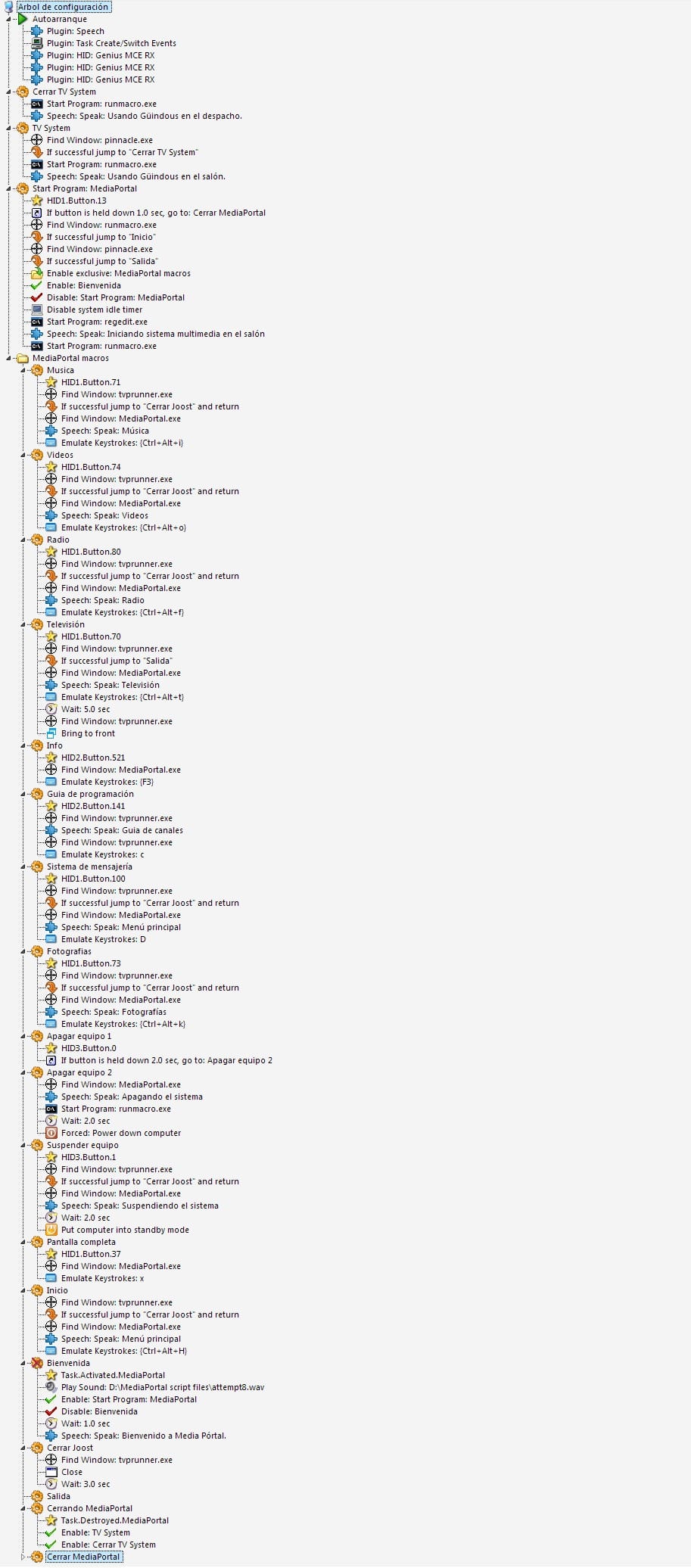
In picture of your project, you have very interesting first Macro. Its for start MP with control if already MP started yet?

Can you send me on stanik@bizonek.com your file for eventghost (project). I will only modified it for my use?

Muchos gracias.

P.S: Yo hablo en espanol, pero poco. Mas y mas fatalmente que ingles :)
 

patricon

Portal Pro
June 16, 2007
543
18
Home Country
Spain Spain
I use keystroke to send keys to MP. in the capture that i've submited i also use another useful software called MacroRunner, using that software i've created a macro that stops all unnecessary services, closes running apps and release resources before launching MP. I think that it's a very specific configuration for my particular way of use MP, but i can send you the project file if you want. Right now im in holidays, but when i return to my home, i can send it to you. I'm also using a plugin for MP called MyKeys, it's very limited but it's the only way that i've discovered to jump to My videos, My pictures, etc using a single keystroke...

if you are interested in MacroRunner, you can download it for free here: www.closetosoftware.com and look for beta version available into the forums. This app is like a enhaced batch file designer.

regards,
 

druid9

MP Donator
  • Premium Supporter
  • December 31, 2006
    255
    9
    65
    Funny how we all face the same challenges

    I have been following your progress Patricon in relation to the use of Event Ghost and how you use it to send remote commands to MP even when it is not in focus.

    I have done some research also on Event Ghost, and it seems like it is the software for me also.

    Whilst I appreciate that we ALL use MP differently, I wonder if you could post your Event Ghost setup so that others can use it as a guide. I have in mind to write a guide for other users to be placed in the wiki, and your way of doing things might be different to my own.

    I guess the reason you and I seem to be looking at the same things is that we are both using MP in a dual monitor setup, and also want the PC to be available for use by others whilst we use MP. Your avatar is also hard to miss so I guess seeing you in the same threads as I is also hard to miss.

    Anyhow, if you have a mind to please post your Event Ghost setup, and I could use it as a reference point.:D
     

    patricon

    Portal Pro
    June 16, 2007
    543
    18
    Home Country
    Spain Spain
    Ok, here it's my EG project, i hope that it helps you... ;)
     

    Attachments

    • EG Project.jpg
      EG Project.jpg
      438.6 KB

    druid9

    MP Donator
  • Premium Supporter
  • December 31, 2006
    255
    9
    65
    Thank You sir, will have a look over the weekend.

    I believe you were also looking at running MP on a secondary monitor with both displays having DirectX, did you ever get to the bottom of that or was it someone else? (I know that you have at least posted on the issue).

    Thanks again for your file, will help me avoid interrupting my son fragging aliens whilst I watch music videos. I will post my own final configuration for reference, and also make a start on drafting some documentation. Not sure whether you saw the EventGhost tutorial and discussion thread on the GB-PVR forum, but I found it useful, and thought we should have something similar here.:) .
     

    Users who are viewing this thread

    Top Bottom