Help setting up 5.1 sound (1 Viewer)

smuge

New Member
November 23, 2008
3
0
Home Country
United Kingdom United Kingdom
Please can someone help with a problem that I have setting up meadia portal with 5.1 sound.
I can get all speakers to work but can not get the Bass speaker (sub woofer) to work they all work fine outside meadia portal i.e with VLC player.
I have been trying now for a week so if anyone has a sugestion I would be very greatfull :D
 

Paranoid Delusion

Moderation Manager
  • Premium Supporter
  • June 13, 2005
    13,052
    2,978
    Cheshire
    Home Country
    United Kingdom United Kingdom
    Hi

    To do this you need to have expert mode enabled in Mediaportals configuration application, this is found at the top right hand side.

    Once there, you now have access to directshow filter control, i take it you are using MPA codec (MP default), so you just change the setting to your speaker requirement and enable LFE (subwoofer).
     

    smuge

    New Member
    November 23, 2008
    3
    0
    Home Country
    United Kingdom United Kingdom
    thanks.
    this is how i had it set up 3 front + 2 rear and LFE ticked but this will still not make the subwoofer work
    Have you any other sugestions as I am pulling my hair out with this one
     

    Paranoid Delusion

    Moderation Manager
  • Premium Supporter
  • June 13, 2005
    13,052
    2,978
    Cheshire
    Home Country
    United Kingdom United Kingdom
    Sorry went out, so did not see you already did this.

    MPA and MPV are not great codecs anyway, you have a couple of choices, which way you do things is upto you.

    I use powerdvd for mpeg2 video (download trial) and ffdshow for all my audio.

    I do not know which codecs you have installed for avi\divx files, i personally use the Vista codec pack for both windows Vista and XP, this contains the latest FFDShow Tryouts version, or you can just just download the standalone version from here.

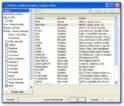
    Now there are a couple of settings you need to alter, open up the ffdshow audio config\codecs section, change the MP1\MP2 from libmad to libavcodec, this allows you to listen to BBC radio five and a couple of other stations that have a unique transmission format, so your screen should look like this.

    sshot-6.jpg

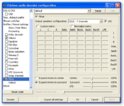
    Next we set up your speakers, enable the mixer tab by ticking it, choose your preferred speaker setup + LFE, enable upmix stereo if you wish and you should have something like below.

    sshot-7.jpg

    That's it for basic setup, now just change all your audio to ffdshow in MP's config, ie TV\DVD\Movies

    By the way if you do go the VCP route uninstall any codec's\packs (except realplayer or Quicktime) you already have and run filmerit (link in my signature) and make sure there are no errors in the filters that are installed, can give no end of grief if left.

    Make sure the audio renderer is set at default directsound device.

    HTH
     

    smuge

    New Member
    November 23, 2008
    3
    0
    Home Country
    United Kingdom United Kingdom
    Thanks for your help
    I have now changed to FFDShow and all is now working
    so I can now stop pulling my hair out

    Thank again for your help
     

    Users who are viewing this thread

    Top Bottom