How to use / program the My Radio plugin? (1 Viewer)

benze

Portal Member
June 30, 2008
8
0
Home Country
Canada Canada
Hi,

I'm a newbie to MediaPortal and trying to figure out how to use/configure it. I've found a couple of plugins that define Radio channels (MEDIAPORTAL - free MediaCenter HTPC Software - Canadian Radio) that indicate to put the files in the web radio directory. However, search as I may, I can't seem to find a "web radio" directory. Where do I find this directory?

I have MP RC1 installed from the download page, but no additional special plugins. When I run MediaPortal, I see the "My Radio" option, but have no idea how to configure it. In the MediaPortal configuration page, I ee the My Radio plugin, but don't see any specific configuration options.

Can anyone point me in the right direction please?

Thanks,

Eric
 

Zappza

MP Donator
  • Premium Supporter
  • December 10, 2006
    176
    9
    Home Country
    Norway Norway
    You just have to unzip the contents of the .zip file you download in a folder on your computer, and direct the My Radio plugin to that.

    To do that, open Configuration -> Radio ->
     

    benze

    Portal Member
    June 30, 2008
    8
    0
    Home Country
    Canada Canada
    Forgive me for being so dense, but I can't seem to find any option that allows me to configure the My Radio plugin.

    If I open the MediaPortal Configuration tool, go to Plugins, right click on My Radio in Window Plugins -> Configuration, the only options I see are "Show the All Channels Group", "Remember last group", "Group to show in root". If I right click My Radio under Process Plugins, there are no configuration options that exist/show up.

    Am I missing something obvious? In my setup window, the only options that show up are:
    Project
    General
    DVD
    Movies
    Music
    Pictures
    Television
    Remote
    DirectShow Filter Control
    Weather
    Plugins


    Do I need to install something else?

    Thanks!

    Eric
     

    Zappza

    MP Donator
  • Premium Supporter
  • December 10, 2006
    176
    9
    Home Country
    Norway Norway
    Hmm, I have really no idea then.

    At my HTPC the list is the same, only that Radio is between Television and Music. Have you activated Advanced View?
     

    benze

    Portal Member
    June 30, 2008
    8
    0
    Home Country
    Canada Canada
    Ok - dumb question number 2....

    How / where do I enable the Advanced View? I don't seem to find that option anywhere either...

    Thanks,

    Eric
     

    Zappza

    MP Donator
  • Premium Supporter
  • December 10, 2006
    176
    9
    Home Country
    Norway Norway
    It's in the top right corner of the Configuration window :)
     

    benze

    Portal Member
    June 30, 2008
    8
    0
    Home Country
    Canada Canada
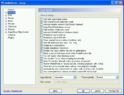
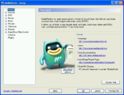
    Ok - I must be incredibly dense here. I'm attaching a pic of my config window, b/c I don't have that option anywhere.

    I've attached screenshots of both the default Project select and the General selection.

    Do yours look similar? Am I running an older / out-dated version of the configuration panel.

    Thanks,

    Eric
     

    Attachments

    • Config_general.jpg
      Config_general.jpg
      77.9 KB
    • config_project.jpg
      config_project.jpg
      64.2 KB

    miccheli

    Portal Member
    July 5, 2008
    5
    0
    Got the thing fixed, the radio options are found in TV-server configuration. You can add the stations in Radio Channels tab. When you put a name and address there, go to Radio mapping, choose web stream "card" and add the channel to the right there. Took like 3 hours to figure this out myself:p Used the 0.2.3 before so didn't look to the server options 1st.
     

    claus14

    Portal Member
    October 1, 2008
    19
    0
    Home Country
    United States of America United States of America
    Thank you

    Thank you, miccheli. I had the same problem benze had. I could not see My radio at "Configuration Panel" window. However, within MediaPortal, I was able to see the "My Radio" button, with the others (My Music, My Video, My Television), but I had no idea how to add radio stations to it. I spent almost 3 days :oops: trying to find the answer to this. At one moment I thought that I need to reinstall MP from scratch. The secret was the TV-server database. I didn't know the password to connect to it. I found later that the password was MediaPortal, anyway.
    So, I read your directions, yesterday morning, at work. I was sooooo anxious to get back home and test....
    I got back home last night and I tested what you wrote and IT WORKED !!! Initially, after entering the password to access TV-Server, the initial window of it gave me some errors and I wasn't able to click on the left side of it. I restarted the HTPC and afterwards everything worked like a charm.
    Michelli, thank you, again for your great directions. Right now, I'm building a list with european radio stations.

    So in conclusion, for people trying to add Radio Channels to My Radio, you have to do the settings within TV-server. Password to access it is MediaPortal. After that, follow Michelli's directions. They worked for me and I'm sure that they worked for others.

    Edit:
    My HTPC settings are:
    NSK-2400 Antec HTPC case
    GIGABYTE GA-MA78GM-S2H
    Windows XP Professional 32-bit with SP3 and Catalyst 8.9
    MediaPortal/TV-server 1.0 RC2
    AMD 4850e processor
    1Gb Geil DDR2-800 memory (planning to replace with 2GB in near future)
    Seagate 160Gb hard-drive (planning to buy something over 500 Gb)
    LG 22" monitor
     

    thorndahl

    Portal Member
    March 14, 2008
    8
    0
    As benze talked about I cant find the folder option either in 1.0 RC2, i know how to config them seperately but the old feature from 0.2.3 where you could point at a local folder where you had placed all your pls etc. files and folders, doesnt seem to be here in the this version? Looks like you to working out this problem in the end of the thread didnt solve the exact problem asked by benze, so bringing it up again. Is there a way to make 1.0 RC2 view a complete folder with .pls instead of manually adding each channel in radio channels?
     

    Users who are viewing this thread

    Top Bottom