IR blaster changes channels in TV SERVER config but not from within MP (1.2 beta) (1 Viewer)

bzemer

Portal Member
December 4, 2008
12
1
Home Country
Israel Israel
MediaPortal Version: MediaPortal 1.2.0 Beta
MediaPortal Skin: Default wide
Windows Version: 7 X64
CPU Type: E8400
HDD: Raptor 150GB
Memory: 4GB DDR2
Motherboard: GA-73PVM-S2H
Video Card: Onboard
Video Card Driver: -
Sound Card: Onboard
Sound Card AC3: -
Sound Card Driver: -
1. TV Card: Hauppauge PVR-150
1. TV Card Type: -
1. TV Card Driver: pvr-150-500_2_0_48_25037_whql
MPEG2 Video Codec: -
MPEG2 Audio Codec: -
h.264 Video Codec: -
Satelite/CableTV Provider: Israel YES
HTPC Case: Antec nsk2480
Cooling: -
Power Supply: 380W
Remote: MCE remote that came in the box with the card
TV: Samsung plasma
TV - HTPC Connection: hdmi


I recently installed MediaPortal 1.2.0 Beta and IR Server Suite - Test Build 1.4.2.4189.
Everything works fine on my Windows 7 x64 system, except that the IR blaster only changes channels from the TV SERVER plugin configuration (when I click TEST), but from within MP, when i change the channel nothing happens (I can see the TV broadcast just fine).

I searched the forums, and tried everything i possibly can, but i can't seem to find the problem.
I used to have MP working just fine on my old XP system, on the very same computer with the same configuration.

Can anyone advise me please?
 

rekenaar

Retired Team Member
  • Premium Supporter
  • December 17, 2006
    4,421
    805
    Home Country
    South Africa South Africa
    Hi :)

    I have seen a few reports where everything just needed to be restarted after first time configuration.
    Have you restarted your system after you configured IRSS?
     

    bzemer

    Portal Member
    December 4, 2008
    12
    1
    Home Country
    Israel Israel
    Yes, I did restart it.
    I also tried to set MP to use MCE remote and abstract remote, and neither worked.
    At first I tried to install MP 1.1.3, and I got the same result. I was told that the new 1.2 beta solved this issue, but not in my case.
    There must be something wrong with my MP control plugin configuration, but I can't put my finger on it.
    On my XP system It worked like a charm...
     

    rekenaar

    Retired Team Member
  • Premium Supporter
  • December 17, 2006
    4,421
    805
    Home Country
    South Africa South Africa
    The MP Control plugin is not involved in the blasting process. Only the TvServer Blaster plugin.

    So I understand that your test-button works. Can you test the following:
    open TVServer Configuration
    Go to Channels
    Select a channel that is properly mapped to a card that is supposed to blast the channel change
    Click on Preview
    It should first of all do the blasting and then it should open the channel preview window shortly after that.

    Please report back with the results.
    Also include all Mp logs and IRSS logs.
     

    bzemer

    Portal Member
    December 4, 2008
    12
    1
    Home Country
    Israel Israel
    Ok, I tried that, and the preview shows only the current tv channel, and does not change to the supposed channel.
    And again, the test button in TV3BlasterPlugin can blast and change the channel, no problems.

    logs:
    View attachment 86899
     

    rekenaar

    Retired Team Member
  • Premium Supporter
  • December 17, 2006
    4,421
    805
    Home Country
    South Africa South Africa
    I did the same test on my setup and compared the logs.
    In my tv.log, I can clearly see where the digits are send to the blaster, but in yours I cannot see it.

    Your log shows the follow:
    2011-08-15 17:13:26.852600 [(15)]: TV3BlasterPlugin: Analog channel input source "Tuner"
    2011-08-15 17:13:26.853600 [(15)]: TV3BlasterPlugin: Tune request - Card: 2, Channel: 4,
    ...
    2011-08-15 17:13:46.568600 [(3)]: TV3BlasterPlugin: Analog channel input source "SvhsInput1"
    2011-08-15 17:13:46.568600 [(3)]: TV3BlasterPlugin: Tune request - Card: 2, Channel: 37, History Channel
    ...
    2011-08-15 17:14:02.143600 [(3)]: TV3BlasterPlugin: Analog channel input source "SvhsInput1"
    2011-08-15 17:14:02.143600 [(3)]: TV3BlasterPlugin: Tune request - Card: 2, Channel: 35, National Geographic
    ...
    2011-08-15 17:14:26.117600 [(3)]: TV3BlasterPlugin: Analog channel input source "SvhsInput1"
    2011-08-15 17:14:26.118600 [(3)]: TV3BlasterPlugin: Tune request - Card: 2, Channel: 37, History Channel
    ...

    where I have:
    2011-08-15 18:17:01.916015 [(25)]: TV3BlasterPlugin: Analog channel input source "VideoInput2"
    2011-08-15 18:17:01.916992 [(25)]: TV3BlasterPlugin: Tune request - Card: 2, Channel: 264, Animal Planet
    2011-08-15 18:17:01.916992 [ProcessExternalChannel(43)]: TV3BlasterPlugin: ProcessExternalCommand("STB: Panasat IRD624DSTV\2|Both", 2, 264)
    2011-08-15 18:17:01.917968 [ProcessExternalChannel(43)]: TV3BlasterPlugin - BlastIR(): C:\ProgramData\IR Server Suite\Set Top Boxes\Panasat IRD624DSTV\2.IR, Both
    2011-08-15 18:17:02.435546 [ProcessExternalChannel(43)]: TV3BlasterPlugin: ProcessExternalCommand("STB: Panasat IRD624DSTV\6|Both", 6, 264)
    2011-08-15 18:17:02.435546 [ProcessExternalChannel(43)]: TV3BlasterPlugin - BlastIR(): C:\ProgramData\IR Server Suite\Set Top Boxes\Panasat IRD624DSTV\6.IR, Both
    2011-08-15 18:17:02.936523 [ProcessExternalChannel(43)]: TV3BlasterPlugin: ProcessExternalCommand("STB: Panasat IRD624DSTV\4|Both", 4, 264)
    2011-08-15 18:17:02.937500 [ProcessExternalChannel(43)]: TV3BlasterPlugin - BlastIR(): C:\ProgramData\IR Server Suite\Set Top Boxes\Panasat IRD624DSTV\4.IR, Both

    Not sure if your "input source" plays a role. Can you please look at the following page and especially confirm whether you TV channels are created in the same manner:
    Set Top Box Blasting - MediaPortal Wiki
     

    srr037

    Portal Member
    July 31, 2011
    22
    2
    Home Country
    United States of America United States of America
    Is it ok if I horn in on this thread with a similar problem? I'm a noob setting up MP 1.2 in a Windows 7 machine trying to use a usbuirt to blast channel changes from within MP to a Dish set top box. I have all my Dish channels loaded and mapped to my HD PVR component input, and I can watch live TV within my MP skin on the actual channel that the Dish set top box is tuned to, but I can't change channel within MP. In the MP Config program under Remotes, usbuirt, I have saved all my Dish remote commands and was initially able to change channels in the "test" window of the usbuirt setup, but not in the MP skin. Now for the second or third time in a row (i.e. it works sometimes and it gives me the following message sometimes), when I start up the config program, it says that my usbuirt drivers are not installed, while my Windows device manager says that the drivers are fine. My first question, do I need to install the TV3 blaster plugin to make this work? I just assumed that the usbuirt part of the config program would be enough, but it appears to by buggy. I've tried to use IRSS to learn my Dish remote commands, which it has done, but I don't know where to tell IRSS to put the commands. Everywhere I've tried has not resulted in any channel changes. Probably missing something really basic here, but I'm stumped. Any help would be appreciated.

    Update: I've discovered that installing IRRS should load the TV3 blaster into the plugin section of the TVServer. The version I'm installing does not do that. I downloaded that version from here (1.4.2.4189): https://forum.team-mediaportal.com/ir-server-suite-irss-165/ir-server-suite-aka-irss-releases-75092/. I reinstalled it again just to be sure.
     

    rekenaar

    Retired Team Member
  • Premium Supporter
  • December 17, 2006
    4,421
    805
    Home Country
    South Africa South Africa
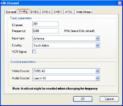
    bzemer - So did you try to set up one of your channels with video- and audio-source as per this attachment?
    80961d1304390762-blast-satelite-box-mediaportal-tv-guide-channel.jpg

    All else I can suggest is that you make screenprints of your setup and attach it here.
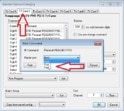
    screenprints of how you defined your channel as well as tv3blaster setup, similar to the following:
    irss.jpg

    srr037 - your problem is not really the same and you also should not post the same question to multiple threads as crossposting is against our forum rules.
     

    bzemer

    Portal Member
    December 4, 2008
    12
    1
    Home Country
    Israel Israel
    Ahhhhhhh!!!!!!!!!!
    You solved it for me.
    The minute I saw the big red arrow pointing to TV card 2, that's when it hit me.
    All this time it was set to TV card 1 - IPTV source filter.
    Damn... I didn't even notice it when I did the setup over and over again.

    Thank you so much for all your patience and help!
    Case closed :)
     

    Users who are viewing this thread

    Top Bottom