
I am using the "eHome Infrared Receiver(USBCIR)" driver. I was able to learn the remote using Translator for my Motorola set-top box. I tested the remote codes with the set-top and it works great. I sent out 200 blasts each about 1 second apart. Every time the set-top box received the IR signal.
I have been having problems with my other set-top box. I was able to learn the remote codes using Translator. When I test the codes every once in a while the set-top box does not respond to the IR signal. When the problem occurs I can see the red light on the IR blaster flash but the green "remote" light on my set-top box does not flash. I opened the channel 0 remote code in "IR File Tool" and clicked "Attempt Decode". I received a message that said "Protocol: Unknown Code: 31909911", when I clicked the ok button I got another message that said "Protocol: NEC Code: 488". Then another message "Use this protocol's carrier frequency (38000)?" I clicked "yes" and then saved the file as "0-test". I tested the remote code and the problem still occurred.
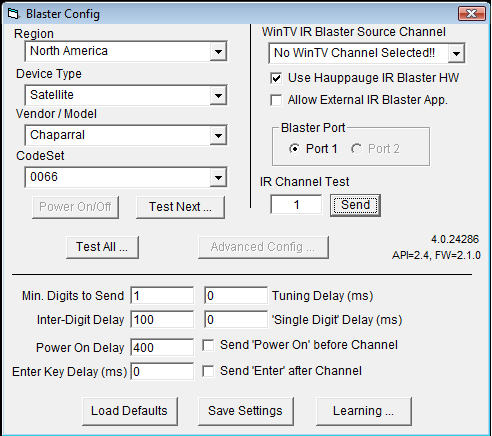
I have a Hauppauge HVR-1600 tv tuner that has a dedicated IR Blaster. I wanted to see if the problem was with the MCE IR blaster/IR Server suite or the set-top box. My set-top box is in the Hauppauge blaster code database that is built into the program. I used the same IR emitter that I used with the MCE blaster. I sent out 200 blasts each about 1 second apart and every time the set-top box received the IR signal. I noticed that the red IR emitter flashed 3 times when I only sent out a single channel digit compared to the MCE IR blaster/IR Server suite which only flashed once.
Since the Hauppauge HVR-1600 tv tuner blaster worked I thought I would use the MCE IR reciever to learn the code. I hooked up the MCE receiver to my laptop and on my desktop computer I used the Hauppauge Blaster program to blast the code. The IR emitter flashed 3 times and the red light on the MCE receiver blinked once. I opened Translator to learn the code. After I clicked the learn button I used my desktop computer to blast the code. The red light on the MCE receiver did not blink. When Translator displayed "Learn IR timed out" I tried blasting the code from the desktop computer and the red light on the MCE receiver blinked.
I have been having problems with my other set-top box. I was able to learn the remote codes using Translator. When I test the codes every once in a while the set-top box does not respond to the IR signal. When the problem occurs I can see the red light on the IR blaster flash but the green "remote" light on my set-top box does not flash. I opened the channel 0 remote code in "IR File Tool" and clicked "Attempt Decode". I received a message that said "Protocol: Unknown Code: 31909911", when I clicked the ok button I got another message that said "Protocol: NEC Code: 488". Then another message "Use this protocol's carrier frequency (38000)?" I clicked "yes" and then saved the file as "0-test". I tested the remote code and the problem still occurred.
I have a Hauppauge HVR-1600 tv tuner that has a dedicated IR Blaster. I wanted to see if the problem was with the MCE IR blaster/IR Server suite or the set-top box. My set-top box is in the Hauppauge blaster code database that is built into the program. I used the same IR emitter that I used with the MCE blaster. I sent out 200 blasts each about 1 second apart and every time the set-top box received the IR signal. I noticed that the red IR emitter flashed 3 times when I only sent out a single channel digit compared to the MCE IR blaster/IR Server suite which only flashed once.
Since the Hauppauge HVR-1600 tv tuner blaster worked I thought I would use the MCE IR reciever to learn the code. I hooked up the MCE receiver to my laptop and on my desktop computer I used the Hauppauge Blaster program to blast the code. The IR emitter flashed 3 times and the red light on the MCE receiver blinked once. I opened Translator to learn the code. After I clicked the learn button I used my desktop computer to blast the code. The red light on the MCE receiver did not blink. When Translator displayed "Learn IR timed out" I tried blasting the code from the desktop computer and the red light on the MCE receiver blinked.

 Norway