
IR Server Suite + Antec V2 with Imon reciever + MCE Remote (1 Viewer)

Crew

Portal Pro
April 24, 2007
61
0
Hi All

The Imon software is driving me nuts. It doesnt work with the tv power button on my MCE remote and a few other buttons are missing. Trying to launch MP is a pain as its from a keyboard shortcut (CTRL+ALT+M) linked in the Imon software to the MCE button. This is great but trying to use the keyboard plugin to get this button combination to go to home screen in MP is frustrating to say the least.

Has anyone successfully got the IR server suite working with this reciever? I tried but got an error saying that IR server suite was not ready to learn codes and after playing around couldnt sort it.

The iMon software is just too limited with multiple software's. If the windows command menu worked on every app apart from the selected app in the program menu it would be so much more useable. If it wouldnt come up with key conflicts between program and window menus it would be great. I did get things working for the majority by setting a program up for explorer. This enabled me to setup ustom commands for windows and for media portal. The problem - sometimes when I press the MCE key to launch MP it says not defined. Something else has got focus, I do not know what.

I have however got the external display working fantastically thats to cybrdisplay. Fantastic bit of software.

I've read as many other threads on this as I can find and nobody has any info on this. I hope some of my descriptions in this thread will save other people time when playing around with the iMon software.

Andy
 

SN33K

Portal Member
February 28, 2007
13
0
Home Country
Netherlands Netherlands
got the same setup. and I'm also not getting the remote to work. some buttons work. like up,down,left,right but back, my movies etc... ain't working. i tried MCE Replacement Plug-in (Vista) and IR Server Suite on my 64bit vista.

need help to.
 

Crew

Portal Pro
April 24, 2007
61
0
To get back working I simply changed it in iMon from the windows command (backspace) to the program setup (mediaportal) escape.

Unlike mce mediaportal uses escape to go back rather than backspace.

Ok after some more playing around I downloaded the IR Server Suite 1.4.2

In this version i can add buttons to the program serction of the translator which is ace as I can add MP as another program and go through all the buttons. I've also disabled the collection of IR codes by iMon. However in MP non of the inbuilt MP control works. Not sure why. And when I try to learn IR codes in any of the IR commands sections it still says the server has not been setup to learn. How do I change this?

Andy
 

kszabo

MP Donator
  • Premium Supporter
  • December 6, 2007
    796
    86
    Germany, Bayern
    Home Country
    Hungary Hungary
    iMon of Antec Fusion works with MCE Remote

    I have got it work. Short description from memory:

    iMon basics:
    iMon Manager controls 2 things: IR receiver and case display. If you use the CybrDisplay Plugin inside MP to control Display from MP, you have to disable the display control in iMon (or close iMon): "Front View" set to never (down under FrontView/general/). If I close iMon, my RC does not work but the display works in MP. If you do not need the RC-Function of iMon, you still have to install iMon because of the display driver (but it does not need to run).

    1. do not install Antec software. Get iMon 7.020.0502 from their website :::confused:oundGraph::: Innovation of Human on Digital Network and install it (without imedianHD)
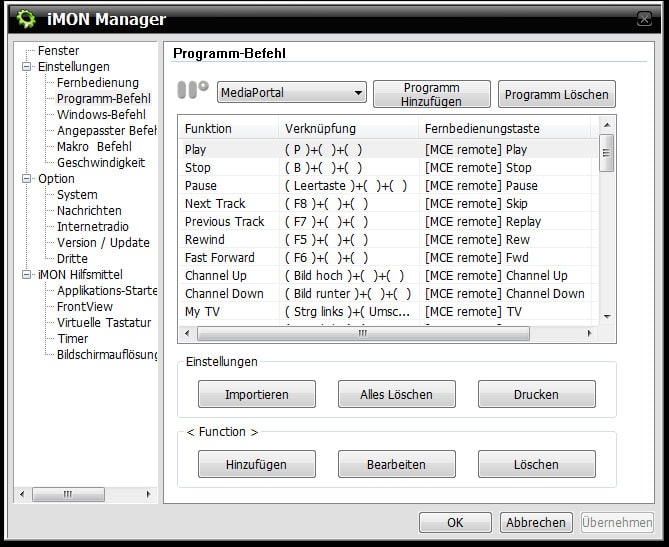
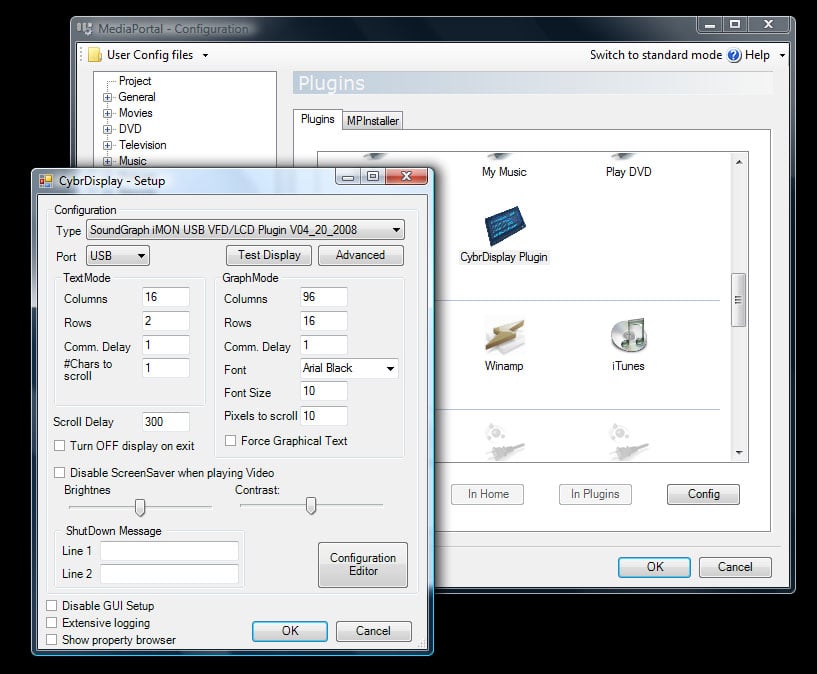
    2. Install iMon and CybrDisplay v.782 Plugin for Mediaportal, configure it as described in its thread (choose display type and connection, and iMon Driver; see 2nd screenshot)

    in iMon Manager you have to do the followings:
    - set MCE as remote device
    - map the left, right, up, down and OK keys of the RC in Settings/Windows commands/ (or like that, i have it in german). Deactivate the rest (to avoid conflicts with other apps)
    - add PowerDVD and Mediaportal under Settings/Application commands to create a profile, you can delete rest if you want (I had Internet Explorer, Powerpoint etc there; see screenshot in german)
    - map your RC-Keys to the functions you need (just check out the keyboard shortcut lists of MP and PDVD) or load mediaportal.imo and pdvd.imo file (.imo config files attached as zip!, import them and modify them to your liking!!!!)
    - choose your default sound device to get controlled through the volume knob of the Antec case (this does not work with Vistas normal driver, you have to install the dedicated driver of the manufacturer like Realtek etc; my setting is "realtek hd audio HDMI")

    Imon switches between the profiles according to the application in the foregroung ("in focus"). If you load PDVD from MP, it switches to PDVD mode, on return to MP it switches back to MP mode. It works great!!

    needed files:
    - iMon 7.020.0502 from their website
    - CybrDisplay v.782 (latest from MP), configure it for the iMon Driver 7.20.0520

    Notes: there are a lot of possibilities to fine tune RC or display, do it yourself, take your time. I do not want to describe everything, just get you roll. e.g. I like to map subtitle and audio toggle to the keys "channel up and down" as you se in my .imo files.
     

    Attachments

    • screen01.jpg
      screen01.jpg
      159.7 KB
    • screen02.jpg
      screen02.jpg
      152.4 KB

    Crew

    Portal Pro
    April 24, 2007
    61
    0
    Hi

    I use a MCE remote and Imon does not have the tv power button and a few others for selection. I also have the problem of loading media portal using the mce button then using this button as the home screen selection.

    Andy
     

    kszabo

    MP Donator
  • Premium Supporter
  • December 6, 2007
    796
    86
    Germany, Bayern
    Home Country
    Hungary Hungary
    I use a MCE remote and Imon does not have the tv power button and a few others for selection. I also have the problem of loading media portal using the mce button then using this button as the home screen selection.
    Andy

    you are right with the TV-Power. But my MCE Remote does not have a TV Power button at all.

    with the green MCE button you are also right, the quickstart function to load MP must be configured under windows commands. But if you do that, you cannot map the green button for homescreen in Mediaportal. But I can live with this, my HTPC starts MP at startup.
     

    simon169

    MP Donator
  • Premium Supporter
  • February 9, 2005
    45
    3
    Erm

    Im a bit confused Im trying to get a antec fusion case with mce remote working again in mediaportal using latest drivers from imon 7.20

    Trying to use kszabo's solution results in the lcd screen not working If I leave Imon Manager running. If I turn it off remote won't work.

    Am I missing something ??

    Thanks
     

    kszabo

    MP Donator
  • Premium Supporter
  • December 6, 2007
    796
    86
    Germany, Bayern
    Home Country
    Hungary Hungary
    Erm
    Trying to use kszabo's solution results in the lcd screen not working If I leave Imon Manager running. If I turn it off remote won't work.

    as I understand you have only a display issue, the remote works as it should.

    1. does the display work at all if iMon runs (without MP)?
    2. did you read this: https://forum.team-mediaportal.com/support-119/cybrdisplay-external-status-plugin-34521/#post228894 , especially the iMON display specific notes? Do it, may help
    3. in MP configuration/plugins/cybrdisplay everything set as should? If you hit the "test display", does the display react?

    I have already set up an Antec Fusion v2 silver with VFD Display and an Antec Fusion Remote Black with LCD Display, without problems. More tricky is the remote thhough...
     

    simon169

    MP Donator
  • Premium Supporter
  • February 9, 2005
    45
    3
    Thx for quick reply

    to clarify things

    the screen works ok in MP when the imon software is turned off

    and the screen works ok with imon software without MP.

    I think MP settings are ok because it works when Imon software off.

    I have just realised that the Imon software has updated from when I originally installed all this and I have not copied the new sg_vfd.dll file into the mediaportal folder, could this be the problem ?? I am at work at the moment so cant test this.

    Thanks
     

    Users who are viewing this thread

    Top Bottom