Issue with Colosso & TV Blaster 3 (1 Viewer)

bornslippy

Portal Pro
December 16, 2008
78
4
Home Country
United States of America United States of America
MediaPortal Version: MediaPortal 1.2.x Final Version
MediaPortal Skin: StreamedMP latest Version 1.7xxx
Windows Version: Win 7 Ultimate
CPU Type: E8400
HDD: Seagate II 160gb
Memory: 4GB DDR2
Motherboard: Asus P5Q??
Video Card: Asus GT430 HDMI out
Video Card Driver: - latest Nivdia Driver from August
Sound Card: Digital Coax
Sound Card AC3: - I use SAF for my codecs
Sound Card Driver: - latest One from Asus
1. TV Card: Hauppauge PVR Colossos
1. TV Card Type: -
1. TV Card Driver: The latest one/up to date
MPEG2 Video Codec: - FFDSHOW - SAF ? I believe or Gabest
MPEG2 Audio Codec: - FFDHOWS - SAF ? I believe
h.264 Video Codec: - CORE
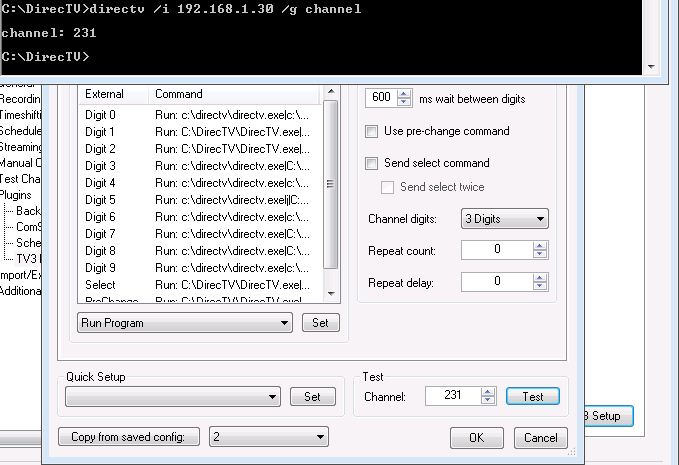
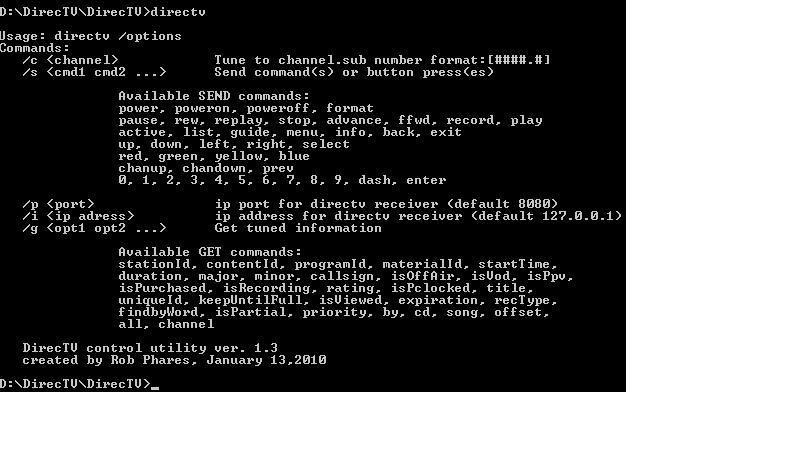
Satelite/CableTV: DirecTV Lexington, Ky - DirecTV HR-24 100 Box using SHEF/IP Commands a nice little program
HTPC Case: Thermaltake ????
Cooling: - 1 80 front 2 40 back 2 60 back 120 top
Power Supply: 450w
Remote: Logictech 990
TV: Samsung 50" Plasma
TV - HTPC Connection: hdmi

The Colosso works great, it pics up the HD channels and SD channels it picks up all the channels I have. At first I only had one problem, btw I am using the IRSS 1.4 the latest one or one told in the one form. When I set it up through TV Blaster using IP change it worked with no problem at all meaning when I tested it in TVServer it would change channels and everything. I thought I was fine. When I would go into TV section I could not change channels at all except for moving the channel button up and down. I couldn't figure out anything I tried different combinations and all that. Now I am screwed. I uninstalled and reinstalled IRSS TV Blaster will show up in plugins I will check it but when I up the plugins I can not get into it. I have checked the logs and don't see anything strange showing up. I even see the setup for my DirecTV box still there.\

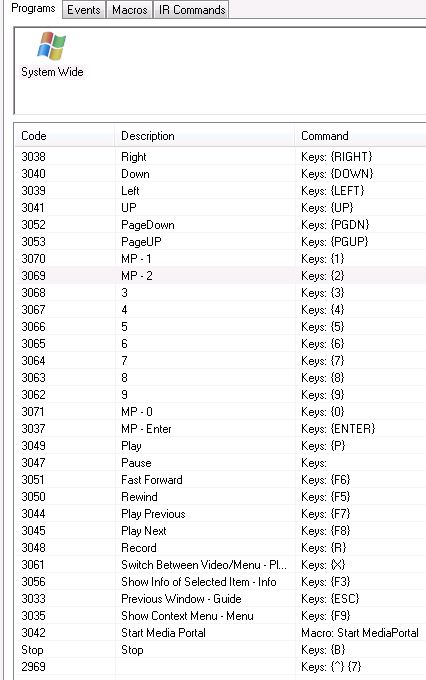
1: Can anyone help me out about changing the channels through the guide and typing in say 202 which takes me to CNN? I can do that in TV Blaster when I could get in and I still can change channels in TVServer Setup but once Media Portal comes up nothing happens i can do jack except for go down turn the TV part on, back out, stop it or pause it which they work. I am using MCE commands and using the control system wide in Translator which has been very good to me. I didn't know if someone could help me out.

2: Last thing, how can I get TV blaster working again. Meaning I can see it, activate it, open up plugins like normal, and then get into it so configure it last I should and have been doing any help please :oops:

Anyone that could help me out post it plus if you know what I need to do because it has happened to you email me please. I want to use MP for everything
 

mm1352000

Retired Team Member
  • Premium Supporter
  • September 1, 2008
    21,544
    8,236
    Home Country
    New Zealand New Zealand
    Hi bornslippy

    So did you follow this guide?

    When I would go into TV section I could not change channels at all except for moving the channel button up and down...
    1: Can anyone help me out about changing the channels through the guide and typing in say 202 which takes me to CNN?
    You need to untick "select channel by index (non-US)" -->here<--.

    2: Last thing, how can I get TV blaster working again. Meaning I can see it, activate it, open up plugins like normal, and then get into it so configure it last I should and have been doing any help please
    If you're using MP 1.2.1 then you need to replace the TVE 3 blaster plugin DLL with the one from -->here<--.

    mm
     

    bornslippy

    Portal Pro
    December 16, 2008
    78
    4
    Home Country
    United States of America United States of America
    yeah I had the 1st one unticked but i did not know about the replacement file. I will put that in my directory and let you know whats going on. thanks for that info..
     

    bornslippy

    Portal Pro
    December 16, 2008
    78
    4
    Home Country
    United States of America United States of America
    Currently I am using the SHEF, IP controls with the directv cmd line program that someone made at dbstalk which rocks. before that I was using serial to usb which did all right.

    If anyone can help me I will take care of you. You if you a storage site I am loaded. I have a NAS unit with two 750gb II just because they were sitting there. I have a 4bay Raid 10 enclosure and 6tb server so I can take care of your storage needs. I have 3MBs dl and I for how many UP I have.

    You can remote into my HTPC if you need to just whatever needs to be done so I can stop having to switch back and forth. Now the directv box is a dvr. I have an extra H23 that I can hook up if need be but I really dont see any issues that will cause here are the logos and screen shots
     

    mm1352000

    Retired Team Member
  • Premium Supporter
  • September 1, 2008
    21,544
    8,236
    Home Country
    New Zealand New Zealand
    Hi again

    So many errors - where to begin!

    --------------------------------------------------------------------------------------------------------
    Okay, first in the TV Server error.log:

    2011-10-07 15:44:36.820159 [TVService(6)]: Exception :confused:ystem.MissingMethodException: Method not found: 'Void TvDatabase.Card..ctor(Int32, System.String, System.String, Int32, Boolean, System.DateTime, System.String, Int32, Boolean, Int32, System.String, Int32, Int32, Int32)'.
    at TvEngine.TV3BlasterPlugin.LoadExternalConfigs()
    at TvEngine.TV3BlasterPlugin.Start(IController controller) in C:\svnroot\mp-plugins\trunk\plugins\IR Server Suite\MediaPortal Plugins\TVServer plugins\TV3 Blaster Plugin\TV3BlasterPlugin.cs:line 158
    at TvService.TvServiceThread.StartPlugins()

    ...which goes with this in the tv.log:

    2011-10-07 15:44:36.814159 [TVService(6)]: TV Service: Plugin: TV3 Blaster Plugin for IR Server started
    2011-10-07 15:44:36.815159 [TVService(6)]: TV3BlasterPlugin: Starting (TV3 Blaster Plugin 1.4.2.0 for TV Server)
    2011-10-07 15:44:36.817159 [TVService(6)]: TV Service: Plugin: TV3 Blaster Plugin for IR Server failed to start

    and

    2011-10-07 15:46:46.101554 [SetupTv(1)]: Exception :confused:ystem.MissingMethodException: Method not found: 'Void TvDatabase.Card..ctor(Int32, System.String, System.String, Int32, Boolean, System.DateTime, System.String, Int32, Boolean, Int32, System.String, Int32, Int32, Int32)'.
    at TvEngine.TV3BlasterPlugin.LoadExternalConfigs()
    at TvEngine.Forms.PluginSetup.OnSectionActivated() in C:\svnroot\mp-plugins\trunk\plugins\IR Server Suite\MediaPortal Plugins\TVServer plugins\TV3 Blaster Plugin\Forms\PluginSetup.cs:line 71
    at SetupTv.SetupTvSettingsForm.ActivateSection(SectionSettings section)

    ...which goes with this in the tv.log:

    2011-10-07 15:46:46.086553 [SetupTv(1)]: TV3BlasterPlugin: Configuration activated

    These are caused by changes in the database interface in TV Server 1.2.1 and should both have been solved by the updated DLL that I pointed you to. That DLL should have been placed in the Plugins subfolder of your TV Server install folder, and then TV Server should have been restarted.

    Did you do that, and did these problems go away?

    --------------------------------------------------------------------------------------------------------
    Then there is also this message which also occurs rather frequently in the TV Server error log:

    2011-10-07 15:21:01.936232 [(21)]: DirecTV_SHEF - DirecTV_SHEF_OnTvServerEvent(): Invalid URI: The hostname could not be parsed.

    The corresponding entries in the tv.log are:

    2011-10-07 15:21:01.934232 [(21)]: ServerBlaster - CardId: 2, Channel: 639 - Channel:639 SNYHD - VideoSource: YRYBYInput1
    2011-10-07 15:21:01.938233 [(21)]: TV3BlasterPlugin: Received TV Server Event "StartZapChannel"
    2011-10-07 15:21:01.938233 [(21)]: TV3BlasterPlugin: Analog channel input source "YRYBYInput1"
    2011-10-07 15:21:01.939233 [(21)]: TV3BlasterPlugin: Tune request - Card: 2, Channel: 639, 639 SNYHD
    2011-10-07 15:21:01.940233 [ProcessExternalChannel(24)]: TV3BlasterPlugin: ProcessExternalCommand("Run: C:\DirecTV\DirecTV.exe|C:\DirecTV|directv /i 192.168.1.30 /c |Hidden|True|False|False|False", -1, 639)

    I'm not sure what these mean. Perhaps something to do with the hostname of the IRSS server?

    --------------------------------------------------------------------------------------------------------
    Then this:

    2011-10-07 15:21:01.186190 [ProcessExternalChannel(27)]: System.ComponentModel.Win32Exception: The system cannot find the file specified
    at System.Diagnostics.Process.StartWithCreateProcess(ProcessStartInfo startInfo)
    at System.Diagnostics.Process.Start()
    at IrssUtils.Common.ProcessRunCommand(String[] commands) in D:\IRSS\IR Server Suite\Common\IrssUtils\Common.cs:line 531
    at TvEngine.TV3BlasterPlugin.ProcessExternalCommand(String command, Int32 channelDigit, String channelFull) in D:\IRSS\MediaPortal Plugins\TVServer plugins\TV3 Blaster Plugin\TV3BlasterPlugin.cs:line 541
    at TvEngine.TV3BlasterPlugin.ProcessExternalChannel(Object args) in D:\IRSS\MediaPortal Plugins\TVServer plugins\TV3 Blaster Plugin\TV3BlasterPlugin.cs:line 493

    ...which corresponds with this in the tv.log:

    2011-10-07 15:21:01.185189 [ProcessExternalChannel(27)]: TV3BlasterPlugin: ProcessExternalCommand("Run: c:\directv\directv.exelj|C:\directv\|directv /i 192.168.1.30 /s 5|Hidden|True|False|False|False", 5, 853)

    You were trying to tune to channel 853 just prior to that. I think that means that the blaster plugin couldn't find "c:\directv\directv.exe" or received a key for which there is no command learnt.

    --------------------------------------------------------------------------------------------------------
    Lastly, there is clearly something wrong in the MP logs. I see "MPControlPlugin: keyCode "57469" was not handled" over and over again (like roughly 13000 times). Have you got a stuck key or something?

    To be honest it really isn't clear to me what you were trying to do in these logs and I'm not sure that I'm clear exactly what the problem are now. It would help if you could delete all the logs and then do a simple action to illustrate one of the problems as the number of issues here and the length of your logs is a little overwhelming.

    mm
     

    bornslippy

    Portal Pro
    December 16, 2008
    78
    4
    Home Country
    United States of America United States of America
    Tonight when I get to work I will do what you have said. I thought I did dl the .dll file but right now who knows. I will do it again. I will make shorter logs for you and post them when I get to work to night. Once again that you for helping me out. If I can get this fix then MP will be complete for me.
     

    bornslippy

    Portal Pro
    December 16, 2008
    78
    4
    Home Country
    United States of America United States of America
    I did a quick test right now after installing those new files and bouncing my htpc. here are the logs.
     

    mm1352000

    Retired Team Member
  • Premium Supporter
  • September 1, 2008
    21,544
    8,236
    Home Country
    New Zealand New Zealand
    Hi again bornslippy

    So it looks to me like all those previous errors are sorted. I'm proceeding under the assumption that we're now trying to get channel changing by channel number working - let me know if that is not correct.

    What I see in the logs is... well, very little if anything seems to have gone wrong. First I see you open TV Server configuration and use the blaster plugin to blast 0102 to the STB:

    2011-10-12 13:48:17.080329 [SetupTv(1)]: ---- SetupTv v1.2.1.0 is starting up on Windows 7 ( Service Pack 1 ) [6.1.7601.65536]
    ...
    2011-10-12 14:16:34.066910 [SetupTv(1)]: TV3BlasterPlugin: ProcessExternalCommand("Run: c:\directv\directv.exe|c:\directv\|directv /i 192.168.1.30 /s 0|Hidden|True|False|False|False", 0, 0102)

    2011-10-12 14:16:34.378910 [SetupTv(1)]: TV3BlasterPlugin: ProcessExternalCommand("Run: C:\DirecTV\DirecTV.exe|C:\DirecTV\|directv /i 192.168.1.30 /s 1|Hidden|True|False|False|False", 1, 0102)

    2011-10-12 14:16:34.690911 [SetupTv(1)]: TV3BlasterPlugin: ProcessExternalCommand("Run: c:\directv\directv.exe|c:\directv\|directv /i 192.168.1.30 /s 0|Hidden|True|False|False|False", 0, 0102)

    2011-10-12 14:16:35.002911 [SetupTv(1)]: TV3BlasterPlugin: ProcessExternalCommand("Run: C:\DirecTV\DirecTV.exe|C:\DirecTV\|directv /i 192.168.1.30 /s 2|Hidden|True|False|False|False", 2, 0102)

    There is no indication whether that succeeds or fails - can you confirm success/failure there?

    After that I see a tune request from MediaPortal for channel 102 NEWSMIX. Everything seems to work perfectly with the blaster sending 102 (note no leading 0 sent):

    2011-10-12 14:16:57.112357 [ProcessExternalChannel(16)]: TV3BlasterPlugin: ProcessExternalCommand("Run: C:\DirecTV\DirecTV.exe|C:\DirecTV\|directv /i 192.168.1.30 /s 1|Hidden|True|False|False|False", 1, 0102)

    2011-10-12 14:16:57.413375 [ProcessExternalChannel(16)]: TV3BlasterPlugin: ProcessExternalCommand("Run: c:\directv\directv.exe|c:\directv\|directv /i 192.168.1.30 /s 0|Hidden|True|False|False|False", 0, 0102)

    2011-10-12 14:16:57.714392 [ProcessExternalChannel(16)]: TV3BlasterPlugin: ProcessExternalCommand("Run: C:\DirecTV\DirecTV.exe|C:\DirecTV\|directv /i 192.168.1.30 /s 2|Hidden|True|False|False|False", 2, 0102)

    Again, not sure whether this was a success or failure.

    Comments?

    mm
     

    bornslippy

    Portal Pro
    December 16, 2008
    78
    4
    Home Country
    United States of America United States of America
    when I am in TV Server Config everything works fine. I can change channels, use time shift, manual test and all that. It's when I load MP and get into the TV Plugin that's when I have issues. I am not able to change channels except for using the channel up and channel down on my remote. Sometimes if I hit the #2 it will do 2222 instead of just one then it will try to finish the rest after DirecTV says can not find channel. So then it will go 02 if I wanted to go to CNN which is 202. As you can see I am using a program that I got from DBSTALK.com It's a very nice program outside of MP. I have actually made a nice little program for my android tablet to control just DTV. I will do some more tests, i am at work so I will not be able to use my remote but I can also show you how I have my Translator setup as well. I didn't know if you wanted to see my translator or tv codecs but I went ahead & did a snip it of them anyways (bored at work, working at a University Data Center 3rd shift) Also I forgot to mention, I have winTV 7.2x installed also, should I uninstall it? It does have things running in the back ground. I really do appreciate all of your help. You have been very helpful.
     

    Attachments

    • DTVMP.jpg
      DTVMP.jpg
      56.9 KB
    • TVConfigMP.JPG
      TVConfigMP.JPG
      74.1 KB
    • translator.JPG
      translator.JPG
      66.2 KB
    • MPerrorTVLog13-10-11.rar
      5.9 KB
    • MPerrorLog13-10-11.rar
      77.6 KB

    mm1352000

    Retired Team Member
  • Premium Supporter
  • September 1, 2008
    21,544
    8,236
    Home Country
    New Zealand New Zealand
    Still looking, but it looks like you've made a mistake in the command for sending '5' (the j).
     

    Users who are viewing this thread

    Top Bottom