Australia
TV-Server Version: 1.0.2.0
MediaPortal Version: 1.0.2.0
MediaPortal Skin: StreamedMP
Windows Version: XP Pro SP3
CPU Type: AMD AM2 dual core 4800+
HDD: 250GB SATA
Memory: 2GB DDR2 667 Corsair Value Select
Motherboard: MSI K9N Platinum
Video Card: Gigabyte 8500GT 256MB PCI-e
Video Card Driver:
Sound Card: On-board (Real-tek)
Sound Card AC3: optical out via SPDIF
Sound Card Driver:
1. TV Card: DigitalNow Dual Hybrid PCIe S2
1. TV Card Type: DVB-T + analog
1. TV Card Driver:
2. TV Card:
2. TV Card Type:
2. TV Card Driver:
3. TV Card:
3. TV Card Type:
3. TV Card Driver:
4. TV Card:
4. TV Card Type:
4. TV Card Driver:
MPEG2 Video Codec: Cyberlink Video/SP Decoder (PDVD9)
MPEG2 Audio Codec: AC3Filter
h.264 Video Codec: MPC - Video Decoder
Satelite/CableTV Provider:
HTPC Case: Silverstone LC20-M
Cooling: 2x Noctua 80mm fans
Power Supply: Corsair VX450
Remote: iMON
TV: Pioneer PDP-508XDA
TV - HTPC Connection: DVI -> HDMI
I have just completed a fresh install of MP1.0.2
I am currently using SAF 3.47 along with AC3Filter to stop the MKV/DTS stutter issue.
I also have a number of MKV files which I encoded myself using Staxrip and its HE-AAC 5.1 for the audio.
Whenever I play one of these files in MediaPortal, it only plays as stereo instead of 5.1
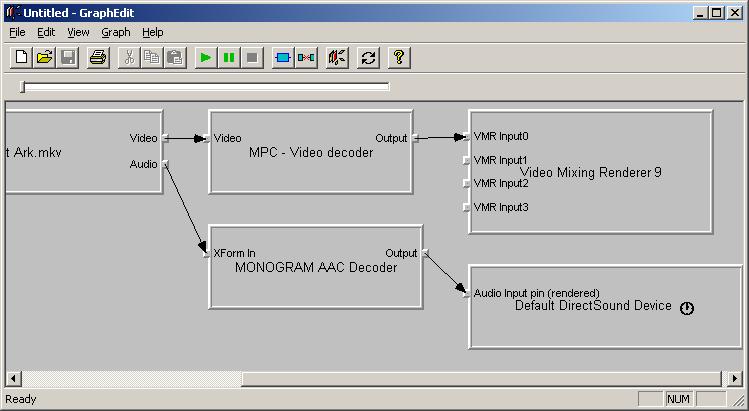
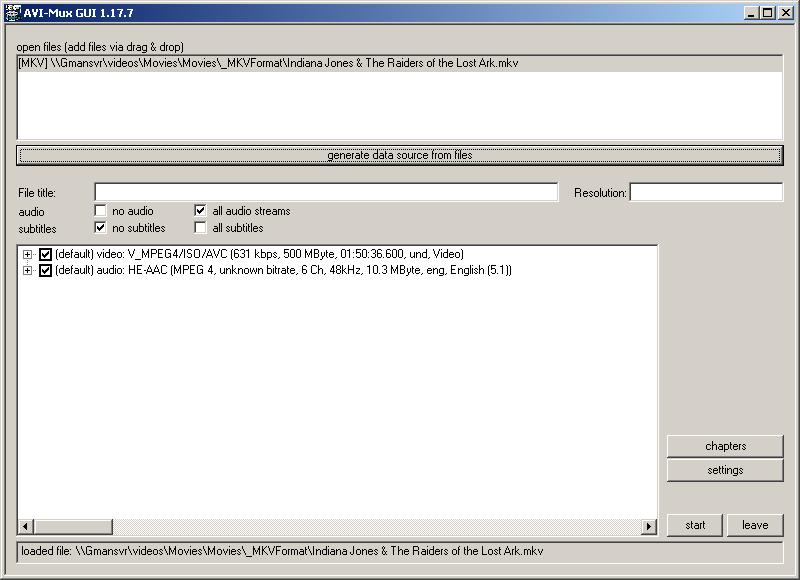
I have included a screenshot of the GraphEdit while playing one of the movies and it is using the Monogram AAC decoder. I have also included a screenshot from AVIMuxGUI which shows that the file has 6 channel audio.
In the DirectShow Filter Control options in MP for Monogram, I have not changed anything.
I am hoping someone may be able to provide me with some guidance as to how I can trouble shoot/fix this issue.
I am trying to avoid installing a large number of codecs to keep the system as clean as possible.
I think in the past I may have had it working by using FFDShow and setting something in the Mixer, Output options for encoding only 5.1 sources (unsure of the exact option as I currently don't have FFDShow installed).
MediaPortal Version: 1.0.2.0
MediaPortal Skin: StreamedMP
Windows Version: XP Pro SP3
CPU Type: AMD AM2 dual core 4800+
HDD: 250GB SATA
Memory: 2GB DDR2 667 Corsair Value Select
Motherboard: MSI K9N Platinum
Video Card: Gigabyte 8500GT 256MB PCI-e
Video Card Driver:
Sound Card: On-board (Real-tek)
Sound Card AC3: optical out via SPDIF
Sound Card Driver:
1. TV Card: DigitalNow Dual Hybrid PCIe S2
1. TV Card Type: DVB-T + analog
1. TV Card Driver:
2. TV Card:
2. TV Card Type:
2. TV Card Driver:
3. TV Card:
3. TV Card Type:
3. TV Card Driver:
4. TV Card:
4. TV Card Type:
4. TV Card Driver:
MPEG2 Video Codec: Cyberlink Video/SP Decoder (PDVD9)
MPEG2 Audio Codec: AC3Filter
h.264 Video Codec: MPC - Video Decoder
Satelite/CableTV Provider:
HTPC Case: Silverstone LC20-M
Cooling: 2x Noctua 80mm fans
Power Supply: Corsair VX450
Remote: iMON
TV: Pioneer PDP-508XDA
TV - HTPC Connection: DVI -> HDMI
I have just completed a fresh install of MP1.0.2
I am currently using SAF 3.47 along with AC3Filter to stop the MKV/DTS stutter issue.
I also have a number of MKV files which I encoded myself using Staxrip and its HE-AAC 5.1 for the audio.
Whenever I play one of these files in MediaPortal, it only plays as stereo instead of 5.1
I have included a screenshot of the GraphEdit while playing one of the movies and it is using the Monogram AAC decoder. I have also included a screenshot from AVIMuxGUI which shows that the file has 6 channel audio.
In the DirectShow Filter Control options in MP for Monogram, I have not changed anything.
I am hoping someone may be able to provide me with some guidance as to how I can trouble shoot/fix this issue.
I am trying to avoid installing a large number of codecs to keep the system as clean as possible.
I think in the past I may have had it working by using FFDShow and setting something in the Mixer, Output options for encoding only 5.1 sources (unsure of the exact option as I currently don't have FFDShow installed).