MediaPortal Test Drive (1 Viewer)

mike_b

Portal Member
July 19, 2011
6
1
Cascade Mountains of Oregon
Home Country
United States of America United States of America
Hi,

I'm a SageTV refugee looking to try different HTPC software. My goals are simple, I want to record over-the-air TV shows and automatically skip commercials during playback. It looks like MediaPortal is a nice interface to record TV shows and I see that there is a Comskip plugin to skip commercials.

I will be installing MediaPortal on a spare Windows XP SP3 computer with an AMD X2 dual core 2.6 GHz processor with 2GB of memory. I ordered an HVR-1250 TV Tuner card that will be here in a few days to use in this test system. I was reading the XP Setup Guide. I am a little confused about the codec section. Do I need to install a codec to play recorded TV shows? If so, which one?

For guide data it looks like WebEPG is the best solution for U.S. guide data. Is this a good source for 14 days of U.S. guide data?

Also, thank you for the great documentation in the wiki. It is the best I've seen for HTPC software!

Thank you,
Mike
 

stevewabc

Portal Member
November 21, 2010
27
9
Home Country
United States of America United States of America
Hi,

I'm a SageTV refugee looking to try different HTPC software. My goals are simple, I want to record over-the-air TV shows and automatically skip commercials during playback. It looks like MediaPortal is a nice interface to record TV shows and I see that there is a Comskip plugin to skip commercials.

I will be installing MediaPortal on a spare Windows XP SP3 computer with an AMD X2 dual core 2.6 GHz processor with 2GB of memory. I ordered an HVR-1250 TV Tuner card that will be here in a few days to use in this test system. I was reading the XP Setup Guide. I am a little confused about the codec section. Do I need to install a codec to play recorded TV shows? If so, which one?

For guide data it looks like WebEPG is the best solution for U.S. guide data. Is this a good source for 14 days of U.S. guide data?

Also, thank you for the great documentation in the wiki. It is the best I've seen for HTPC software!

Thank you,
Mike


Mike here this will be helpful and you also can find me on the IRC as Homefront I would be glad to help get you up and going... but take a look here this will speed up your install. MediaPortal Setup Guide
 

mm1352000

Retired Team Member
  • Premium Supporter
  • September 1, 2008
    21,544
    8,236
    Home Country
    New Zealand New Zealand
    Hi Mike

    Welcome, and I hope you find MediaPortal to your liking. :)
    Just a few quick comments from a different perspective in the hope that they might be useful to you...

    I am a little confused about the codec section. Do I need to install a codec to play recorded TV shows?
    You need to have codecs to get videos and TV to play. Without codecs, video and TV won't work. Recorded TV is no different from any other video (except that it was "created" by TV Server), so *yes* you need codecs to play recorded TV shows. If you're able to watch live TV then you should be able to watch the recordings too.

    If so, which one?
    That is a million dollar question. :D
    Let's talk about availability first.

    Most people already have some codecs installed on their system. If you were using Windows 7 then you'd have some Microsoft codecs (which are pretty reasonable). Other media software like Arcsoft TMT, PowerDVD, WinDVD, DivX... they all install codecs that are *usually* usable in MediaPortal (I say usually because Cyberlink have become scrooges and prevent you using their codecs in 3rd party software like MediaPortal). ATI and NVidia software sometimes installs codecs. In general, many media/video playback related applications will install codecs.

    As if that wasn't enough, there are tons of codecs like FFDShow, AC3Filter, LAV, CoreAVC... available to download. Many for free; there is a free codec for almost any media format known to man. Just visit free-codecs.com and you'll see what I mean. Some people have created bundles of codecs like klite, Shark, SAF... sometimes they do more damage than good because codec packs can interfere with eachother.

    Finally, as Ray has said, MP also comes with some basic codecs. They don't work with all formats (in particular, the video codec doesn't support h.264 video), but they're a reasonable starting point for people that aren't technically minded.

    Okay, moving on from availability...
    Some codecs are better than others. By better I mean they can decode more formats, produce higher quality output, and support hardware accelerated decoding (DxVA - ie. using your video card to decode the video, which frees up your CPU to do other things). The first thing (decoding more formats) may not matter too much. As long as you have codecs for MPEG 2 and h.264 video, and MPEG, AC3 and AAC audio you should be sweet. The second thing is reasonably subjective - personally I don't worry too much about quality these days as long as the video works since most codecs are very good at what they do. Hardware acceleration is definitely important for h.264 video though. A couple of years ago there were only a handful of codecs that supported it. Now there are many. Some like FFDShow DxVA are free.

    So which should you choose?
    In my opinion, whatever is most convenient and whatever works. If you have a large collection of internet downloads in various formats or you're not technically minded then a codec pack like SAF is recommended. Free, does the job well, excellent support... can't ask for much more. It is probably a good option for XP, otherwise the Microsoft video codec coupled with AC3Filter or similar is probably a good combination too.

    For guide data it looks like WebEPG is the best solution for U.S. guide data. Is this a good source for 14 days of U.S. guide data?
    I'm not so well versed in my US guide data source knowledge, but I am aware of a few alternatives. Namely SchedulesDirect, and mc2xml. From what I read, SchedulesDirect is probably the most "polished" and user friendly option, however it does cost money. mc2xml is a free (I *think*) way to grab and convert Microsoft's listings into a format (XMLTV) that TV Server can work with. There is an excellent walkthrough for XMLTV setup in our wiki -->here<--. Further than that I probably can't be much help.

    Also, thank you for the great documentation in the wiki. It is the best I've seen for HTPC software!
    Thank you for the compliment and the feedback! :)
    I agree that the docs group (with help from the wider team and community) do a *fantastic* job. Do remember that you can contribute to the wiki, so if you notice anything that is missing or that would have aided your setup experience then please help us out in that area. It would be *much* appreciated.

    mm
     

    mike_b

    Portal Member
    July 19, 2011
    6
    1
    Cascade Mountains of Oregon
    Home Country
    United States of America United States of America
    MP comes with tv codecs supplied, just not the best, you might want to look at hoborgs SAF6 pack found here on the forum, make sure you uninstall any other codecs prior to installing, pm hoborg for the unlock key.
    Thanks Ray. I sent hoborgs a private message to get the unlock key. I'm not exactly sure how the unlock key is used, but I'm sure it will become apparent as I move along.

    Mike here this will be helpful and you also can find me on the IRC as Homefront I would be glad to help get you up and going... but take a look here this will speed up your install. MediaPortal Setup Guide
    Your configuration guide looks great Steve. I will certainly reference it when I begin installing and configuring MediaPortal. I think I'll wait a couple days before I do anything. The HVR-1250 tuner card will be here then. If I'm happy with MediaPortal I will take the HVR-2250 tuner out of my SageTV computer and use it in the MediaPortal computer.

    Welcome, and I hope you find MediaPortal to your liking. :)
    Just a few quick comments from a different perspective in the hope that they might be useful to you...
    mm
    mm, thank you for the detailed explanations. I've never had a good understanding of codecs. Your explanation was very helpful. In the SageTV world I used the HD200 extender so there was no need to worry about codecs. I've been reading other posts in the forum about guide data and it sounds like the SchedulesDirect solution is the easiest to get up and running. I've also been reading more of the wiki and I'm really impressed. It's a great resource.

    :D everyone!
     

    Paranoid Delusion

    Moderation Manager
  • Premium Supporter
  • June 13, 2005
    13,052
    2,978
    Cheshire
    Home Country
    United Kingdom United Kingdom
    Key plus SAF exe need to be in the same folder, ie downloads, so when you run the installer it can download extra necessary files.

    If you have already installed SAF6, then just uninstall and reinstall with key, no problem doing that.

    All the best with getting MP up and running.
     

    milhouse

    Portal Pro
    November 9, 2006
    363
    54
    52
    Raleigh, NC U.S.
    Home Country
    United States of America United States of America
    For EPG data, I would highly recommend Schedules Direct. Yes, it's $15/year year. But as you are evaluating, they also have a free trial (30 days, I think). It's way easier than getting appropriate scrapers and xml converters set up and scheduled right. It just works, and doesn't need to be updated like many of the scrapers do. 14 days worth of data.

    milhouse
     

    mike_b

    Portal Member
    July 19, 2011
    6
    1
    Cascade Mountains of Oregon
    Home Country
    United States of America United States of America
    I received my HVR1250 TV tuner card for my spare PC. I followed the wiki setup guide as well as Steve's setup guide to install and configure the software. This went well and I was quickly using the Schedules Direct guide data and recording TV.

    I only have two basic requirements. To record over-the-air TV and automatically skip commercials.

    Recording and viewing TV works fine. However, I'm failing miserably at automatically skipping commercials. I first wanted to try version 1.2. But I then read in the wiki that ComskipLauncer is not one of the 1.2 compatible plugins. I tried it anyway but could not get comskip to launch automatically after a show completed. I could run the "Test" button from ComskipLauncher and the comskip txt file was created.

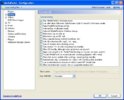
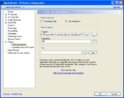
    I restored my XP base image and installed version 1.1.3. Again, I can record and view TV, but ComskipLauncher does not launch comskip. I can run the "Test" button from ComskipLauncher and the comskip txt file is created. But now the commercials are not automatically skipped. Apparently, the commercials can only be skipped if the files are played from the Videos folder. This actually worked, but why such a strange workaround? I attached a couple screenshots and the TV log.

    I would like to use MediaPortal 1.2. What is the secret to get ComskipLauncher to launch comskip?
     

    Attachments

    • mpconfig.jpg
      mpconfig.jpg
      88.1 KB
    • comskiplauncher.jpg
      comskiplauncher.jpg
      66.2 KB

    mike_b

    Portal Member
    July 19, 2011
    6
    1
    Cascade Mountains of Oregon
    Home Country
    United States of America United States of America
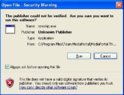
    Thanks for the info TLD. I was using the files that you referred to. I accidentally stumbled upon the problem. ComskipLauncher was trying to launch comskip, but was stopped by the attached XP security warning. I was running MediaPortal in full screen mode so I couldn't see the warning. I answered the dialog box and now comskip is running on all recordings when the show ends.

    The next goal was to have comskip process the show while the show was recording. I changed the TV Server config from "Recording End" to "Recording Start". My intention is to let comskip process a few minutes of the show and then start watching the recorded show from the beginning and have the commercials skipped. "Recording Start" did not work until I changed the live_tv value from 0 to 1 in the comskip.ini file. Comskip now starts processing the show immediately, but does not skip the commercials until the show has ended. In SageTV I can let the show record for a few minutes and then watch the show from the beginning and have the commercials skipped as the show is recording. Is this possible in MediaPortal?
     

    Attachments

    • comskip.jpg
      comskip.jpg
      31.3 KB

    Users who are viewing this thread

    Top Bottom