Ongoing My HTPC without enclosure in a cabinet. (1 Viewer)

Peter2

MP Donator
  • Premium Supporter
  • September 18, 2006
    847
    53
    Home Country
    Belgium Belgium
    Inspired by this build I started my own DIY project: my antec case is to wide for the tv cabinet and I would like to make it less visible in the living area.
    The tv cabinet has 2 vertical panels which are to close to eachother and at first I thought of changing the structure but by putting the HTPC in that cabinet, there is not much reason to keep the enclosure.
    So I decided to put the components without the enclosure and not change the structure, which is a lot easier.
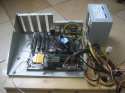
    I have cut the tray and backplate from an obsolete tower case to be able to hold the mobo and especially fix the tuner card.
    Because the part which will hold the pc has a typical cardboard back I thought of also cutting the part that holds the PSU from an obsolete case so I can screw that part to the cardboard and fix the PSU like in a pc enclosure.
    Since the front of the cabinet is open, I thought of closing the part which holds the pc with a wooden front panel which has 1 or 2 openings with dustfilters.

    I have the switch, LED's and USB ports from a pc that I will put on this wooden panel.
    At the backside, I will put 1 or 2 fans - guess 120mm - to create airflow.

    Any suggestions about how to create the optimum airflow are welcome; that is the number/size of openings/fans and the position.
     

    Luca Brasi

    MP Donator
  • Premium Supporter
  • November 14, 2007
    1,026
    119
    Home Country
    Germany Germany
    The main principle about cooling is to imagine how the airflow in your case will behave. Hot air will always ascend on it's own in the first place. Start with this concept and improve it if needed by adding some speed to the stream with some fans.
    This means, get fresh air in at the front bottom of the case, let it flow over your components and push it out at the back top.

    Some additional advices
    - Put critical devices like HDDs in the fresh air at the beginning of the airflow
    - Try to get hot stuff like the cpu cooler more to the back
    - Make sure that the opening(s) for the intake air is big enough. In most cases you don't need intake fans.
    - Put the outtake fans near the hottest components to prevent heat accumulations under the top
    - Make sure that the air can get away once it left the case.

    For quiet operation
    - Control your fan speeds. These days your mainboard should do that...
    - Try to absorb all vibrations from components with moving parts like fans, hdds....
     

    Peter2

    MP Donator
  • Premium Supporter
  • September 18, 2006
    847
    53
    Home Country
    Belgium Belgium
    Hi Luca, thank you for stepping in!

    I guess I will start with 1 intake opening at the front, 1 fan at the back and put the HDD close to the intake with a zalman heatpipe cooler that I already have.
    Other than that, there is the TV card which gets quite warm.
    The Cpu is running stock speed and should not be a problem I think, temps are currently 30°C idle and 54°C under 90% load when transcoding.

    One of the 'challenges' is the PSU, there are 3 possible options:
    1) horizontally, but that takes to much space and I wonder what might be the effect on keeping the PSU cool that way
    2) vertically as in the picture
    IMG_2663.JPG
    3) in another compartment but then I might have a problem with cable lengths

    Another option would be to rotate the mobo 90° ccw so the backside is not blocking the airflow but then it's perpendicular to the TV card.

    What do you think about putting the TV card without fixing it, just inserting it in the mobo?
    That way I can leave the whole enclosure part off and airflow is maximal.

    All suggestions are welcome and thanks for thinking with me.
    P.
     
    Last edited:

    Luca Brasi

    MP Donator
  • Premium Supporter
  • November 14, 2007
    1,026
    119
    Home Country
    Germany Germany
    I guess you will be fine with option 2 for the psu. That way the psu fan will help with the outtake. This is the legacy atx standard. If you notice the psu fan making to much noise after installation you might consider installing it rotated 180° and cut a own intake hole for the psu in the right side board. This is how most of the cases are built currently. If it gets noisy depends on the temperature in your case, the built in fan an especially its speed control.

    What do you think about putting the TV card without fixing it, just inserting it in the mobo?
    That way I can leave the whole enclosure part off and airflow is maximal.
    Think it will work and is the best solution. Have a look at Lehmden's installation, he is running it that way...
     

    Peter2

    MP Donator
  • Premium Supporter
  • September 18, 2006
    847
    53
    Home Country
    Belgium Belgium
    Ok, I will leave that partial enclosure out which makes it a lot easier and I get more space.

    Luca, I was wondering about the PSU on it's side because in an enclosure it is at the top and of course the lifting hot air finds it's way by itself to that fan.
    The 'problem' by putting the PSU on it's side is that I have to increase the height in the cupboard by lowering the bottom panel on which the components will sit.
    I wonder if I mount the PSU horizontally with it's back to the top panel and with an opening between itself and the bottom panel it would make any difference compared to on it' side regarding cooling.

    @Lehmden: thanks for joining with your expertise. Good idea about fixing the cable!
     

    Luca Brasi

    MP Donator
  • Premium Supporter
  • November 14, 2007
    1,026
    119
    Home Country
    Germany Germany
    I wonder if I mount the PSU horizontally with it's back to the top panel and with an opening between itself and the bottom panel it would make any difference compared to on it' side regarding cooling.
    If I get you right I guess it will be be fine for the psu itself as it gets relatively cool air from the bottom of the enclosure. It will not contribute to the outtake of hot air from other components but you should be fine on account of the additional fan in the back.
     

    Peter2

    MP Donator
  • Premium Supporter
  • September 18, 2006
    847
    53
    Home Country
    Belgium Belgium
    I'm testing right now with the mobo on another tray that I had which has no upstanding sides so it's smaller then that part of the enclosure I had cut out.
    The TV card is only holding by the tension of the slot which seems to be OK.
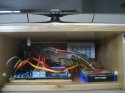
    Right now, the PSU is on it's side because I still do not have enough space to put it horizontally.
    Next thing to do is search for something to replace the mobo tray because it is for a full size ATX mobo so it's to wide. I could cut it but I think it's better to have some rubber pads or washers to put the mobo on so I gain space on the bottom panel & it's better to absorb vibrations/sound.
    IMG_2665.JPG

    Temps are slightly higher since there is no real airflow.
    I think I will hang the PSU horizontally, to the top in the righthand corner at the back and open up to the back so the hot air from the PSU itself can at least leave that space.

    When the components are arranged and I'm sure about the needed height, I will create a wooden front panel to hold an air intake with filter, the power switch and power LED.
    Another thing I will do is to modify the whole back panel.
    Behind the HTPC is an opening for all the cables that was already there but I somehow want to close as much possible and put a fan at the back.
    Since the amplifier is generating quite some heat, I will foresee an opening just below the HTPC compartment for the whole width and might put some speaker fabric. That way I can also create an opening for the cables going to the amplifier and isolate both compartments from each-other, mainly to keep the HTPC cooler.
     
    Last edited:

    Peter2

    MP Donator
  • Premium Supporter
  • September 18, 2006
    847
    53
    Home Country
    Belgium Belgium
    A little update.
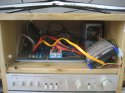
    1) I have removed the tray and used some rubber pads screwed together on a thin wooden rail
    2) opened the back to fix the PSU to it and some of the heat leaves the compartment

    IMG_2681.JPG

    Next, I will lift the bottom shelf by 5 cm so that the height becomes 14 cm which is what I need for the TV tuner.
    Another idea is to use a riser card for the TV tuner so that I can lift the bottom even more, mainly to decrease the volume in the box but a new problem rises on how to position/fix this riser card with TV tuner above the mobo and I wonder if this is worth doing so.

    What do you guys think: will this have any noticeable effect on temps?
    Remember, I want to close the front completely with probably at least the power LED, power button and if needed an air intake with filter.
    If the intake opening is necessary because of temps getting to high, I think putting it to the right close so the HD gets cool air and put a fan at the back-left, somewhere close the TV card.

    Any comments, ideas, ... are very appreciated.
     
    Last edited:

    Luca Brasi

    MP Donator
  • Premium Supporter
  • November 14, 2007
    1,026
    119
    Home Country
    Germany Germany
    Puh, honestly I'd be concerned about the temps if you proceeded like you described. Decreasing the height will make cooling more difficult. I guess if you close the front in any way you will need some more outtake in the back. And I would go with some 120mm fan in that case. And you will need intake air in the front definitely. Right now your setup is more like an running a system openly on a table. As soon as you close the front it is a complete different story.
    Additionally you should think about easy access to the hardware and that you might add some stuff in the future.
    So my advice is to cut a nice round hole in the back near the tv card and install a fan. Install a cover with a big enough intake at its right side.

    If you doubt my feeling about the temps you could try to simulate how it's gonna be. Take some paperboard and tape and close the front almost completely. Then take aida64 and do the stability test. Have a close eye on the temps.
     

    Users who are viewing this thread

    Top Bottom