Sweden
Hi Everyone!
Just another tool for you people, who likes MyFilms!
Brief:
This tool creates an XML file which is intended to be used in MyFilms. It will download movie info from the web including posters. Currently only imdb is supported. Can be used as a window App or as a Plugin to MediaPortal.
Precondition:
Movies should be in a structure like this:
Movies
|->Movie1
|->Movie2
|...
An Url to the imdb of the current movie, should be placed in the same folder as the movie it self. If no url is found, the movie is added anyway without any info. Just add the folder "movies" and it will pick all subfolders.
Background:
As a user of myFilms I was interested to get my movies imported without to use some kind of "database" tool for movies (like the Ant Movie Catalog, which indeed are very powerful and nice!). The idea was to have an import tool that creates the xml file and download movie info 100% automatically. Due to some movies exists in new releases or that the search tool can't find an exactly match with the filename/folder name as a search parameter, the only way, were to use an url inside the movie folder. Well it seems that it's almost 100% automatically , but when you have the url in place in each movie folder, it gets the job done (I know some of you people as huge collection ).
The idea was to be able to update movies from MediaPortal, so you don't have to switch to Windows to make an import of new movies (Maybe this is mainly good for thouse that run a machine dedicated to MediaPortal), or you could run the updater on start of your computer.
There already exist another great tool in this area, the AMC Updater, current version is 0.7 Beta.
AMC updater can be found at SourceForge.net: AMC Updater, more info can be found here:
https://forum.team-mediaportal.com/my-films-164/amcupdater-v0-7-beta-release-41486/
But why another tool? if it already exists a great tool! I think they target different kind of users, currently they are quite different.
Other Info:
Downloads can be found here: https://sourceforge.net/projects/mesfilmsantimpo/
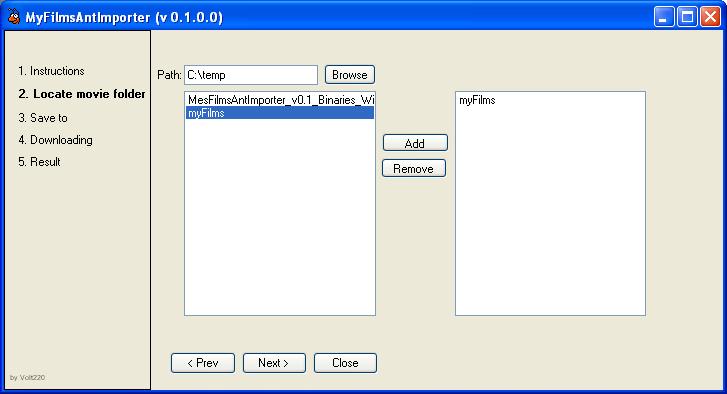
Several folders that contain Movies, can be included.
This program can be run as a Windows App or as a plugin to MediaPortal.
If running as a Windows App switches can be used:
/Auto - Makes the import automatically, with the settings from the last run.
/Settings - Create settings, doesn't download anything.
log files can be found in the import folder, settings are stored in the exe.
folder (stand alone app) or for plugins, in the regular settings folder for MP.
Installation/Setup:
As a Windows application, just put the MesFilmsAntImporter.exe and MesFilmsAntImporterLib.dll in a app folder.
As a MP Plugin, just copy the MesFilmsAntImporterLib.dll to \MediaPortal\plugins\Windows
Also put the skin file (MesFilmsAntImporter.xml) in your active skin map
(e.g \MediaPortal\skin\BlueTwo), or the skin you are intended to use.
You must run the MP configurations and make the configuration before you run it from MP.
myFilms - Settings:
Catalog File - The path to the xml file that's created with this tool.
Picture Path - The same path as the xml file.
Catalog Type - Ant Movie Catalog.
Ant Item For Storage File Info - Source.
Ant identification Item - Number
Known problems:
The OK button for "ok dialog" is not visible for the indigo skin.
Todo:
•Support more file types (currently: avi, mkv, mpg, iso, img).
•Support other folder structures (see precondition).
•Other web pages like imdb, makes it possible to pick info from different places in the same import section.
•More robust! Better exception handling, add logs.
Motto:
Keep it simpel and stupid!
Creds:
Topicons (Juan Manzano) for the ant icon. (Ants Icons)
History:
22.06.2008 v0.1 - initial release (A "ProtoType version" - No life jacket, No parachute, it just hit the wall, if something goes bad!)
Just another tool for you people, who likes MyFilms!
Brief:
This tool creates an XML file which is intended to be used in MyFilms. It will download movie info from the web including posters. Currently only imdb is supported. Can be used as a window App or as a Plugin to MediaPortal.
Precondition:
Movies should be in a structure like this:
Movies
|->Movie1
|->Movie2
|...
An Url to the imdb of the current movie, should be placed in the same folder as the movie it self. If no url is found, the movie is added anyway without any info. Just add the folder "movies" and it will pick all subfolders.
Background:
As a user of myFilms I was interested to get my movies imported without to use some kind of "database" tool for movies (like the Ant Movie Catalog, which indeed are very powerful and nice!). The idea was to have an import tool that creates the xml file and download movie info 100% automatically. Due to some movies exists in new releases or that the search tool can't find an exactly match with the filename/folder name as a search parameter, the only way, were to use an url inside the movie folder. Well it seems that it's almost 100% automatically
, but when you have the url in place in each movie folder, it gets the job done (I know some of you people as huge collection ).The idea was to be able to update movies from MediaPortal, so you don't have to switch to Windows to make an import of new movies (Maybe this is mainly good for thouse that run a machine dedicated to MediaPortal), or you could run the updater on start of your computer.
There already exist another great tool in this area, the AMC Updater, current version is 0.7 Beta.
AMC updater can be found at SourceForge.net: AMC Updater, more info can be found here:
https://forum.team-mediaportal.com/my-films-164/amcupdater-v0-7-beta-release-41486/
But why another tool? if it already exists a great tool! I think they target different kind of users, currently they are quite different.
Other Info:
Downloads can be found here: https://sourceforge.net/projects/mesfilmsantimpo/
Several folders that contain Movies, can be included.
This program can be run as a Windows App or as a plugin to MediaPortal.
If running as a Windows App switches can be used:
/Auto - Makes the import automatically, with the settings from the last run.
/Settings - Create settings, doesn't download anything.
log files can be found in the import folder, settings are stored in the exe.
folder (stand alone app) or for plugins, in the regular settings folder for MP.
Installation/Setup:
As a Windows application, just put the MesFilmsAntImporter.exe and MesFilmsAntImporterLib.dll in a app folder.
As a MP Plugin, just copy the MesFilmsAntImporterLib.dll to \MediaPortal\plugins\Windows
Also put the skin file (MesFilmsAntImporter.xml) in your active skin map
(e.g \MediaPortal\skin\BlueTwo), or the skin you are intended to use.
You must run the MP configurations and make the configuration before you run it from MP.
myFilms - Settings:
Catalog File - The path to the xml file that's created with this tool.
Picture Path - The same path as the xml file.
Catalog Type - Ant Movie Catalog.
Ant Item For Storage File Info - Source.
Ant identification Item - Number
Known problems:
The OK button for "ok dialog" is not visible for the indigo skin.
Todo:
•Support more file types (currently: avi, mkv, mpg, iso, img).
•Support other folder structures (see precondition).
•Other web pages like imdb, makes it possible to pick info from different places in the same import section.
•More robust! Better exception handling, add logs.
Motto:
Keep it simpel and stupid!
Creds:
Topicons (Juan Manzano) for the ant icon. (Ants Icons)
History:
22.06.2008 v0.1 - initial release (A "ProtoType version" - No life jacket, No parachute, it just hit the wall, if something goes bad!)