- September 8, 2009
- 24
- 2
- Home Country
-
 United Kingdom
Can anyone help with a new problem which has arisen tonight?
Someone might have seen it somewhere before...
Following the UK channel switch, I had rescanned but was missing some channels (and Star Trek Volyager failed to record tonight .
.
I deleted all channels in TV server Config and rescanned - all channels are now back.
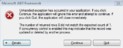
Unfortunately, about 5 seconds after MP has started, tan error error message appears on screen (attach Error1.jpg).
Full details are listed in the text file also attached.
I installed the MP Web Interface last night (together with the SQL Studio Express) but that was working fine.
A suggested fix would be wonderful!
If I continue at the error message rather than quit, all seems to work OK - except I have no recorded TV programmes listed.
Thanks all.
(If anyone got tonights Star Trek and could burn me a copy....?! - it was the last episode ever!)
Martin
HP xw4600 Quad Core PC
NVIDIA Quadro FX370
Vista SP2
Pinnacle 3010iX Dual Analogue/DVB-T
MP v1.0.2
Someone might have seen it somewhere before...
Following the UK channel switch, I had rescanned but was missing some channels (and Star Trek Volyager failed to record tonight
.I deleted all channels in TV server Config and rescanned - all channels are now back.
Unfortunately, about 5 seconds after MP has started, tan error error message appears on screen (attach Error1.jpg).
Full details are listed in the text file also attached.
I installed the MP Web Interface last night (together with the SQL Studio Express) but that was working fine.
A suggested fix would be wonderful!
If I continue at the error message rather than quit, all seems to work OK - except I have no recorded TV programmes listed.
Thanks all.
(If anyone got tonights Star Trek and could burn me a copy....?! - it was the last episode ever!)
Martin
HP xw4600 Quad Core PC
NVIDIA Quadro FX370
Vista SP2
Pinnacle 3010iX Dual Analogue/DVB-T
MP v1.0.2