New user queries - sorry, long post! (1 Viewer)

vfrvulcan

Portal Member
September 7, 2011
16
0
Home Country
England England
Have been using GBPVR/NPVR for years with good results but felt the time was right to look for a 'more polished' client/server setup. Don't get me wrong NPVR and its predecessor GBPVR are very good at what they do but lack in some areas.

Installed 1.2.0RC last week and have upgraded to the final release - good work Guys!

So, on to the queries...

1) Command line recording/scheduling:
Can't find anything in the documentation/wiki for this. Is it possible?
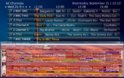
I use DigiGuide as my main TV guide and would like to shedule recordings directly from it rather than look at DigiGuide, load MP, go to spot in guide and select to record. DigiGuide shows me 45 channels and 8 hours on a single display whereas MP shows 10 channels and two hours with defaultwide skin.

2) Scheduled recordings don't always happen:
On a couple of occasions now I've scheduled recordings using the guide within MP but the recordings didn't happen even though no other TV was being watched or recorded. I'm hoping to replicate this again but every time I deliberately sit there and try and make it happen it doesn't! This has not happened since upgrade from 1.2.0RC to Final so possibly a bug-fix in there somewhere.

3) Channel numbers incorrect in client:
Using Freeview here in the UK I have numbered all channels to be the same as the proper Freeview channel numbers (BBC3 on 7 and BBC4 on 9, ITV3 on 10 etc), but looking at the guide in MP (and when changing channels manually during live TV, the client has them as BBC3 on 7, BBC 4 on 8 and ITV 3 on 9. This progresses through the entire line-up so by the time I get to Sky News on Freeview 82 it appears as 34 in MP and Red Button 301 is 35 - any way to correct this behaviour?

4) Lack of System Tray notifications:
It would be nice to have a System Tray icon to denote if any recordings are in progress and when the next recording is due to start (FTR does this but flawed - see next item). Currently, it is unknown if another user has scheduled a program for recording. If there was a systray notification another user could see that the recording had already been scheduled so wouldn't need to set it up. Would also be able to see next scheduled recording time - perhaps to check if time allows for a reboot or to spot if something isn't scheduled.

5) Web based scheduling:
What's the best way to achieve this? Shame there isn't (doesn't appear to be) a web guide/scheduler built-in. I've installed ForTheRecord, and while it works, it has it's own set of problems like the databases aren't integrated so the notifier will only tell me the next recording scheduled using FTR and not by MP, also recordings made via FTR do not show up in RecordedTV. I do like the Android app option though.

So, if anyone can give me some pointers to address this little lot it'd be much appreciated! :D

MTIA

Aaron
 

mm1352000

Retired Team Member
  • Premium Supporter
  • September 1, 2008
    21,544
    8,236
    Home Country
    New Zealand New Zealand
    Hi Aaron

    1) Command line recording/scheduling:
    Not possible so far as I'm aware, but...

    ...whereas MP shows 10 channels and two hours with defaultwide skin.
    This can be changed. Look up at the top of the guide in MP - see the two arrows by themselves (ie. the ones that aren't on either side of the date)? Have a play with them.

    2) Scheduled recordings don't always happen:
    Impossible to help with this without logs. If you do get logs then please post and we'll be more than happy to take a look. :)

    3) Channel numbers incorrect in client:
    You can fix this, yes. Untick "select channel by index" in the "TV" section of MP configuration, shown and explained in the wiki -->here<--. You may also need to edit the "channel" field on some channels. Use the "show channel numbers" option in the same config area to temporarily show the channel numbers so you know which ones are "wrong".

    4) Lack of System Tray notifications:
    I don't think you can do it by tray icon, but you can certainly do the rest in TV Server configuration in the "schedules" section. Wiki section -->here<--.

    5) Web based scheduling:
    I'm inclined to agree on this one. Personally I don't like FTR. There used to be an MPWebGuide but I don't think it is maintained any more. There may well be plugins that I'm not aware of.

    mm
     

    vfrvulcan

    Portal Member
    September 7, 2011
    16
    0
    Home Country
    England England
    1) Command line recording/scheduling:
    Not possible so far as I'm aware, but...

    Ouch! That could be a show-stopper. With GBPVR/NPVR there is a separate schedule.exe which, injects an SQL entry into the recording schedule database. Maybe this is achievable by one of the talents on the dev team or a plug-in dev.

    ...whereas MP shows 10 channels and two hours with defaultwide skin.
    This can be changed. Look up at the top of the guide in MP - see the two arrows by themselves (ie. the ones that aren't on either side of the date)? Have a play with them.
    Unfortunately only changes the timeline visible between one and three hours and no increase in number of channels shown. Have attached pic comparing the two. It seems all these media-player type apps assume connection to giant screen TV and not used my peeps with a 2nd display on their desk and waste a lot of real-estate with huge fonts.

    2) Scheduled recordings don't always happen:
    Impossible to help with this without logs. If you do get logs then please post and we'll be more than happy to take a look. :)
    Sure, appreciate that, just trying, intermittently, to replicate. I know I'm not going crazy as the Missus saw me set the recordings that failed! :) Maybe I quit MP too quickly, before the request got handed over to the TV Server.

    3) Channel numbers incorrect in client:
    You can fix this, yes. Untick "select channel by index" in the "TV" section of MP configuration, shown and explained in the wiki -->here<--. You may also need to edit the "channel" field on some channels. Use the "show channel numbers" option in the same config area to temporarily show the channel numbers so you know which ones are "wrong".

    Thanks, that cured it! I had the 'select by index' checked as I assumed it matched the channel number in the server list rather than the entry number. Must read more carefully :oops:

    4) Lack of System Tray notifications:
    I don't think you can do it by tray icon, but you can certainly do the rest in TV Server configuration in the "schedules" section. Wiki section -->here<--.
    Shame about the tray icon - it could be really useful. As for looking in the TV Server config for upcoming schedules, its a non-starter as I'm not going to give others access to the back-end TV Server to mess things up! :)

    5) Web based scheduling:
    I'm inclined to agree on this one. Personally I don't like FTR. There used to be an MPWebGuide but I don't think it is maintained any more. There may well be plugins that I'm not aware of.
    Hopefully one will appear now that 1.2.0 has gone gold.

    Thanks MM, that's a couple of them answered!

    Aaron
     

    Attachments

    • Capture.jpg
      Capture.jpg
      455.3 KB

    mm1352000

    Retired Team Member
  • Premium Supporter
  • September 1, 2008
    21,544
    8,236
    Home Country
    New Zealand New Zealand
    Ouch! That could be a show-stopper. With GBPVR/NPVR there is a separate schedule.exe which, injects an SQL entry into the recording schedule database. Maybe this is achievable by one of the talents on the dev team or a plug-in dev.
    Let's be clear: what I meant is that you can't do it "out-of-the-box". You can inject a record directly into the DB, but there's no plugin that I know of for specifically doing that. Wouldn't be hard to create...

    It seems all these media-player type apps assume connection to giant screen TV and not used my peeps with a 2nd display on their desk and waste a lot of real-estate with huge fonts.
    MP has a 10 foot interface designed to work on a TV as well as a PC. The font needs to be big to handle the TV use case...

    Shame about the tray icon - it could be really useful. As for looking in the TV Server config for upcoming schedules, its a non-starter as I'm not going to give others access to the back-end TV Server to mess things up! :)
    Alternative is to look at the "scheduled" section within MP. I suggested the TV Server config first because it seems like you want something available from the desktop (MP is more focussed on dedicated HTPC use cases than being just another PC application).

    mm
     

    vfrvulcan

    Portal Member
    September 7, 2011
    16
    0
    Home Country
    England England
    Ouch! That could be a show-stopper. With GBPVR/NPVR there is a separate schedule.exe which, injects an SQL entry into the recording schedule database. Maybe this is achievable by one of the talents on the dev team or a plug-in dev.
    Let's be clear: what I meant is that you can't do it "out-of-the-box". You can inject a record directly into the DB, but there's no plugin that I know of for specifically doing that. Wouldn't be hard to create...

    It seems all these media-player type apps assume connection to giant screen TV and not used my peeps with a 2nd display on their desk and waste a lot of real-estate with huge fonts.
    MP has a 10 foot interface designed to work on a TV as well as a PC. The font needs to be big to handle the TV use case...

    Shame about the tray icon - it could be really useful. As for looking in the TV Server config for upcoming schedules, its a non-starter as I'm not going to give others access to the back-end TV Server to mess things up! :)
    Alternative is to look at the "scheduled" section within MP. I suggested the TV Server config first because it seems like you want something available from the desktop (MP is more focussed on dedicated HTPC use cases than being just another PC application).

    mm

    Thanks MM, command line line scheduling is less of an issue with seeing more of the guide (hard-coded 4 hours is a bit of a pain though). I've got no hope of writing a program to give that functionality so I'll give up on that idea or wait for some great dev to write it :)

    I fully understand the 10' interface, I was merely saying that the desktop seems to be overlooked. I've modified the the standard defaultwide skin to show 24 channels instead on the standard 10 but I'd like to see more than 4 hours of schedules on it to be able to replace DigiGuide. A 1680x1050 screen can easily handle 24 channels and 8 hours. I'd like to try make my own skin in it's entirety for desktop monitors but the documentation seems to be aimed more at v1.1 or lower and isn't that wonderful in it's desciptiveness as to how to start. A decent tutorial on creating skins in 1.2 would be great.

    As for the scheduled recordings don't always happen - this one has been solved. The culprit is For The Record 1.6.0.0. When I said last week a couple of recordings set up in MP didn't happen I didn't know why, didn't have the logs to see why either. Yesterday, I had Formula 1 Practice 3 and Qualifying set to record via MP along with several other single hits and series links.

    Came home to find that Practice 3 had been recorded but shortly after that a series set to record via FTR had recorded an episode and then everything in the recording schedule was blank, no Qualifying! Tested again, set something to record in MP, set something else in FTR, FTR did it's recording and blanked the schedule for anything else.

    FTR now uninstalled.
     

    dvdfreak

    Portal Pro
    June 13, 2006
    979
    178
    Home Country
    Belgium Belgium
    As for the scheduled recordings don't always happen - this one has been solved. The culprit is For The Record 1.6.0.0. When I said last week a couple of recordings set up in MP didn't happen I didn't know why, didn't have the logs to see why either. Yesterday, I had Formula 1 Practice 3 and Qualifying set to record via MP along with several other single hits and series links.
    Just wanted to clarify that you either run For The Record and let it manage your recordings, or you run MP standard without FTR. You can't run both at the same time, which should be clear from the installation guide. If you use For The Record's built-in Argus recording engine you even need to make sure TV server is either not installed or disabled.

    When you understand the underlying mechanics this is all actually quite obvious, you can't have two "things" fighting over your recording card. One needs to be master :)
     

    vfrvulcan

    Portal Member
    September 7, 2011
    16
    0
    Home Country
    England England
    Thanks Dvdfreak,

    I had installed FTR on the server for web and Android access but not onto any of the MP Clients hence the conflicts.

    @Paranoid - Now I've installed the FTR client on the MP Client the FTR Systray is fine. Be nice to see the new scheduling implementation.

    All looking pretty good now except one little hitch found today with the BatchProcessor Command line processor for FTR and getting it to generate XML files for MP's video collection. Not sure if this is an MP issue or a BatchProcessor issue:

    Files created with BatchProcessor MyVideo have XML <Tags> and </Tags> whereas files created by MP have <tags> and </tags>. Files created by BatchProcessor aren't parsed unless I manually change those entries to lower case.

    I know BatchProcessor should create XML which MP will parse correctly, but is MP at fault for expecting those entries to be lower case?
     

    Users who are viewing this thread

    Top Bottom