Not blasting STB properly (1 Viewer)

HKMe

Portal Member
August 14, 2006
11
0
Home Country
Hong Kong Hong Kong
I'm having issues trying to use the IR Server Suite to blast my STB. The program learns the IR codes and appears to blast them correctly (IR emitters light up), but the STB generally doesn’t respond. The emitters are right up against the STB IR receiver. If I move the emitter around a fraction of a millimeter at a time while repeatedly pressing the test button in the program, the STB will pick up about 1 out of every 50 transmissions.

Using the same hardware, XP MCE learns the codes and blasts the STB correctly from a distance of up to 30cm with 100% success rate. I can also use my Onkyo multi-remote (RC-511M) to learn the STB remote codes and operated the STB. If I use IR Server Suite to learn the cloned codes from the Onkyo remote instead, I still get the same problem. I can however use the IR Server Suite to learn and correctly blast my Onkyo amp.

The STB is branded and distributed by my pay TV provider – Now Broadband in Hong Kong (www.nowbroadbandtv.com) and is likely manufactured specifically for them (IP TV over DSL). Not sure if it’s useful, but I found the following link to the Slingbox binaries for the STB – I presume this contains the IR codes: http://www.hifi-remote.com/forums/dload.php?action=file&file_id=4906

Are there any tweakable settings for the IR transmission in the Server Suite that might assist? I seem to remember the old version had some fast/slow/delay settings.

Many thanks in advance for anyone with any advice. My setup is:
-----------------------------------------
OS: XP MCE SP2
Blaster: SMK
Driver: ehome 5.1.2600.2825
 

and-81

Retired Team Member
  • Premium Supporter
  • March 7, 2005
    2,257
    183
    Melbourne
    Home Country
    Australia Australia
    Have you applied the update patch to version 1.0.4.1?

    It should solve that problem.

    Otherwise, there will be a new version soon.

    Cheers,
     

    HKMe

    Portal Member
    August 14, 2006
    11
    0
    Home Country
    Hong Kong Hong Kong
    Hi Aaron,

    Yes, I'm using v1.0.4.1. This is the first version of the Sever Suite I've used so no patching, just installed directly. Will wait on the new version.

    Thanks.
     

    Neptuni

    MP Donator
  • Premium Supporter
  • May 17, 2007
    63
    1
    Linkoping
    Home Country
    Sweden Sweden
    I could not resist...

    To try the new preview of 1.0.4.2!

    Macro seems to work now, perfect!

    But I got another issue now, I can't send serial commands anymore, I receive an "access to COM1 denied".

    If I close mediaportal config and start hyperterminal everything works...

    Thanks for an excellent software and your dedication and support!

    /Mikael
     

    and-81

    Retired Team Member
  • Premium Supporter
  • March 7, 2005
    2,257
    183
    Melbourne
    Home Country
    Australia Australia
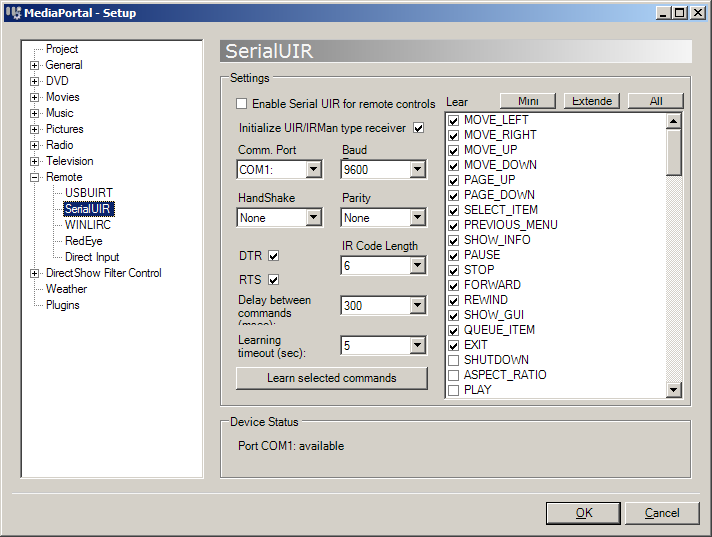
    There is a sort-of bug in MediaPortal configuration that if the Serial UIR support is set to a particular com port, even if you've got Serial UIR disabled, it will still occupy the port. This could be true of anything in there that has a com port settings because of the way it initializes the components.

    I guess it could be a new bug in IR Server Suite, so I'll check it out anyway, but in the meantime try changing the com port on the remote -> serial uir settings.

    Hope that helps,
     

    Neptuni

    MP Donator
  • Premium Supporter
  • May 17, 2007
    63
    1
    Linkoping
    Home Country
    Sweden Sweden
    Hello again Aaron,

    Which setting are you refering to, I can't find serial UIR in Mediaportal configuration?
    And I suppose that I can only select an COM port that is installed on the PC, and I only have one.

    The only change I have done is to install the 1.0.4.2 preview, before that serial com was working.

    Blasting works wonderful now also, one question does the tickbox "require focus" has to be ticked and if thats the case why?

    Will "wake on lan" be in 1.0.4.2 or 1.0.5, I'm longing for that!

    Thanks for letting us try the preview.

    /Mikael
     

    and-81

    Retired Team Member
  • Premium Supporter
  • March 7, 2005
    2,257
    183
    Melbourne
    Home Country
    Australia Australia
    Hey,

    The Serial UIR component is in the remotes area of MediaPortal configuration... if you look at the attached screenshot you'll see where.

    If it is what's causing the problem then you may need to enable another serial port and set it to that, or manually modify the mediaportal.xml to change the com port to one that doesn't exist.

    The require focus checkbox just means that MP Control Plugin will only respond to remote buttons when MediaPortal is focused. If you want it to respond to remote buttons when MediaPortal doesn't have focus then remove the check.

    WakeOnLAN command is in for 1.0.5.0. In the meantime you could use an EXE to trigger the WOL command ...

    Free Command Line Tools

    Hope that helps,
     

    Attachments

    • SerialUIR.png
      SerialUIR.png
      36.4 KB

    Neptuni

    MP Donator
  • Premium Supporter
  • May 17, 2007
    63
    1
    Linkoping
    Home Country
    Sweden Sweden
    Hello again,

    I forget to expand the "Remote" section vertically, I will look into it tonight after work...

    Thanks for the tip on "command line tools", I will probable use it until 1.0.5 is out.

    The problem is to keep the server alive, while accessing for instance video's on a client, I think that the Powerschedule plugin isn't aware of clients streaming other things than TV from TVE3.

    /Mikael
     

    and-81

    Retired Team Member
  • Premium Supporter
  • March 7, 2005
    2,257
    183
    Melbourne
    Home Country
    Australia Australia
    I see, that is an problem I guess...

    Maybe Powerscheduler needs to be modified to check for open file handles over the network ...

    Let me know how you go.

    Cheers,
     

    Users who are viewing this thread

    Top Bottom