(Old) My Emulators (4 Viewers)

Chreekar

Community Plugin Dev
November 11, 2006
234
52
Stockholm
Home Country
Sweden Sweden
In the newly uploaded version (which should be the last one before release) I've fixed the sqlite_error in the log (thanks dir for the heads up), and when listing subfolders the plugin now skips the ones that are hidden. Furthermore, the skinning labels ajp put in are there now. That means that the following labels or strings can be used to show game meta data:

ID = 40, or #game_description, to show Description property
ID = 41, or #game_yearmade, to show Year property
ID = 42, or #game_genre, to show Genre property
ID = 43, or #game_company, to show Company property
ID = 44, or #game_latestplay, to show Latest Play property
ID = 45, or #game_playcount, to show Playcount property

I love the idea to make the thumbnails for favourite games special, but I think we should find a better way to generate them to not disturb the user. Perhaps doing it on the ConfigurationForm_Closing()?
 

emphatic

Design Group
  • Team MediaPortal
  • August 25, 2006
    3,758
    1,250
    Alingsås
    Home Country
    Sweden Sweden
    Would it be possible to implement background fanart? Say you have a supermario.png or a zelda.png that you want to use for your NES or SNES, emus.. Could you somehow do a string to alter the background path to a specified folder?

    If the skin structure is like this:

    [skin name]
    [media]
    [Animations]
    [emulator]
    [NES] (supermario.png for example is in this folder)
    [PSX]
    [MAME]

    and the skin would have something like this:

    Code:
    <imageFolder>emulator\[B]#current_emu_fanart[/B]</imageFolder>

    And when you've installed a new Emulator, a field called "current_emu_fanart" in the plugin database gets the chosen name of this Emulator.

    Is this possible :D
    Emph
     

    dir

    MP Donator
  • Premium Supporter
  • August 30, 2006
    408
    36
    Home Country
    Afghanistan Afghanistan
    Hi,
    speaking of next versions, could you make the config window resizable? It's really difficult to update the table of roms when you have to constantly scroll or resize the columns, which I need to do when I'm trying to see the rom's name and check the "Visible" tick box. With so many roms to go through to update, I'd like to resize the window so I can see all columns at a glance.

    Thanks for the consideration!
     

    dir

    MP Donator
  • Premium Supporter
  • August 30, 2006
    408
    36
    Home Country
    Afghanistan Afghanistan
    Ah, a penny just dropped in my head!

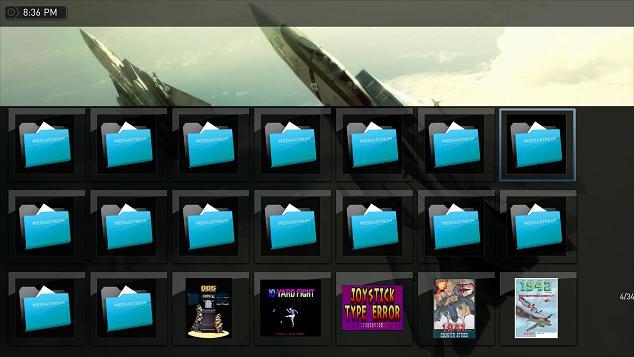
    When viewing all the roms within MP, regardless of view (list, icon, etc.) I get several rows of folder icons before I start seeing the game images. I worked out this is because the Mame ROMS directory contains 7000+ rom zip files, but also has 64 folders in it to hold CHD files (special MAME games that have very large hard drive images).

    These folders end up appearing in MyEmulators, but without any identifying image associated with them.

    Ideally, the screen would either not show these folders, or show the image associated with the folder's name. As it currently stands, having the folders showing looks pretty yucky!

    The screen shot below shows it - note that I scrolled down several lines to get to the point where the folder stop and game pictures begin.
     

    Attachments

    • 20-36-27.jpg
      20-36-27.jpg
      36 KB

    hulkhaugen

    Portal Pro
    November 9, 2008
    450
    58
    Arendal
    Home Country
    Norway Norway
    Hello folks!

    I used yesterday to examine this plugin. Dunno if this skiped your mind, not really a problem but i thought you should know. Even if i rename my "PC Games" to "PC Spill" (Norwegian translation), the folder for the thumbs still has to be "...\PC Games\Rise of Nations - Gold Edition.png".

    No biggie, just wanted you to know.

    And another thing, dunno if it's the skin or plugin (using StreamedMP), but the thumbs for SNES and N64 games aren't DVD cover sized, but rather wide-look. And these thumbs get stretched into DVD cover size which doesn't look very well.... Any workaround for that issue?
     

    Clair

    Portal Pro
    November 15, 2007
    70
    0
    50
    Gorzów Wielkopolski
    Home Country
    Poland Poland
    Amiga games are without hidden folders :) so everything are ok for me

    configuration issues:

    0 Export doesnt work for me. I remove whole database, install new version (2009-01-04) add my roms, set grade, year, favourite mark to some of them, and i try to export... exported file are empty.
    Code:
    <?xml version="1.0" encoding="UTF-8"?>
    <games />
    i can send my database (unpacked 3.20MB) for check if this could be Helpfull to solve

    (in database and in MP changed data are visible). I dont know what im doing wrong :/
    1 Config should be able to maximize or sizeable (especially database view) because of more columns visibility
    2 Copy single field are strange working, because even if im highlighting a content of field and i press ctrl+c - in clipboard i have a wole row. I think possibility of copy single fields sould make a database filling more user freindly :)

    thanks for everything, im going back to my family.


    dir: did you try to make a chd folders hidden? for amiga games it works at now (folders doesnt appear at MyEums) may for MAME a hidden folders dont be a problem (i havent any chd at now to check this)

    I think there should be possibility to PERMANENT DELETE OF GAME (ROM) file (not only from database) from context menu. Ofcourse with "are you really really sure?" question before done.
     

    Chreekar

    Community Plugin Dev
    November 11, 2006
    234
    52
    Stockholm
    Home Country
    Sweden Sweden
    Even if i rename my "PC Games" to "PC Spill" (Norwegian translation), the folder for the thumbs still has to be "...\PC Games\Rise of Nations - Gold Edition.png".

    I thought I'd made it that way, so that if you translate it you should also have a translated path. But then I'll have to look into it.

    speaking of next versions, could you make the config window resizable?

    Yes I will. I've just been to lazy to do it :sorry:

    i can send my database (unpacked 3.20MB) for check if this could be Helpfull to solve

    Sure, post it here and I'll see what I can find out.
     
    A

    andreyua

    Guest
    SVN 2.5

    I'm write parameters in "Path to emualtor" field, for example: F:\Run\Emul\Runned\Mess\mess0126b\mess.exe -now -screen "\\.\DISPLAY2" -nonu nes -cart'
    and get error: Please specify a valid emulator executable path
    If without "-screen "\\.\DISPLAY2"" - then OK
     

    Users who are viewing this thread

    Top Bottom