- January 5, 2009
- 121
- 0
- Home Country
-
 Canada
MediaPortal Version: 1.0.4.24281
MediaPortal Skin: StreamedMP
Windows Version: XP Home Edition Serv Pk 3
CPU Type: Celeron CPU 2.80GHz
HDD:
Memory: 512 MB Ram
Motherboard: DELL DE051
Video Card: NVIDEA GeForce 6200
Video Card Driver: N/A
MPEG2 Video Codec: PDVD9
MPEG2 Audio Codec: ffdshow
h.264 Video Codec: MPC Video Decoder
Hey Guys,
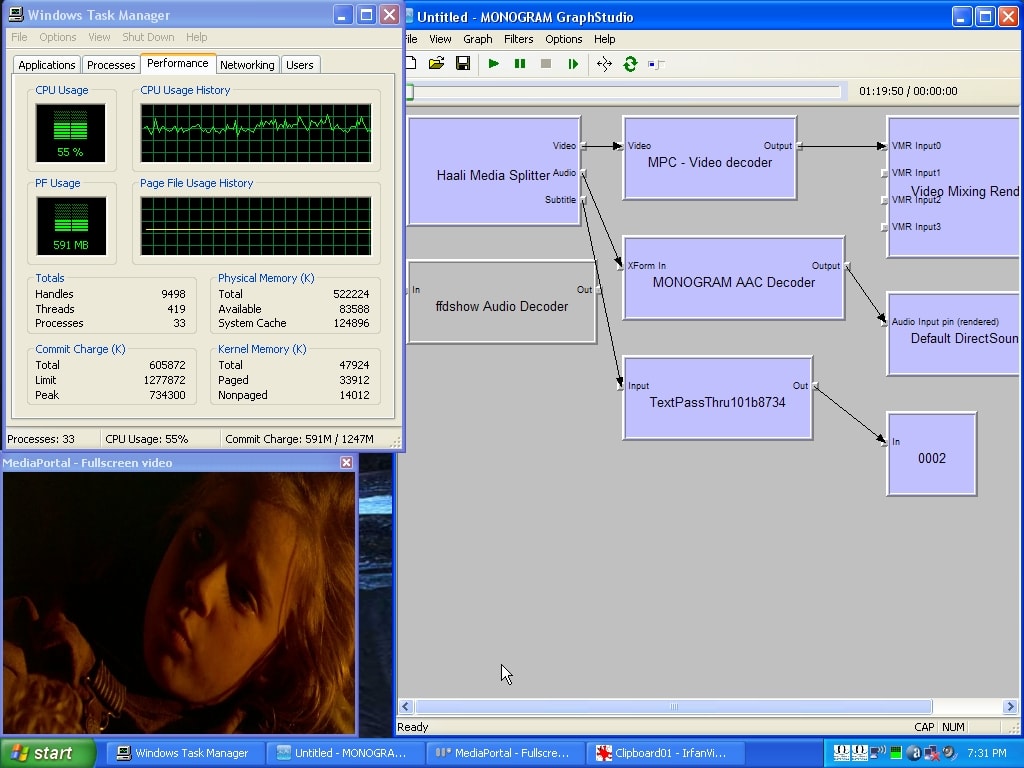
I am trying to figure out how to lower my CPU strain with this older model Dell. I have the latest SAF Beta 22Test4 codec pack running on it and added a GeForce 6200 video card. Only option on this Dell Mother board was PCI slot unfortunatley. Computer has a small 80gig HD so I figured I would upload all smaller encoded movies with .mkv extensions, Which are usually H264. I am getting a CPU strain in the higher 60% to 80% range on most. Funny thing is the .Avi's I have the CPU usage goes right down to 15 or 16% which is great. Watching Aliens tonight this attached pic is at 55% but it was going up as high as 72% and more at times. Any options?
MediaPortal Skin: StreamedMP
Windows Version: XP Home Edition Serv Pk 3
CPU Type: Celeron CPU 2.80GHz
HDD:
Memory: 512 MB Ram
Motherboard: DELL DE051
Video Card: NVIDEA GeForce 6200
Video Card Driver: N/A
MPEG2 Video Codec: PDVD9
MPEG2 Audio Codec: ffdshow
h.264 Video Codec: MPC Video Decoder
Hey Guys,
I am trying to figure out how to lower my CPU strain with this older model Dell. I have the latest SAF Beta 22Test4 codec pack running on it and added a GeForce 6200 video card. Only option on this Dell Mother board was PCI slot unfortunatley. Computer has a small 80gig HD so I figured I would upload all smaller encoded movies with .mkv extensions, Which are usually H264. I am getting a CPU strain in the higher 60% to 80% range on most. Funny thing is the .Avi's I have the CPU usage goes right down to 15 or 16% which is great. Watching Aliens tonight this attached pic is at 55% but it was going up as high as 72% and more at times. Any options?