
PC LCD stuttering (1 Viewer)

cubusmedusa

New Member
January 15, 2014
2
0
Home Country
Austria Austria
Hi folks,

another newbie. :)
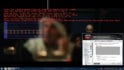
as you can see in the jpg I have some playback problems. I play my videos from my internal HDD (WD 2TB green) and during movement of a certain speed I see annoying stuttering. Faster and slower speeds are fine. My LED LCD runs at 60Hz and can be forced to run at 50Hz. I see this effect in either setting. I dont see frame drops during playback (unless I am messing around with settings - as done during playback of enclosed picture).
Played with settings of my Sapphire Radeon HD 5770 (latest driver) - no effect on stuttering.
Is it possible to draw a conclusion from the enclosed picture about the reason for this stuttering. I use an i5-760, 8Gb Ram, HD5770, Win7 64bit Prof.
I tried so many different things and nothing solved the problem.

Any ideas?

Cheers,
Chris
 

Attachments

  • Video-Playback.jpg
    Video-Playback.jpg
    506.1 KB

HomeY

Test Group
  • Team MediaPortal
  • February 23, 2008
    6,418
    4,717
    51
    ::1
    Home Country
    Netherlands Netherlands
    Hi and welcome Chris,

    Is it possible to draw a conclusion from the enclosed picture about the reason for this stuttering?
    Normally we always need logs & filled in system specs, but in this case i'll give it a try ;)

    If you look @ the screenshot you see the screen refresh rate on top, which (in this case) is set to 50Hz.
    Then, when we look @ movie you're playing, it's an MKV with 24 FPS (look @ the 2nd line from the top >> Act FPS: 24.0381 (red)). Now we also know the red line is showing the Actual Frames Per Second.
    Conclusion: we have a (minor) mismatsch between the Video FPS and the screen Refresh Rate. If your LCD can only do 50 & 60Hz, i would suggest to use the MediaPortal Audio Renderer. This will then speed up the playback from 24 > 25 FPS, and times to we reach >> 50Hz ;)
    That should make the red line almost flat (depending on OS).
    MPAR (configuration) info:
    http://wiki.team-mediaportal.com/1_...odecs_and_Renderer/3_MP_Audio_Renderer_(MPAR)
     

    cubusmedusa

    New Member
    January 15, 2014
    2
    0
    Home Country
    Austria Austria
    Hi Jeroen,

    thanks for your reply. Sounds interesting. I will give it a try and report. In the meantime I updated my specs. :) I had my display running on 50Hz as you saw, but it was in forced-mode. The display is not natively capable of running at 50Hz. Only between 60 and 76Hz. Forced mode worked but I ran into some problems which made me switch back to 60Hz. But your suggestion should also work with 30fps, right?

    Unfortunately a couple of days ago my PC had a hardware crash and died. Will take a little bit to set up a replacement.
    Chris
     
    Last edited:

    HomeY

    Test Group
  • Team MediaPortal
  • February 23, 2008
    6,418
    4,717
    51
    ::1
    Home Country
    Netherlands Netherlands
    But your suggestion should also work with 30fps, right?
    Not sure if don't think 24 will be speed up to 30. Best is to use 60Hz in that case, then 2:3 pulldown will be applied.
    I looks more interesting to see if you can make your display do 72Hz (which is 24Hz x3).

    Good luck with setting up the PC again!
     

    Users who are viewing this thread

    Top Bottom