Problems recording to NAS (1 Viewer)

rileydogmi

MP Donator
  • Premium Supporter
  • September 18, 2014
    23
    3
    58
    Home Country
    United States of America United States of America
    New user - finally leaving SageTV. After spending most of today working on this transition, I got MP 1.8 working with my HD-PVR2. Everything works using the local drive but I can't record to the NAS. I read many threads on this topic and did as suggested:

    Created a user on my MP server and created that same user on my QNAP.
    Verified I can write to the QNAP with that user in Windows
    Changes the service to login using this new user
    Username and passwords match on both
    I am using the full path (no letter path).

    Very frustrated - I see that it tried to start recording then goes back to idle. I had SageTV recording to my NAS with no issue...

    Any other suggestion? All help is appreciated.
     

    mm1352000

    Retired Team Member
  • Premium Supporter
  • September 1, 2008
    21,544
    8,236
    Home Country
    New Zealand New Zealand

    mm1352000

    Retired Team Member
  • Premium Supporter
  • September 1, 2008
    21,544
    8,236
    Home Country
    New Zealand New Zealand
    No problem. :)
    You're certainly right about the issue being failure to create the file.
    Latest example:
    [2014-09-18 00:56:03,675] [666ef48] [18f4] - Recorder:unable to create file:'X:\MediaPortal\Law & Order_ Special Victims Unit - 2014-09-18 s02e07p-.ts' 3

    That last "3" is the error code. Looking that up here:
    http://msdn.microsoft.com/en-us/library/windows/desktop/ms681382(v=vs.85).aspx

    ...we find it means "path not found".
    So, have you created the "MediaPortal" folder on that drive?
     

    rileydogmi

    MP Donator
  • Premium Supporter
  • September 18, 2014
    23
    3
    58
    Home Country
    United States of America United States of America
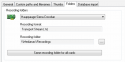
    Don't know why the X: showed up again - I changed it to the real path once, but it must have reverted since I had to change it with an export and import settings (I couldn't use the UI because the NAS doesn't show in network).. What log file do you see that error in? Here are the logs with the full path (not the X) - if X: is still in this log, then I don't know how to change to the correct path.[DOUBLEPOST=1411018537][/DOUBLEPOST]Here is a screen shot of the record settings too...Screen Shot 2014-09-18 at 1.24.50 AM.png
     

    mm1352000

    Retired Team Member
  • Premium Supporter
  • September 1, 2008
    21,544
    8,236
    Home Country
    New Zealand New Zealand
    What log file do you see that error in?
    The TsWriter log.
    Looks like the same error again I'm afraid...
    [2014-09-18 01:21:48,196] [7bb43f0] [156c] - Recorder:unable to create file:'X:\MediaPortal\Law & Order_ Special Victims Unit - 2014-09-18 s02e01p-.ts' 3

    Can you please post the XML file that you're importing. Maybe there's a mistake in there. Seems unlikely though...
     

    rileydogmi

    MP Donator
  • Premium Supporter
  • September 18, 2014
    23
    3
    58
    Home Country
    United States of America United States of America
    Ugh - I am sure that is the problem then - X: will never work from the service - if needs the full path... So I have to figure out how to get this setting to stick... Enclosed is the XML I modified.
     

    Attachments

    • export.xml
      11.6 KB

    mm1352000

    Retired Team Member
  • Premium Supporter
  • September 1, 2008
    21,544
    8,236
    Home Country
    New Zealand New Zealand
    Well that is highly embarrassing. It looks like when the import/export function for tuners/cards was added last year, the import part never saved the values read from the XML file. :oops:

    Going back to your recording setting screenshot...
    That looks right. After you've made that change, go to any other section in TV Server configuration to have the change saved. At that time I believe the TV service should automatically restart or ask to restart (one or the other); point being, the TV service needs to restart in order for the change to be applied. Can you please double check that?

    If worst comes to worst it is possible to edit the folder value by editing the database contents directly... though that really shouldn't be necessary.
     

    rileydogmi

    MP Donator
  • Premium Supporter
  • September 18, 2014
    23
    3
    58
    Home Country
    United States of America United States of America
    Yes - when I import the settings, it shows correctly (the screen shot I posted) but when I restart the service it reverts back to the X:... I guess I will need to edit the database contents? Where? Thanks!
     

    mm1352000

    Retired Team Member
  • Premium Supporter
  • September 1, 2008
    21,544
    8,236
    Home Country
    New Zealand New Zealand
    You can use MySQL Workbench or similar to edit your MySQL database contents.
    Go into the SQL Development section. You'll need a username and password to get in there. Default username and password for a MySQL database installed by MediaPortal (like your database probably is) are "root" and "MediaPortal" (case sensitive).
    You want to edit the "Cards" table, "recordingFolder" column.
    That can be done with the following SQL statement:
    UPDATE Cards SET recordingFolder = '\\MediaNas\Recordings';

    Run that and hopefully you're sorted.
    http://dev.mysql.com/downloads/workbench/5.2.html
     

    Users who are viewing this thread

    Top Bottom