Recording and MySeries (1 Viewer)

whiskeynsoda

Portal Member
October 31, 2011
9
0
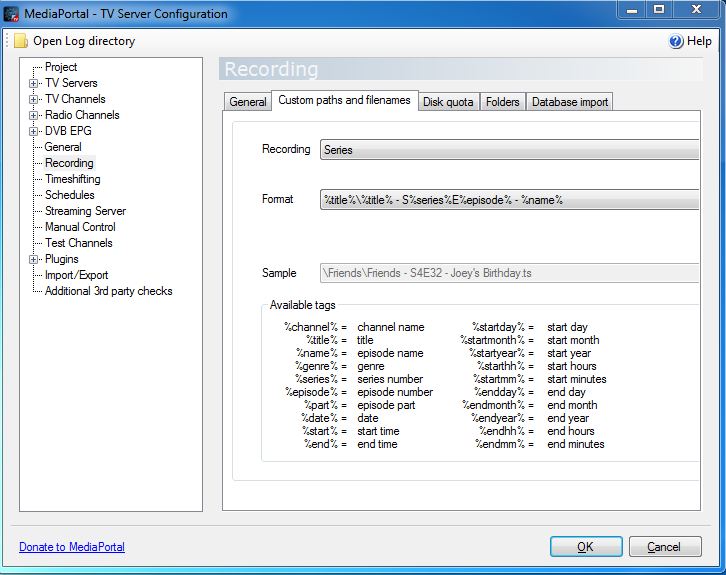
I am having an issue with finding the correct format/path in which to record a TV show. So to start I use ScheduleDirect, Now I have set up my recordings as seen in the attached file. When I record a show everything goes as planned( The recording actually creates a folder of the Show and has the file in it..Awesome).. it shows up in Series, but when updating the dialog box pops up and has 3 options
1 Skip
2 Skip, never ask again
3 Find Manually
I select #3... and the EDIT box comes up with the shows name and then a bunch of random #s and letters(im assuming this is episode info). ie " 2 Broke Girls - SEP1029394ES01E04 ( I just made those numbers up but its very close to that and I can always figure out the last bit as its the Season and episode #) anyways I delete everything except the title of the show. Dont know if i should but it gets rid of that annoying pop up ( the one with the 3 options). Now i have only recorded 5 shows and 3 of them were great ( Got a Banner, show info..etc , granted this is after I manually edit the pop up box with all the random numbers at the end of the shows title). The other 2 shows recorded but episode info was missing ( on closer look in the folder where shows are saved, the long set of # and letters seemed a bit shorter than the other 3 shows) So what am i doing wrong?
 

Attachments

  • recording.JPG
    recording.JPG
    79.7 KB

gtfreymann

MP Donator
  • Premium Supporter
  • August 3, 2011
    119
    11
    Ontario, Canada
    Home Country
    Canada Canada
    I am having an issue with finding the correct format/path in which to record a TV show. So to start I use ScheduleDirect, Now I have set up my recordings as seen in the attached file. When I record a show everything goes as planned( The recording actually creates a folder of the Show and has the file in it..Awesome).. it shows up in Series

    I have the same problem with Schedules Direct. I've tried variations of the filename and I can't get a nice neat end result at all so I gave up on that completely.

    What I have been able to get is:

    "Name of Show - - - Episode Title.ts"

    like:

    "Desperate Housewives - - - Always in Control.ts"

    That is using:

    %title%\%title% - %episode% - %name%

    in TV Server Config > Recording > Custom paths and filenames > series.

    I find that some TV shows record as "Movies" so I was thinking I would use the same format as Series in Movies but I haven't changed that yet.

    For a while I was having MP TV Series import my recorded tv folder but it was so hit and miss I decided to keep things separate.
     

    whiskeynsoda

    Portal Member
    October 31, 2011
    9
    0
    Cool I'll try that.... I like the fact that I can have my recording show up in series so I'm not bouncing from one to the other..but your right it is hit or miss. I can go into series and see what shows i have and it will import anything it finds new. BUT... I notice that when a show is highlighted .... The preview/info is not necessarily that show... Ie.... Law n. order.... Simpson....family guy ..... Glee....so when simpsons is highlighted it might show info for glee...... That was just an example ...I do not watch Glee....Haha
     

    whiskeynsoda

    Portal Member
    October 31, 2011
    9
    0
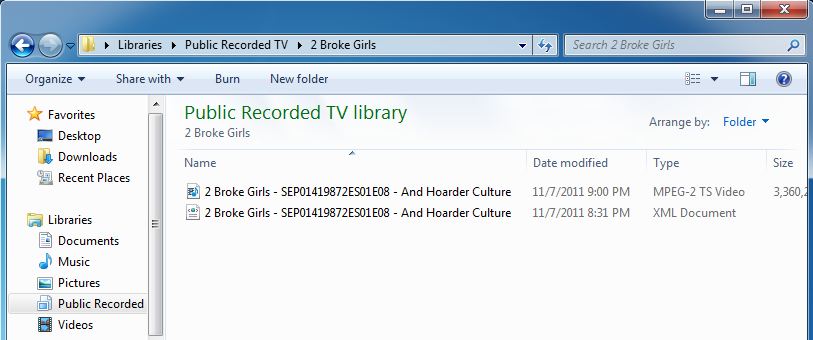
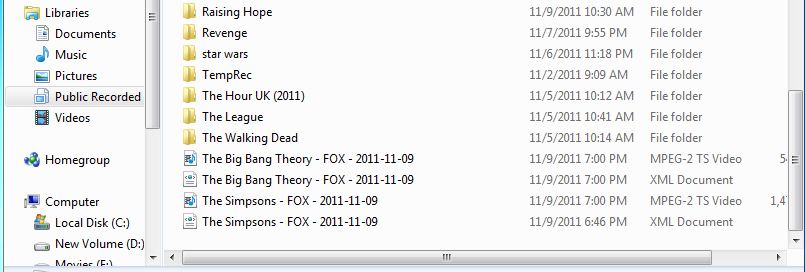
    Ok So the attached pics are what im trying to deal with . The "2 broke girls" (recorded) has the name with the long string of numbers which im assuming is series info. I messed with that as explained in my previous post . Now im getting what you see in the (now) file. It get me nothing... Well i should say that when in Series i manually find a match..It shows the series but no episode in the series. I see it in my folder. :I just want to have my scheduled recordings end up in my Series folder without having to do any editing ...
     

    Attachments

    • recorded.JPG
      recorded.JPG
      51.2 KB
    • now.JPG
      now.JPG
      50.6 KB

    gtfreymann

    MP Donator
  • Premium Supporter
  • August 3, 2011
    119
    11
    Ontario, Canada
    Home Country
    Canada Canada
    I've had certain "series" record but end up in the root directory, not in a series folder. You can always change the Movie filename format to match your Series format, then everything would be in a folder no matter what.
     

    whiskeynsoda

    Portal Member
    October 31, 2011
    9
    0
    After some troubleshooting.. I have come to realize that only shows that I have set to record (advanced record..Every week at this time on this channel) seem to record that episode info (ie...2 Broke Girls - SEP0149872ES01E08 - And Hoarder Culture) I know the first part is the shows title and the last part is the shows particular episode title. Its the middle part i can only partly figure out with the season and episode info (this one is season 1 episode 8) , though its not a big deal "SERIES" figures it out. Still my problem is after show is recorded and I go into "SERIES" to watch I still get that dialogue box that there is no match for the recorded show. I select Manual search and an edit box pops up with the "2 Broke Girls - SEP0149872E" the part of that number letter sequence i cant figure out. Anyways I edit down to just the shows name "2 Broke Girls" and select done. The that dialogue box pops up again and now instead of manual search it gives me the shows name. So How can i set this up without using the edit box. Hope it makes sense.
     

    Da_JoJo

    MP Donator
  • Premium Supporter
  • August 6, 2008
    64
    3
    Home Country
    Netherlands Netherlands
    my guess : SEP0149872ES01E08
    SEP = september ;date or some time it recorded
    ES = episode of serie 01
    E = episode show nr 8
     

    whiskeynsoda

    Portal Member
    October 31, 2011
    9
    0
    I thought SEP was also september , but no these are new shows in october.. I think the SEP stands for SERIES/EPISODE and the number is a the shows ID
     

    Users who are viewing this thread

    Top Bottom