Codecs SAF v5.02 *final* (based on FFDShow DXVA decoder) (13 Viewers)

Truri

MP Donator
  • Premium Supporter
  • November 9, 2008
    192
    9
    Home Country
    Germany Germany
    AW: SAF v5.00 experimental (based on FFDShow DXVA decoder)

    Hi,

    thx for the new Version. Seems to work really fine.

    But... I have a problem with the sound of some videos. I dont know if its directly related to SAF, but perhaps you can help me :) :D

    It's an 5.1 AAC Audiotrack.
    I'm using Audio Passthrough, so ffdshow is encoding the AAC track to AC3.
    The Problem is, that the voices (center channel) are "cracked up and have hickups".
    If I let ffdshow downmix the 5.1 channels to 2.0, its totally ok.

    I have also tried using Monogam AAC decoder, there is the same phenomen...
    Maybe someone has an idea...

    Here is a sample:
    http://rapidshare.com/files/4123093...0x720-aac_ger.sub__3521398c___1_-001.mkv.html
    Speech is beginning at ~ 5.35min

    Code:
    General
    Complete name                    : \\Server\h\MyAnimes 2\Ghost Hound\[subs4u]_ghost_hound_01_(h264-1280x720-aac,ger.sub)[3521398c].mkv
    Format                           : Matroska
    File size                        : 300 MiB
    Duration                         : 25mn 4s
    Overall bit rate                 : 1 670 Kbps
    Movie name                       : subs4u präsentiert: Ghost Hound - Episode 1
    Encoded date                     : UTC 2007-11-06 21:32:10
    Writing application              : mkvmerge v2.1.0 ('Another Place To Fall') built on Aug 19 2007 13:40:07
    Writing library                  : libebml v0.7.7 + libmatroska v0.8.1
    
    Video
    ID                               : 1
    Format                           : AVC
    Format/Info                      : Advanced Video Codec
    Format profile                   : High@L5.1
    Format settings, CABAC           : Yes
    Format settings, ReFrames        : 11 frames
    Muxing mode                      : Container profile=Unknown@5.1
    Codec ID                         : V_MPEG4/ISO/AVC
    Duration                         : 25mn 4s
    Nominal bit rate                 : 1 349 Kbps
    Width                            : 1 280 pixels
    Height                           : 720 pixels
    Display aspect ratio             : 16:9
    Frame rate                       : 23.976 fps
    Color space                      : YUV
    Chroma subsampling               : 4:2:0
    Bit depth                        : 8 bits
    Scan type                        : Progressive
    Bits/(Pixel*Frame)               : 0.061
    Title                            : Episode 1
    Writing library                  : x264 core 56 svn-680
    Encoding settings                : cabac=1 / ref=8 / deblock=1:1:1 / analyse=0x3:0x113 / me=umh / subme=6 / brdo=1 / mixed_ref=1 / me_range=12 / chroma_me=1 / trellis=1 / 8x8dct=1 / cqm=0 / deadzone=21,11 / chroma_qp_offset=0 / threads=3 / nr=0 / decimate=1 / mbaff=0 / bframes=3 / b_pyramid=1 / b_adapt=1 / b_bias=0 / direct=3 / wpredb=1 / bime=1 / keyint=240 / keyint_min=24 / scenecut=40(pre) / rc=2pass / bitrate=1349 / ratetol=1.0 / rceq='blurCplx^(1-qComp)' / qcomp=0.60 / qpmin=10 / qpmax=51 / qpstep=4 / cplxblur=20.0 / qblur=0.5 / ip_ratio=1.40 / pb_ratio=1.30
    
    Audio
    ID                               : 2
    Format                           : AAC
    Format/Info                      : Advanced Audio Codec
    Format version                   : Version 4
    Format profile                   : LC
    Format settings, SBR             : No
    Codec ID                         : A_AAC
    Duration                         : 25mn 4s
    Channel(s)                       : 6 channels
    Channel positions                : Front: L C R, Side: L R, LFE
    Sampling rate                    : 48.0 KHz
    Title                            : AAC 5.1
    Language                         : Japanese
    
    Menu
    00:00:00.000                     : en:Intro
    00:00:40.081                     : en:Opening
    00:02:10.046                     : en:Title
    00:02:15.051                     : en:Part A
    00:11:45.998                     : en:Eye Catch
    00:11:53.505                     : en:Part B
    00:23:04.510                     : en:Ending
    00:24:35.059                     : en:Preview
     

    Larzon

    MP Donator
  • Premium Supporter
  • January 16, 2010
    79
    9
    Phoenix, Arizona
    Home Country
    United States of America United States of America
    Re: SAF v5.00 experimental (based on FFDShow DXVA decoder)

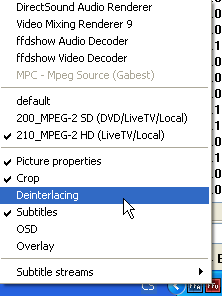
    OK, i reworked/splited MPEG-2 profiles in to SD and HD, so please try letest SAF build and durning MPEG-2 HD playback enable deinterlacing: (right click on FFDShouw icon)

    Are the autoload conditions ambiguous for 1280x720?

    200_MPEG-2 SD ---> ...width <= 1280 ...height <= 720

    210_MPEG-2 HD ---> 1280 <= width... 720 <= height...

    ...
    OK, the main issue I wish to address is the FFDSHOW audio-video synchronization problem inside MediaPortal.

    FFDSHOW is using the YADIF deinterlacer... Do you suppose a less-intensive deinterlacer would help the synchronization issue when playing in MediaPortal?

    If so, can you suggest which FFDSHOW deinterlacer is similar to the MPC (Gabest) deinterlacer? I will try them all eventually, but any hints would be helpful.

    Hi.
    FFDshow Liear blending deinterlacing is one of fastest, PDVD or Gabest use this one too, but causing blur effect, YADIF deinterlacer is on other side of coin, this one eat a lot of CPU power, ffmpeg deinterlacer is middle way - good quality/CPU useage.

    Thanks for these tips. I tried the various deinterlacers in FFDSHOW, but this did not help the audio-video synchronization problem with live TV inside MePo.

    So then I turned off deinterlacing completely, and no other options were checked (no Crop, etc.), and this still did not help the synchronization problem. Content 1080i vs 720p does not matter.

    This is in MePo 1.1 final with no plugins, latest SAF, XP Pro SP3 always up-to-date... no other software running... CPU 0-1% while idle, around 40% playing 1080i (no deinterlacing).

    This seems to be related to the way MePo interacts with FFDSHOW codecs... apparently on my system :confused: . This just bugs the heck out of me. MPC (Gabest) codecs work great, and I suspect somehow MePo checks for synchronization of the audio-video when using these codecs. <Sigh...>
     

    hoborg

    Portal Pro
    June 13, 2008
    4,413
    1,644
    Nový Jičín
    Home Country
    Czech Republic Czech Republic
    Re: SAF v5.00 experimental (based on FFDShow DXVA decoder)

    OK, i reworked/splited MPEG-2 profiles in to SD and HD, so please try letest SAF build and durning MPEG-2 HD playback enable deinterlacing: (right click on FFDShouw icon)

    Are the autoload conditions ambiguous for 1280x720?

    200_MPEG-2 SD ---> ...width <= 1280 ...height <= 720

    210_MPEG-2 HD ---> 1280 <= width... 720 <= height...

    I tested only SD and Full HD MPEG-2 files, i do not have any 720 to test.
    Maybe there should be 200_MPEG-2 SD ---> ...width <= 1279 ...height <= 719
     

    fabien44

    Portal Pro
    March 12, 2006
    414
    33
    Re: SAF v5.00 experimental (based on FFDShow DXVA decoder)

    Hi Hoborg,

    here is a link (in french but very understandable thanks to pictures) with a custom setup of video ffdshow for HTPC use. I imagine that you can cross with your experience to test and give your opinion about it. I think it can take lot of cpu consuming but could be lightered.

    PCHC.fr.nf - Tuto Lecture Video SD & HD PCHC MPC-HC ffdshow AC3Filter Reclock
     

    wonkyd

    Retired Team Member
  • Premium Supporter
  • August 29, 2007
    791
    177
    Home Country
    United Kingdom United Kingdom
    Re: SAF v5.00 experimental (based on FFDShow DXVA decoder)

    Hi Hoborg,

    In the last few SAF's when I play an H.264 MKV in MediaPortal it will play it at it's original resolution, not full screen - as if I have the video enlargement mode set to Original, rather than Normal. My video playback settings in MediaPortal match those in the screenshot on the first page but unless I disable the resize/aspect ratio adjustment completely in the standard FFDshow config it won't play the video enlarged to full screen.

    The info of one of the affected files is

    Complete Name :Test_File.mkv
    Format : Matroska
    File size : 352 MiB
    Duration : 41mn 15s
    Overall bit rate : 1 191 Kbps
    Writing application : HandBrake 0.9.4

    Video
    ID : 1
    Format : AVC
    Format/Info : Advanced Video Codec
    Format profile : Main@L3.0
    Format settings, CABAC : Yes
    Format settings, ReFrames : 2 frames
    Muxing mode : Container profile=Unknown@3.0
    Codec ID : V_MPEG4/ISO/AVC
    Duration : 41mn 15s
    Nominal bit rate : 1 054 Kbps
    Width : 720 pixels
    Height : 576 pixels
    Display aspect ratio : 16:9
    Frame rate : 25.000 fps
    Standard : PAL
    Color space : YUV
    Chroma subsampling : 4:2:0
    Bit depth : 8 bits
    Scan type : Progressive
    Bits/(Pixel*Frame) : 0.102
    Writing library : x264 core 79
    Encoding settings : cabac=1 / ref=2 / deblock=1:0:0 / analyse=0x1:0x111 / me=umh / subme=6 / psy=1 / psy_rd=1.0:0.0 / mixed_ref=0 / me_range=16 / chroma_me=1 / trellis=0 / 8x8dct=0 / cqm=0 / deadzone=21,11 / chroma_qp_offset=-2 / threads=3 / nr=0 / decimate=1 / mbaff=0 / constrained_intra=0 / bframes=2 / b_pyramid=0 / b_adapt=1 / b_bias=0 / direct=1 / wpredb=0 / wpredp=2 / keyint=250 / keyint_min=25 / scenecut=40 / rc_lookahead=40 / rc=2pass / mbtree=1 / bitrate=1054 / ratetol=1.0 / qcomp=0.60 / qpmin=10 / qpmax=51 / qpstep=4 / cplxblur=20.0 / qblur=0.5 / ip_ratio=1.40 / aq=1:1.00
    Color primaries : BT.601-6 525, BT.1358 525, BT.1700 NTSC, SMPTE 170M
    Transfer characteristics : BT.709-5, BT.1361
    Matrix coefficients : BT.601-6 525, BT.1358 525, BT.1700 NTSC, SMPTE 170M

    Audio
    ID : 2
    Format : AAC
    Format/Info : Advanced Audio Codec
    Format version : Version 4
    Format profile : LC
    Format settings, SBR : No
    Codec ID : A_AAC
    Duration : 41mn 15s
    Channel(s) : 2 channels
    Channel positions : Front: L R
    Sampling rate : 48.0 KHz
    Language : English

    Text
    ID : 3
    Format : VobSub
    Codec ID : S_VOBSUB
    Codec ID/Info : The same subtitle format used on DVDs
    Language : English

    Menu
    00:00:00.000 : Chapter 1
    00:00:27.040 : Chapter 2
    00:04:42.000 : Chapter 3
    00:10:00.600 : Chapter 4
    00:19:28.800 : Chapter 5
    00:26:10.040 : Chapter 6
    00:33:21.400 : Chapter 7
    00:40:39.040 : Chapter 8
    00:41:14.800 : Chapter 9

    Thanks for your help. I'm using the latest version of SAF btw.
     

    doskabouter

    Development Group
  • Team MediaPortal
  • September 27, 2009
    5,232
    4,184
    Nuenen
    Home Country
    Netherlands Netherlands
    Re: SAF v5.00 experimental (based on FFDShow DXVA decoder)

    @doskabouter:

    OK, i reworked/splited MPEG-2 profiles in to SD and HD, so please try letest SAF build and durning MPEG-2 HD playback enable deinterlacing: (right click on FFDShouw icon)
    saf5_hd_deinterlace.png


    This wil enable fast linear deinterlacing and send pisture as progresive to GPU

    Another SAF out:


    Alas, this didn't bring any improvement.
    Recorded tv (.ts) files are always playing good, the problems are with live tv (no hd-tv).
    1. With pdvd10 I have low fps-counts after zapping (stop/play resolves it) (fullscreen)
    2. With ffdshow I always have low fps-counts at fullscreen, windowed it's ok. but massive audio out of syncs (both fullscreen and windowed).

    I'm assuming the problem nr 1 is something caused by mediaportal, so I will stick with the PDVD10 and try to get used to it.
    So :D for your efforts and keep up the good work!
     

    no.diggity

    MP Donator
  • Premium Supporter
  • March 26, 2009
    21
    0
    Home Country
    Czech Republic Czech Republic
    Re: SAF v5.00 experimental (based on FFDShow DXVA decoder)

    Hello,

    don't know, if anybody asked before, but when I play SD movies encoded with H.264, DXVA is used and no resize is applied, the movie is being played in the original resolution. Is there a way to change this ? Thanks.
     

    Users who are viewing this thread

    Top Bottom