Codecs SAF v6 (based on LAVF) (8 Viewers)

hoborg

Portal Pro
June 13, 2008
4,413
1,644
Nový Jičín
Home Country
Czech Republic Czech Republic
Trying to install SAF609 on Win7 x32 I'm getting permission errors when it gets to arc.bat and the .bat files after that.

I've checked the Permissions on the Program Files folder and they are:
Creator Owner, System and Administrators - Special Permissions
Users - Read and Execute, List Folder Contents and Read
Trusted Installer - List Folder Contents and Special Permissions

and Trusted Installer is the Owner. This all seems to be the same as on my other system (Win7 x64) where I don't have any problems installing. On both systems, the users are Administrators and I've tried specifically running SAF609 as Administrator as well. If I check the C:\T folder it creates, I'm unable to execute or open the .bat files in there manually, so it seems there's a permission problem on that folder, but checking the permissions shows that Administrators (and Users) have read and execute rights.

Even if I manually set the Owner of C:\T to the current user before running SAF, SAF seems to remove this user from the Permissions when I run it and when I check the Owner of the .bat files that can't run it says "Unable to diplay current owner". This only applies to the .bat files though and the files (7z.dll, ff_*.*) SAF creates in this folder before the .bat files install fine and show the Owner as Administrators.

SAF also doesn't create a SAF.LOGs file in the root of C: which I guess is also a permissions issue (although it doesn't give a specific error about that file) which might help pinpoint the problem.

EDIT: I found that the folder I was trying to install from was Owned by a strange user, so I removed that and changed the Ownership to Administrators thinking that was the problem but it's still doing the same thing. I tried uninstalling and reinstalling the SAF_Key after changing the Owner as well, in case that had gone wrong but that hasn't helped either.
Sorry, but i have no idea. I newer seen such problem on any machine by myself. Just make sure you are logged as admin - not to execute SAF from not admin account as run as admin.
Try to install SAF in safe mode, maybe something on your PC is blocking SAF installation or something is in use prevent SAF to change it.
 

BrownGhost

MP Donator
  • Premium Supporter
  • October 15, 2008
    435
    30
    Home Country
    Denmark Denmark
    Whats up H, thanks for all your hard work love SAF so much, it what makes MePo work easy :)

    I do however have a problem, i hope you can help me, as you know a lot about this..
    I need to find out if its a computer problem or software problem, if computer i will buy new one.
    Here it goes.

    More and more movies, lets say mkv 720P'ish are lagging in picture, not much but a little.
    its like when camera svings from left to right, its not smooth, almost smooth but a frew lags in there..
    im running
    SAF 6.0.9
    MePo 1.2.2

    Computer win 7 64 bit
    6 giga ram
    ATI 5xxx mobility radion (is this getting to weak to handle HD movies??) Newst drivers 12.3 from AMD

    My tv is brand new 60" Samsung Top model 800mhz LED tv

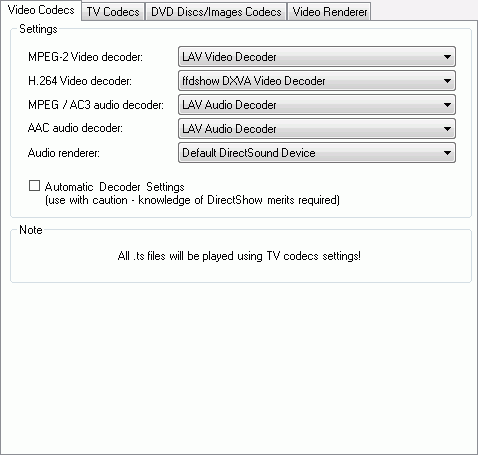
    and my settings are

    saf6_video.png


    What can i do to get that lagging away?
    Thanks so much, hope you have time to help me out, once again.. :eek:)

    Forgot to add graphstudio screenshot
    graphstudio.jpg
     
    C

    CypherMK

    Guest
    Does your refresh rate (TV) match with the frames per second of mkv file?
    Do you use the refresh rate changer? Or do you use reclock?
     

    BrownGhost

    MP Donator
  • Premium Supporter
  • October 15, 2008
    435
    30
    Home Country
    Denmark Denmark
    Does your refresh rate (TV) match with the frames per second of mkv file?
    Do you use the refresh rate changer? Or do you use reclock?

    I dont use either of them, should i do that?

    My tv is brand new 60" Samsung Top model 800mhz LED tv :eek:)
     

    BlueMax1916

    Super User
  • Team MediaPortal
  • Super User
  • January 29, 2007
    706
    125
    Home Country
    Germany Germany
    I had stutters when I made a fresh reinstall of Windows some days ago: I have a Nvidia card and checked the available screen resolutions/frequency combinations in the Nvidia Control Panel. Turned out that Windows did not recognize my TV and did not read out the EDID information the TV sends over HDMI. In device manager the TV was shown as PnP Monitor. This is an old Windows bug. My solution was to use Monitor Asset Manager to create a correct Monitor.inf file for my TV and repalce the standard one with this. Voila the missing screen resolutions/frequency combinations are available now and the stutter is gone. I had the same problem with an ATI Setup and it was also Windows 7 causing the troubles.

    Hope this helps.
     

    BrownGhost

    MP Donator
  • Premium Supporter
  • October 15, 2008
    435
    30
    Home Country
    Denmark Denmark
    I had stutters when I made a fresh reinstall of Windows some days ago: I have a Nvidia card and checked the available screen resolutions/frequency combinations in the Nvidia Control Panel. Turned out that Windows did not recognize my TV and did not read out the EDID information the TV sends over HDMI. In device manager the TV was shown as PnP Monitor. This is an old Windows bug. My solution was to use Monitor Asset Manager to create a correct Monitor.inf file for my TV and repalce the standard one with this. Voila the missing screen resolutions/frequency combinations are available now and the stutter is gone. I had the same problem with an ATI Setup and it was also Windows 7 causing the troubles.

    Hope this helps.

    Wow sounds like this is the think, ill try it later and report back how it works:
    Edit update: My tv is brand new 60" Samsung Top model 800mhz LED tv

    I havee my self many times wondery why monitor just lists as plug and play from MS and the driver is millions years old..
    Hope this program you mentioned can solve the issues..
    all i have to do it, DL run, save new ini file and update monitor driver with new ini file and im done??
     

    McFly

    MP Donator
  • Premium Supporter
  • November 5, 2008
    18
    1
    Milan
    Home Country
    Italy Italy
    ... My solution was to use Monitor Asset Manager to create a correct Monitor.inf file for my TV and repalce the standard one with this. Voila the missing screen resolutions/frequency combinations are available now and the stutter is gone. I had the same problem with an ATI Setup and it was also Windows 7 causing the troubles.

    Hope this helps.

    Do you have an HDMI AV Receiver between your TV and the HTPC?

    I have this kind of configuration (TV->AVR->HTPC all connected through HDMI) and experience stutters and all the videos don't play smooth with SAF 6.0.9 (or older). I have an ATI card with 12.2 drivers in my HTPC.
     
    C

    CypherMK

    Guest
    First I would try the refresh rate changer! Works fine on my Samsung 50" top model state of the art plasma TV ;)
     

    Users who are viewing this thread

    Top Bottom