Sending Serial Commands (1 Viewer)

cafe.racer

Portal Pro
August 5, 2008
74
1
Home Country
United Kingdom United Kingdom
Thought it would be best to start a new thread, rather than discuss in the "Feature Requests" thread.

Pussywagon asked me how I send serial commands, so I thought it best to describe my setup - I have a Cambridge Audio 340R Receiver that I control with serial commands and IRSS. My setup might not be too relevant, because I don't actually use MP, but hopefully some of it is relevant.

I have the MCE Vista Remote (the white one) that I use with the older MCE Transceiver as it has blasters. I also blast IR to the TV to turn it on and off.

The Serial Protocol for my amp is in this document.

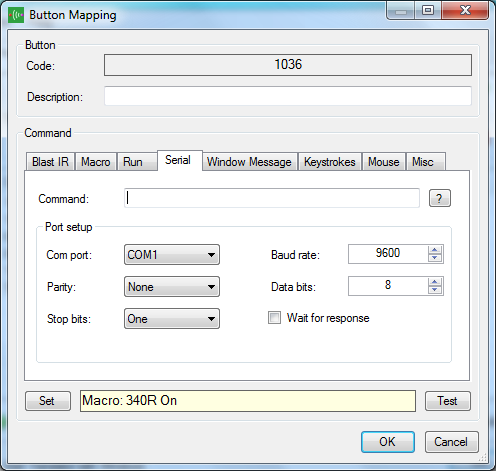
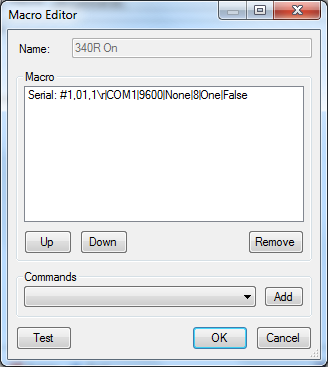
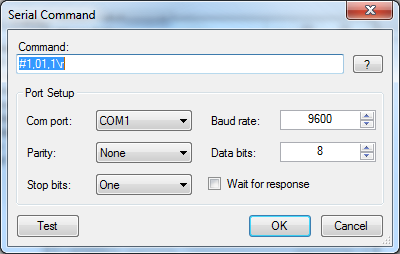
When I look at my Translator setup, the specific command I have to turn the amp on is shown below, then the button mapping screen and the macro screen are also shown.

Notice that the button mapping screen you have to click "Set" down at the bottom to Set the command that is used.
 

Attachments

  • Capture4.PNG
    Capture4.PNG
    38.4 KB
  • Capture5.PNG
    Capture5.PNG
    57.4 KB
  • Capture3.PNG
    Capture3.PNG
    32.6 KB

PussyWagon

Portal Pro
August 2, 2008
235
7
i really appreciate your help Cafe.racer!

But unfortunately i cant get it to work anyway... As my receiver accepts HEX format my settings are different from yours but i still think it should work! GAH! :(

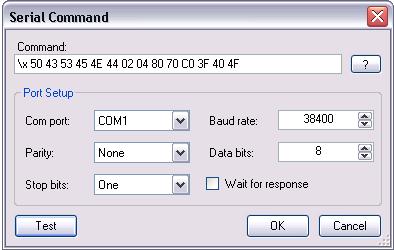
I have tried as shown in the picture below and in many, many other ways but i really cant understand what i'm doing wrong???

Here is my Serial Protocol
And here is a link with some Hex codes and informations.

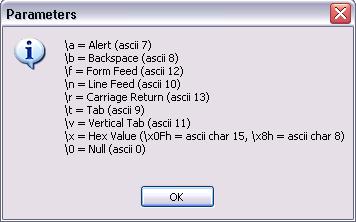
Also, in the picture below showing Parameters it says "\x" is for HEX codes... it also says "\x0Fh" is for ASCII char 15 and "\x8h" is for ASCII char 8. I dont understand this?

Please help me, im going crazy getting this to work! What can i try, is there something wrong using HEX codes in IRSS or am i just stupid? :mad:
 

Attachments

  • serial command.JPG
    serial command.JPG
    21.6 KB
  • macro editor.JPG
    macro editor.JPG
    28.2 KB
  • parameters.JPG
    parameters.JPG
    14.9 KB

cafe.racer

Portal Pro
August 5, 2008
74
1
Home Country
United Kingdom United Kingdom
Nice Amp! I've seen them in the store and they LOOK fantastic, I wish they did a matching HTPC case. H-K have done a job and a half on that protocol, but easy to understand it is not.

Other than checking the cable, are you sure yours is a straight wired one? Have you got a multimeter to check?

Have you got that firmware update?

I think the \x switch should be \x6h in your case to signify a 6 char ASCII.

I would try that sermon program, and email that bloke with the results.
 

PussyWagon

Portal Pro
August 2, 2008
235
7
Thanks! Yea its great but its getting old now... :) Hehe, yes a HTPC case in same design would have been cool!
Cable is working fine as i have no problem controlling it with another RS232 remote software.

Also i have tried using the sermon program and sure, i see a significant difference but what could i do about it? :)

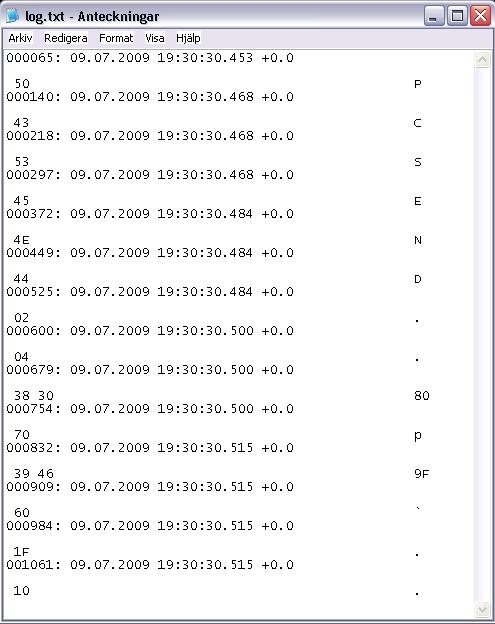
This is the log file from sermon, the first rows (PCSEND....) showing the command "TURN OFF" using RS232 software, after that Translator is sending "TURN ON" and as you can see its a strange difference? This is when using "\x6h" as you suggested!
 

cafe.racer

Portal Pro
August 5, 2008
74
1
Home Country
United Kingdom United Kingdom
It looks like Translator is sending the 50 43 53 45 ... all in one go, which is what you'd expect, but that other program is sending 50 then 43 then 53 then 45. I noticed the "PCSEND" in the protocol and wondered if you were supposed to send that at the start of each command, it looks like that's what the other program has done.

If the other program works, as in it controls the amp, you could try and get IRSS to call the other program OR you should be able to create a macro that sends the hex commands in series so the output in sermon looks the same as the output from the other program.
 

PussyWagon

Portal Pro
August 2, 2008
235
7
Yes "PCSEND" is at the beginning of each commando. Then follows 8 more HEX values..

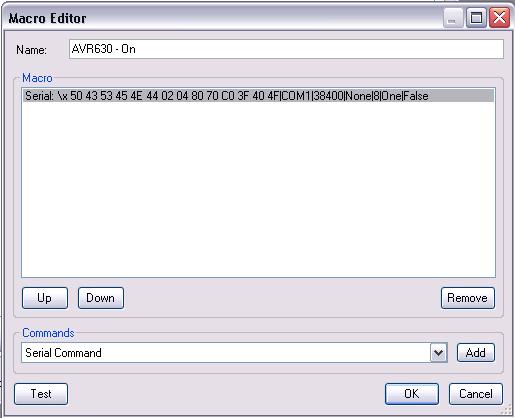
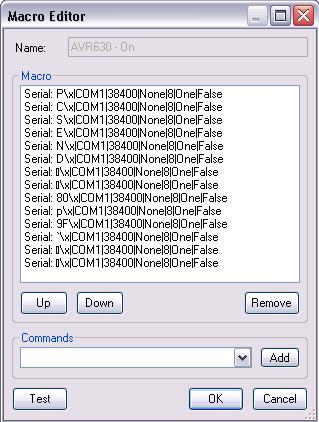
As you mentioned, it seems like i have to make Translator sending these HEX values one at time and i actually succeeded to do this with macro and "P\x" commando for each value. Like this:

P\x
C\x
S\x
E\x
N\x
D\x


This whas the easy part, but then.. it came some more harder values that was not that easy to convert to ascii characters.. like "9F" and "80" but i'm sure there are more values! If i try to convert 9F i get "?" or "€" or some other character but it wont be "9F" when running it through Serial monitor, it will be "3F". It feels like this isn't the right way to go, the right way would be to write "\x80" and "\9F" just as it is, create a macro is OK but "50 43 53 45 4E 44 02 04 80 70 C0 3F 40 4F \x" should be the absolute right way!

:(

Here are some picture.. The one on the left side is my MACRO and on the right is what im getting!
 

Attachments

  • macro editor.JPG
    macro editor.JPG
    39.4 KB
  • log.JPG
    log.JPG
    52.2 KB

PussyWagon

Portal Pro
August 2, 2008
235
7
No, unfortunately not... :(
But I have been speaking with a guy who have helped me troubleshooting this and he says there is some problem with the code in irss which makes it sending wrong HEX codes for some of the characters. LIKE i said above for example, 9F and 80 is one of those characters.
This makes it impossible for me to use it! I have PM chemelli but he dont have time and knowledge in that area to fix it.

Dont know if there is anybody else who is able to fix this problem and helping me out? :)
 

and-81

Retired Team Member
  • Premium Supporter
  • March 7, 2005
    2,257
    183
    Melbourne
    Home Country
    Australia Australia
    Was there any resolution for this?

    If not, let me know what the problem is with the code and I'll make sure it's sorted out.

    Cheers,
     

    Users who are viewing this thread

    Top Bottom