
Skystar HD2 & DiseqC switch - no signal (1 Viewer)

wisdom

MP Donator
  • Premium Supporter
  • December 20, 2010
    31
    2
    Prague
    Home Country
    Czech Republic Czech Republic
    I did it.
    1. Deleted all logs
    2. Started TV-server config.
    3. Selected DVB-S card and "Scanning" button
    4. After first transponder scanned with no signal, I cancelled it and exit TV-server

    What´s wrong? I´m sorry, but I´m trying my best :/
     

    mm1352000

    Retired Team Member
  • Premium Supporter
  • September 1, 2008
    21,544
    8,236
    Home Country
    New Zealand New Zealand
    I did it.
    1. Deleted all logs
    2. Started TV-server config.
    3. Selected DVB-S card and "Scanning" button
    4. After first transponder scanned with no signal, I cancelled it and exit TV-server

    What´s wrong? I´m sorry, but I´m trying my best :/
    You're doing well. I guess you're just learning. It is my fault for not giving you good instructions ;)
    Let's try again:

    1. Delete your TV Server logs (you are doing this correctly).
    2. Restart TV Server - this is what you didn't do. How do you do that?
    - Open TV Server configuration.
    - Go to the "manual control" section.
    - Click on the "stop service" button.
    - Wait 5 to 10 seconds.
    - Click on the "start service" button.
    3. Select the Skystar card and do a scan. You can cancel after the first transponder.
    4. Post TV Server logs again.
     

    wisdom

    MP Donator
  • Premium Supporter
  • December 20, 2010
    31
    2
    Prague
    Home Country
    Czech Republic Czech Republic
    Sorry, I didn´t know, what restart server exactly means. I´m new to Mediaportal, built HTPC a few days ago.
    Ok, so here are new logs.
    Thanks for your patience :)
     

    mm1352000

    Retired Team Member
  • Premium Supporter
  • September 1, 2008
    21,544
    8,236
    Home Country
    New Zealand New Zealand
    Sorry, I didn´t know, what restart server exactly means. I´m new to Mediaportal, built HTPC a few days ago.
    Ok, so here are new logs.
    Thanks for your patience :)

    Perfect! :)
    Okay, now I understand: the Technisat Skystar HD2 is actually a rebranded Twinhan Mantis tuner. This is why I was seeing the "Twinhan" references in the logs. I must have got the Skystar 2 and the Skystar HD 2 mixed up. Sorry about that...

    Can you tell me about your DiSEqC setup please.
    What kind of switch/motor do you have?
    If it is a switch:
    -how many ports does it have
    -what LNB is connected to each port

    There doesn't seem to be any trouble with the tuner itself. I suspect that the problem is that you aren't setting the LNB or DiSEqC parameters correctly when you scan for satellite channels. You need to make sure you select the right kind of LNB and the correct DiSEqC port. If necessary, use the "advanced" options to set custom LNB local oscillator frequencies. Does that make sense?
     

    wisdom

    MP Donator
  • Premium Supporter
  • December 20, 2010
    31
    2
    Prague
    Home Country
    Czech Republic Czech Republic
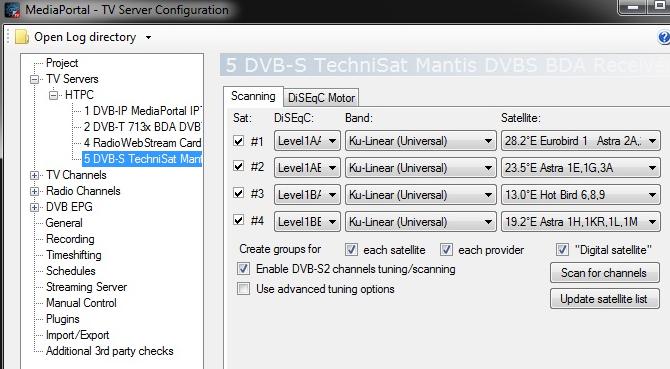
    I have 4-port DiseqC switch. Here is screen of my setup. It´s same as on Golden Interstar reciever, which I used before.
    I´m not sure how numeric ports are handled with two letters, but I hope this is right?
    1.port - AA
    2.port - AB
    3.port - BA
    4.port - BB

    Thanks.
     

    Attachments

    • diseqc.jpg
      diseqc.jpg
      53 KB

    mm1352000

    Retired Team Member
  • Premium Supporter
  • September 1, 2008
    21,544
    8,236
    Home Country
    New Zealand New Zealand
    Hi again

    I have 4-port DiseqC switch. Here is screen of my setup. It´s same as on Golden Interstar reciever, which I used before.
    I´m not sure how numeric ports are handled with two letters, but I hope this is right?
    1.port - AA
    2.port - AB
    3.port - BA
    4.port - BB

    Thanks.

    That setup looks good to me as long as your LNBs are all universal KU LNBs:
    LO (low) = 9750 MHz
    LO (high) = 10600 MHz
    Switch = 11700 MHz

    If those frequencies aren't correct then you need to enable "use advanced tuning options" and "override default LNB frequencies". I'd also try disabling the "DVB-S2 channel tuning/scanning" option. It should work with it enabled, however just to be safe...

    Happy Christmas! :D
     

    wisdom

    MP Donator
  • Premium Supporter
  • December 20, 2010
    31
    2
    Prague
    Home Country
    Czech Republic Czech Republic
    All LNBs area universal KU. I tried many options ON/OFF, but nothing helped.
    I´m affraid, there is maybe something outside the MediaPortal. Bad driver I think.
    I´ll try another DVB-S players and make sure, that card working there.

    So, thanks for you support for now. It´s admirable, that you´re supporting even at Christmas Eve day :)

    Happy Christmas to you too!
     

    mm1352000

    Retired Team Member
  • Premium Supporter
  • September 1, 2008
    21,544
    8,236
    Home Country
    New Zealand New Zealand
    Hi again

    All LNBs area universal KU. I tried many options ON/OFF, but nothing helped.
    I´m affraid, there is maybe something outside the MediaPortal. Bad driver I think.
    I´ll try another DVB-S players and make sure, that card working there.
    That sounds like a good plan to me. If the driver was bad then I think the tuner wouldn't even scan or be recognised by TV Server. It is possible that the signal is too weak or too strong for it...
    I think it would also be worth trying only one satellite group at a time. For example, try 28.2E with each DiSEqC port (AA, AB, BA, BB) and DVB-S2 features disabled. Perhaps you have already tried this?

    If you try other programs and the tuner works, but you still can't get TV Server to work then I will provide you with a patch to see more details about the signal - whether it is present, the quality, and the strength, rather than just whether the tuner is "locked".
     

    Users who are viewing this thread

    Top Bottom