So, because the built in touch screen is not HDCP compliant, you have to disable it before playing a BD? That sucks. I was going for the T12 12 inch screen from Origen, but it´ll probably have the same problem.

You are using an out of date browser. It may not display this or other websites correctly.
You should upgrade or use an alternative browser.
You should upgrade or use an alternative browser.
Completed The Media Beast (1 Viewer)
- Thread starter MyPVR
- Start date

- September 22, 2006
- 123
- 5
- Home Country
-
 Germany
- Thread starter
- #22
I think you are going to have the same problem: The T12 has got a SVGA-input connector as my T16 has... and I hold that there is no HDCP. What realy sucks: It's not enough to power off the display, I've got to disable it in the NVIDIA desktop settings.
Regards,
MyPVR
Regards,
MyPVR
- September 22, 2006
- 123
- 5
- Home Country
-
Germany
- Thread starter
- #24
I struggeled now for 3 weeks with Blu-ray Disk playback and PDVD 7.3.
The reason for this was a gfx card driver problem:
Regards,
MyPVR
The reason for this was a gfx card driver problem:
- With NVIDIA 195.62 and 191.07 it was impossbile to playback a BD.
- After a downgrade to version 190.62 everything is working again.
Regards,
MyPVR
Hi MyPVR,
here are a few hints after a lot of time over my Origen
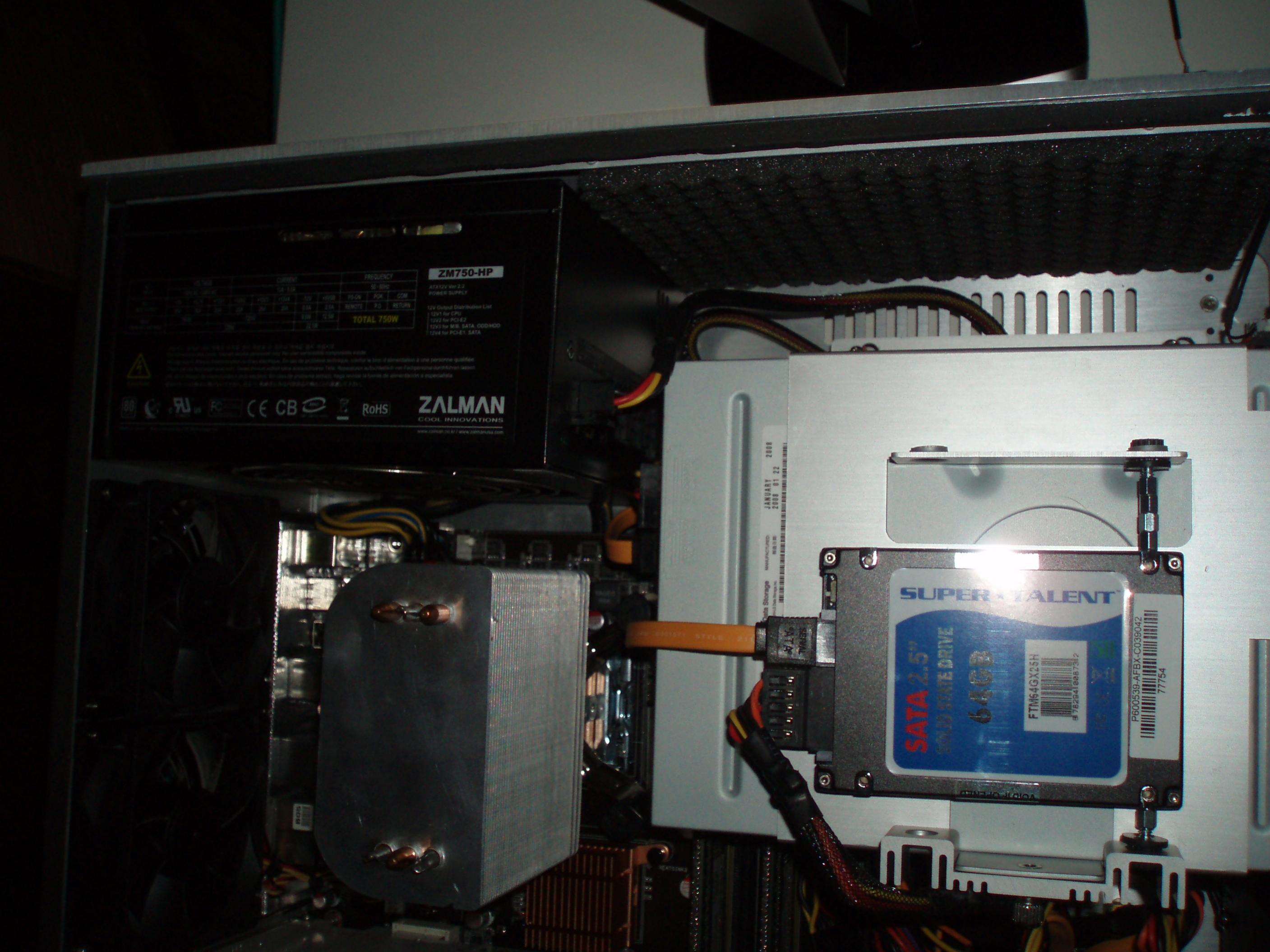
a) the solid state disk will not help you with timeshifting. Also the start up time does not change too much...
b) use SSD only if you are looking to make your system more quiet. In this case, use an SSD as a boot disk with MP and your apps installed, but keep all your media on a Network Attached Storage device (NAS). They can be found at reasonable prices ...(!). This way you do not need to have the loud, vibrating disks in your case!!!
c) If you want your system to become more quiet you can also loose your CPU cooler. Just replace it with something like mine, or ideally with a silverstone NT01 e (SilverStone Technology Co., Ltd - Designing Inspiration). The case fans and the PSU fan will do the trick. For your info my CPU is an Intel E8400. Be carefull with the cooling of your chipset on the motherboard. If you skip the CPU fan it might get hot, although I do not think so because of the heat pipes that lead close to the case fans in the back.
d) last point, if anyone is interested I can provide a little script with which you can program your MCE "*" and "#" remote buttons to swap the main moitor from the TV to the case screen and vice verca. The script uses autohotkeys but it requires an ATI GPU because ATI supports profiles while NVidia does not.
Cheers,
Chris
here are a few hints after a lot of time over my Origen
a) the solid state disk will not help you with timeshifting. Also the start up time does not change too much...
b) use SSD only if you are looking to make your system more quiet. In this case, use an SSD as a boot disk with MP and your apps installed, but keep all your media on a Network Attached Storage device (NAS). They can be found at reasonable prices ...(!). This way you do not need to have the loud, vibrating disks in your case!!!
c) If you want your system to become more quiet you can also loose your CPU cooler. Just replace it with something like mine, or ideally with a silverstone NT01 e (SilverStone Technology Co., Ltd - Designing Inspiration). The case fans and the PSU fan will do the trick. For your info my CPU is an Intel E8400. Be carefull with the cooling of your chipset on the motherboard. If you skip the CPU fan it might get hot, although I do not think so because of the heat pipes that lead close to the case fans in the back.
d) last point, if anyone is interested I can provide a little script with which you can program your MCE "*" and "#" remote buttons to swap the main moitor from the TV to the case screen and vice verca. The script uses autohotkeys but it requires an ATI GPU because ATI supports profiles while NVidia does not.
Cheers,
Chris
Attachments
- September 22, 2006
- 123
- 5
- Home Country
-
Germany
- Thread starter
- #26
Hi Chris,
I do NOT use a SSD. My setup uses a Compact Flash Card with an adapter to IDE as timeshift drive only and works fairly well.
To switch the NVIDIA graphic card between CLONE FullHD@50Hz / SINGLE FullHD@24Hz / SINGLE FullHD@50Hz I wrote some scripts with AutoIt and perhaps you want to have a look at them: View Mode Switcher (AutoIt Scripts)
These scripts should easily to be hot-key'ed.
The CPU fan is not a source of noise. Keep in mind that there are more case and power supply fans included, but up to now these are not creating any issues. I will check your advice and have a look at a passively cooling solution.
Thanks & Regards
MyPVR
I do NOT use a SSD. My setup uses a Compact Flash Card with an adapter to IDE as timeshift drive only and works fairly well.
To switch the NVIDIA graphic card between CLONE FullHD@50Hz / SINGLE FullHD@24Hz / SINGLE FullHD@50Hz I wrote some scripts with AutoIt and perhaps you want to have a look at them: View Mode Switcher (AutoIt Scripts)
These scripts should easily to be hot-key'ed.
The CPU fan is not a source of noise. Keep in mind that there are more case and power supply fans included, but up to now these are not creating any issues. I will check your advice and have a look at a passively cooling solution.
Thanks & Regards
MyPVR
Users who are viewing this thread
Online now: 2 (members: 0, guests: 2)