Netherlands
Hi,
I've got a strange problem, which i pointed down to the TV Server not recognizing my TV Card from standbye.
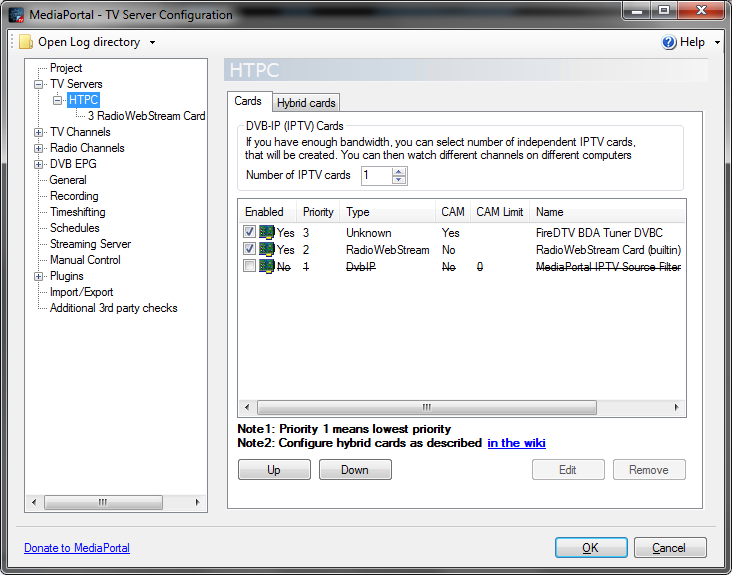
I noticed that every morning i was getting an errormessage in MePo stating thet 'the channel wasn't mapped' to a card, which (off course) prevented me from watching TV. Attached are logs and a screenshot of the TV server config when the problem/errormessage appears.
What have i tried:
1. Tried the 'reinitialze card after standbye' option in PowerScheduler
2. Tried the command line in PowerScheduler (net stop tvservice, net start tvservice)
3. Re-installed hardware (uninstall through Device Manager, reboot, install)
4. Re-installed TV Card software/drivers
Had some other issues about 'no graph' in RC2 or other previous versions, but this is the first time the card kinda gets 'dropped' by the config.
Only way to fix this is to give the machine a reboot, and then it's all fine again (but that's not why i put it in standbye offcourse)
I've got a strange problem, which i pointed down to the TV Server not recognizing my TV Card from standbye.
I noticed that every morning i was getting an errormessage in MePo stating thet 'the channel wasn't mapped' to a card, which (off course) prevented me from watching TV. Attached are logs and a screenshot of the TV server config when the problem/errormessage appears.
What have i tried:
1. Tried the 'reinitialze card after standbye' option in PowerScheduler
2. Tried the command line in PowerScheduler (net stop tvservice, net start tvservice)
3. Re-installed hardware (uninstall through Device Manager, reboot, install)
4. Re-installed TV Card software/drivers
Had some other issues about 'no graph' in RC2 or other previous versions, but this is the first time the card kinda gets 'dropped' by the config.
Only way to fix this is to give the machine a reboot, and then it's all fine again (but that's not why i put it in standbye offcourse)