
TV Guide channel names? (1 Viewer)

Physicist

Portal Member
July 13, 2011
8
0
Home Country
United States of America United States of America
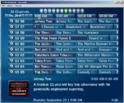
The TV Guide on my system shows the following for each channel.
1. A strange icon showing a vertical bar that looks like a ruler and a circular object that looks like a CD.
2. The channel number.
3. The same channel number again.
4. The upcoming program titles.

I assume this can be configured somewhere, but I can't find where.

I'd like to see the NAME of the channel (e.g. Disney).
I'd like to either remove the icon or replace it with something meaningful.

Help would be appreciated.
 

mm1352000

Retired Team Member
  • Premium Supporter
  • September 1, 2008
    21,544
    8,236
    Home Country
    New Zealand New Zealand
    Hi Physicist

    What you're asking for should be possible. Could you post a screenshot please (pressing F11 creates a jpg in your Windows My Pictures folder I think) so I can visualise the problem - it sounds like something must be wrong...

    mm
     

    Physicist

    Portal Member
    July 13, 2011
    8
    0
    Home Country
    United States of America United States of America
    Hi MM,

    Thanks for your reply.

    Here is a screen snap.
    Not sure where the forum will put it, but the file name is "TV Guide.JPG".

    Mark
     

    Attachments

    • TV Guide.JPG
      TV Guide.JPG
      98.5 KB

    mm1352000

    Retired Team Member
  • Premium Supporter
  • September 1, 2008
    21,544
    8,236
    Home Country
    New Zealand New Zealand
    Hi Mark

    So it looks like these are analog cable channels that have been named with the channel number (channel names are *very* rarely available for analog broadcasts). You need to set the channel names in the TV Channel list in MediaPortal configuration. Simply select the channel that you want to edit, then click again on the name column to edit the name.

    mm
     

    TLD

    Portal Pro
    October 26, 2007
    989
    429
    Rainy Washington
    Home Country
    United States of America United States of America
    Put channel logo here "C:\Documents and Settings\All Users\Application Data\Team MediaPortal\MediaPortal\thumbs\tv\logos" (on windows xp) and name them the same name as the channel and the logos will take the place of the strange icon showing a vertical bar that looks like a ruler and a circular object that looks like a CD.

    Goggle (tv channel logos) for your area to find the logos.

    In MP configuration click tv and make sure "select channel by index" and "show channel number" are unchecked to lose the extra set of channel numbers.
     

    Physicist

    Portal Member
    July 13, 2011
    8
    0
    Home Country
    United States of America United States of America
    Thanks to all who helped.

    I had trouble finding where to change the name, but knowing I could kept me trying until I found it.

    I got a set of logos online. Giving all the logos names to match the channels was tedious, but the TV Guide is now so much easier to use.
     

    Users who are viewing this thread

    Top Bottom