Hi,
I'm a MP noob so please be gentle! I've downloaded and configured MP to the best of my ability, but I've got a problem which I'm hoping has a simple solution...
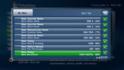
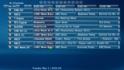
The EPG seems to download data for all channels relevent to my locality (Melbourne, Australia), but the TV Guide only displays some of them, not all. The evidence I see for this is that the Channel page gives me info on the current channel's program - see screen dump attached for Channel 9 and GEM for instance. But when I go to the TV Guide, Channel 9 and GEM don't appear in the list.
How can I add them to the TV Guide listing?
Cheers, Darren.
I'm a MP noob so please be gentle! I've downloaded and configured MP to the best of my ability, but I've got a problem which I'm hoping has a simple solution...
The EPG seems to download data for all channels relevent to my locality (Melbourne, Australia), but the TV Guide only displays some of them, not all. The evidence I see for this is that the Channel page gives me info on the current channel's program - see screen dump attached for Channel 9 and GEM for instance. But when I go to the TV Guide, Channel 9 and GEM don't appear in the list.
How can I add them to the TV Guide listing?
Cheers, Darren.