
Unable to play live TV in single station mp2 (1 Viewer)

KostasPiraeus

MP Donator
  • Premium Supporter
  • October 20, 2016
    15
    2
    72
    Home Country
    Greece Greece
    Hello to all. I am a medium level PC user and i am using mp1 for a few months.
    I need your help because I recently installed mp2 on a single PC but i am not able so far to watch live TV!.
    With Mp2 TV Configuration both tuners (AverMedia A825 USB Dual DVB-T) were successfully tuned.
    In manual timeshift test when I play in VLC the file created there is not video, only sound.
    When I open mp2 and select TV, it drives me to EPG display after few seconds of inactivity. When I select "Watch program now" from the EPG, I only hear the click response sound and then nothing happens.
    My PC configuration is:
    Mother board: ASRock X99 Extreme4
    CPU: Intel Core i7 5820K
    RAM: 16GB
    Graphics: AMD Radeon HD 7700
    OS: WIN 10 64bit
     
    Last edited:

    Owlsroost

    Retired Team Member
  • Premium Supporter
  • October 28, 2008
    5,539
    5,038
    Cambridge
    Home Country
    United Kingdom United Kingdom
    Your TsWriter.log (from TV Server) has a huge number of lines like this:

    [2016-10-20 01:14:34,260] [7bc3e78] [1af8] - MultiFileWriter: failed to create file R:\\live3-0.ts.tsbuffer1.ts

    Is there a problem with drive R ? (like it's full or write-protected ?)
     

    KostasPiraeus

    MP Donator
  • Premium Supporter
  • October 20, 2016
    15
    2
    72
    Home Country
    Greece Greece
    Thank you very much for your reply.
    As a Time-Shifting disk I had created a "SoftPerfect RAM Disk" of 2GB size (disk R:). Using mp1 I had no problems so far with this disk.
    Responding to your reply I have made the next few changes:
    a) I made sure that the Time-Shifting area is not write protected and that there is enough disk space.
    b) I changed the RAM disk to become “Hard Disk Emulated”.
    c) I consequently changed the time shifting area to a new directory in my hard drive. After the above changes I have noticed the following that apply to all changes above:
    1. When, on mp2 tv menu, I select TV sub-window, the EPG window comes up but, when I select a TV channel nothing happens. Nevertheless when looking in time-shifting area I can see a video file named e.g.”live3.0ts.tsbuffer1.ts” which can be opened with VLC player and contains the video and audio content of the selected TV channel. If I try to change TV channel nothing happens.
    2. When I select the option “record now” for the current program on the EPG, the corresponding area becomes red and nothing happens. Occasionally in the TV recording area a recorded file is found and the program stops with an error message when a “Watch recording from beginning” is selected.
    mp1 is still installed and working! Is there something else I could try next?
     
    Last edited:

    Owlsroost

    Retired Team Member
  • Premium Supporter
  • October 28, 2008
    5,539
    5,038
    Cambridge
    Home Country
    United Kingdom United Kingdom
    Your TsWriter.log looks much better - no 'failed to create file' messages.

    mp1 is still installed and working!

    Are you saying that MP1 is installed on the same PC as MP2?

    I can't help much with the MP2 TV player problems because I'm an MP1 user/developer with very little experience of using MP2. Hopefully an 'MP2' person will come along to help...
     

    KostasPiraeus

    MP Donator
  • Premium Supporter
  • October 20, 2016
    15
    2
    72
    Home Country
    Greece Greece
    Dear Owlsroost, thank you very much for having dealt with my problem so far.

    Yes, MP1 is installed on the same PC as MP2 and it is working rather normally, except from some minor problems, (i.e. the live TV display window is not shrinkable beyond a certain point, sometimes live TV refuses to start unless I previously start playing for few seconds a Recorded TV program, some control buttons in the video player do not respond, etc. Anyway I ignore those problems).

    I also hope that another person familiar with MediaPortal 2 will be kind enough to deal with my problem . . . so I will have to wait!

    Thank you again.
     

    HTPCSourcer

    Retired Team Member
  • Premium Supporter
  • May 16, 2008
    11,382
    2,369
    Home Country
    Germany Germany
    In a parallel installation of both MP1 and MP2 you need to make sure that the TVService of MP1 is deactivated if you want to use MP2.
     

    mm1352000

    Retired Team Member
  • Premium Supporter
  • September 1, 2008
    21,544
    8,236
    Home Country
    New Zealand New Zealand
    the live TV display window is not shrinkable beyond a certain point
    Do you mean the window inside MP, or the MP window itself?
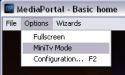
    (Do you know about MiniTV mode?)
    upload_2016-10-23_10-0-43.png

    sometimes live TV refuses to start unless I previously start playing for few seconds a Recorded TV program
    That's odd. Make sure you've configured your TV codec settings. Feel free to provide log files if you want help to resolve this.

    some control buttons in the video player do not respond
    Which ones?
     

    KostasPiraeus

    MP Donator
  • Premium Supporter
  • October 20, 2016
    15
    2
    72
    Home Country
    Greece Greece
    Many thanks to both HTPCSourcer and MM for your suggestions.
    During my trials, I used to end MP1 before I tried to open MP2 (MP was not visible in process explorer). Today to be more certain, I uninstalled both MP1 & MP2, I restarted the system, and then I reinstalled MP2 alone. To my surprise, it was the first time MP2 worked and I could watch live TV with it! But something goes wrong as I am having the following issues:

    - It requires enough attempts to switch to a TV station.

    - It keeps conflicting with process explorer displaying the message “Sysinternals Process Explorer has stopped working – A problem caused the program to stop working correctly . . . ” even after two system restarts. . .

    - Besides the mouse arrow, the icon of the time glass is always present.

    - During my reply to this post the screen went black, no response to the keyboard, the HDD led was blinking and I had to hard reset the system and continue my post!

    I will keep MP2 for the next few days to get familiar with and I will try to overcome these issues with your help if possible.

    Thank you very much again for your help.

    P.S. I had BSOD with stop code: "CRITICAL PROCESS DIED" and I am considering rolling back to previous MP1 installation!
     
    Last edited:

    KostasPiraeus

    MP Donator
  • Premium Supporter
  • October 20, 2016
    15
    2
    72
    Home Country
    Greece Greece
    After getting the B.S.O.D., I finally restored a previous stable system backup with only MP1 installed. I will try MP2 sometime in the future.

    In MP1 I changed TV codec settings by selecting Microsoft codecs where they are available.

    MP1 seems to work better, but the problem of resizing MP window still remains (it seems to have a limit to one third of the horizontal screen resolution), no matter if MiniTV Mode is selected.

    Thank you very much for dealing with my MP issues.
     

    mm1352000

    Retired Team Member
  • Premium Supporter
  • September 1, 2008
    21,544
    8,236
    Home Country
    New Zealand New Zealand
    In MP1 I changed TV codec settings by selecting Microsoft codecs where they are available.
    Note that Microsoft codecs may not support certain audio formats such as Dolby Digital (AC3), so it might be better to install and use the [free and open source!] LAV codecs. You can do that by installing the "LAVFilters" package in the MP Extension Installer, or manually using the installer from -->here<--.

    MP1 seems to work better, but the problem of resizing MP window still remains (it seems to have a limit to one third of the horizontal screen resolution), no matter if MiniTV Mode is selected.
    There are minimum and maximum window sizes.
    AFAIK those limits exist to avoid problems with scaling artefacts.
    Minimum is 1/3 of the native skin resolution.
    Maximum is the native skin resolution.
    You're using the DefaultWideHD skin.
    The native resolution for that skin is 1920x1080.
    Therefore minimum window size will be 640x360, and maximum Window size will be 1920x1080.
    If you want to make it possible to have a smaller window, you need to find a skin with a lower native resolution (...or modify the code).
     

    Users who are viewing this thread

    Top Bottom