
Vista UAC prompt manifest (1 Viewer)

JaLooNz

Portal Member
March 13, 2008
20
1
Home Country
Hi,

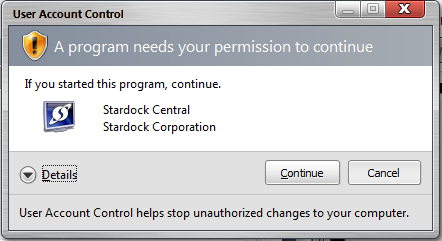
Can we add manifest files to the set-up control panels for both Mediaportal and TV-engine, so that instead of the ugly elevation prompt we get a more beautiful one?

.NET Security Blog : Adding a UAC Manifest to Managed Code

Windows Vista Application Development Requirements for User Account Control Compatibility
http://www.microsoft.com/downloads/...69-A648-49AF-BC5E-A2EEBB74C16B&displaylang=en
See Step Six: Create and Embed an Application Manifest with Your Application, p63

Executable: IsUserAdmin.exe
Manifest:IsUserAdmin.exe.manifest
Sample application manifest file:
<?xml version="1.0" encoding="UTF-8" standalone="yes"?>
<assembly xmlns="urn:schemas-microsoft-com:asm.v1" manifestVersion="1.0">
<assemblyIdentity version="1.0.0.0"
processorArchitecture="X86"
name="IsUserAdmin"
type="win32"/>
<description>Description of your application</description>
<!-- Identify the application security requirements. -->
<trustInfo xmlns="urn:schemas-microsoft-com:asm.v2">
<security>
<requestedPrivileges>
<requestedExecutionLevel
level="requireAdministrator"
uiAccess="false"/>
</requestedPrivileges>
</security>
</trustInfo>
</assembly>
 

Attachments

  • uac panel.png
    uac panel.png
    28.5 KB

and-81

Retired Team Member
  • Premium Supporter
  • March 7, 2005
    2,257
    183
    Melbourne
    Home Country
    Australia Australia
    The assemblies in question already have a manifest that requires administrator rights, but the difference is that they are considered "unidentified publisher" because they aren't digitally signed with a trusted certificate.

    To change this we would have to buy a digital certificate and sign the assemblies ... and that's not likely to happen.

    Cheers,
     

    JaLooNz

    Portal Member
    March 13, 2008
    20
    1
    Home Country
    I thought signing is a optional requirement, and mainly for driver level code?

    Anyway I doubt the control panel requires admin access, and the reason why the TV-server config has the admin prompt is because it has "setup" in its' filename. Maybe you would want to change that in future, or embed a manifest that says it does not require administrator access.

    Another thing I see with the builds is that sometimes the application attempts to write to Program Files, and because UAC is on it is redirected to...
    C:\Users\Username\AppData\Local\VirtualStore\Program Files\Team MediaPortal\MediaPortal
    This causes the version number display on starting Mediaportal to be that of a old version. Wiping out the directory will correct the version number. I cannot be sure if Mediaportal is running the old / new version when the directory is not wiped, maybe you would want to look into that.
     

    and-81

    Retired Team Member
  • Premium Supporter
  • March 7, 2005
    2,257
    183
    Melbourne
    Home Country
    Australia Australia
    Signing is not a requirement, but if you don't sign you don't get the nicer UAC prompt ... at least that's the information I have ...

    For anything that needs admin rights we are already supplying a manifest file (not embedded) ... if we didn't supply the manifest you would start the application and it would run but as soon as you tried to do something that required admin privileges you would get a security exception.

    The issue with files being redirected to a different location is being worked on at the moment ... the key is to not try to write to files that are stored in the Program Files folder... We're changing that as we speak, it's just that it will require a re-install so we're holding it off until the 1.0 Release Candidates start coming out.

    If there's some trick we could be using to make this stuff better then let me know.

    Cheers,
     

    dgrind

    New Member
    March 25, 2008
    2
    0
    Another thing I see with the builds is that sometimes the application attempts to write to Program Files, and because UAC is on it is redirected to...
    C:\Users\Username\AppData\Local\VirtualStore\Program Files\Team MediaPortal\MediaPortal
    This causes the version number display on starting Mediaportal to be that of a old version. Wiping out the directory will correct the version number. I cannot be sure if Mediaportal is running the old / new version when the directory is not wiped, maybe you would want to look into that.

    Aha this is just what I was looking for!:D

    I just had this problem and I think I can safely say it runs the old version.

    With UAC enabled after installing RC1 the splash screen still indicated I was running an old snapshot of MP (noticed that after reading this thread) and when attempting to connect to the TVServer it failed. Turning UAC off gave me RC1 back on the splashscreen and everything worked fine. After reading this I deleted the folder you mention and bam, now I have a fully working MP with UAC enabled.

    I second the suggestion to clean that directory in either an uninstall or a dirty install. Would have saved me a bit of frustration anyway.

    P.S. The similar threads thing on posting a new thread is rather handy. Was about to post my own and then found the answer was already around :D
     

    Users who are viewing this thread

    Top Bottom