Thanks for the help guys. I have another issue, I have a couple of channels that are combined analog and atsc, and I am not getting guide data for them. When I first combined them the data was already populated and worked fine, but no new data is getting added, and now I have no guide data for the channels at all.

You are using an out of date browser. It may not display this or other websites correctly.
You should upgrade or use an alternative browser.
You should upgrade or use an alternative browser.
Schedules Direct US/Canadian/Mexico EPG Plugin (Updated August 2010) (1 Viewer)
- Thread starter patrick
- Start date
- September 1, 2008
- 21,544
- 8,236
- Home Country
-
 New Zealand
Hi poppabk
That is probably because the SD link got lost when you combined the channels. The way in which you combine the channels will be important - you effectively need to add the tuning detail from the analog channel to the ATSC channel. In other words, the analog channel needs to get merged into the ATSC channel so that the SD guide data link from the ATSC channel is used for the combined channel. You can't de-combine channels () so you're going to need to delete one of the tuning details from within each of those channels and start fresh.
1. Open TV Server config.
2. Go to the TV Channels section.
3. Select a combined channel.
4. Click edit.
5. Select the analog tuning detail row and click remove.
6. Click OK.
7. Repeat 3 - 6 for each of the combined channels.
8. Rename the [formerly combined] ATSC channels to match the call sign in your SD lineup.
9. Edit SD options: enable "force guide update on next TvService startup", disable "automatically add new digital cable/satellite channels" and "include analog channels" (in "Digital Cable/Satellite Channel Management"), disable "allow EPG channel mapping by channel number only".
10. Stop/start the TV service in the manual control section.
11. After a few minutes check that guide information is showing for the channels in MediaPortal.
12. Rescan to get the analog channels back.
13. Recombine carefully - might pay to do an export of your channel list before you do this so you can easily delete channels and then restore again.
mm
That is probably because the SD link got lost when you combined the channels. The way in which you combine the channels will be important - you effectively need to add the tuning detail from the analog channel to the ATSC channel. In other words, the analog channel needs to get merged into the ATSC channel so that the SD guide data link from the ATSC channel is used for the combined channel. You can't de-combine channels
() so you're going to need to delete one of the tuning details from within each of those channels and start fresh.1. Open TV Server config.
2. Go to the TV Channels section.
3. Select a combined channel.
4. Click edit.
5. Select the analog tuning detail row and click remove.
6. Click OK.
7. Repeat 3 - 6 for each of the combined channels.
8. Rename the [formerly combined] ATSC channels to match the call sign in your SD lineup.
9. Edit SD options: enable "force guide update on next TvService startup", disable "automatically add new digital cable/satellite channels" and "include analog channels" (in "Digital Cable/Satellite Channel Management"), disable "allow EPG channel mapping by channel number only".
10. Stop/start the TV service in the manual control section.
11. After a few minutes check that guide information is showing for the channels in MediaPortal.
12. Rescan to get the analog channels back.
13. Recombine carefully - might pay to do an export of your channel list before you do this so you can easily delete channels and then restore again.
mm

The wiki recomends using:
%title%\%title% - %episode% - %name%
to name the file for MP TV-Series comparability. So remove the date tag from the filename ... it isn't needed, as that info is in the xml for RecordedTV. Then the SD plugin can capture the %episode% label and convert it to SxxExx.
Chuck
I noticed with my setup, I have used the above for "SERIES" but lots of my TV Series recorded from TV are using the "MOVIES" format.
This brings up a question: Should you set the file format for SERIES and MOVIES to the same as shown in the wiki and in your post?

- October 24, 2011
- 261
- 207
- 45
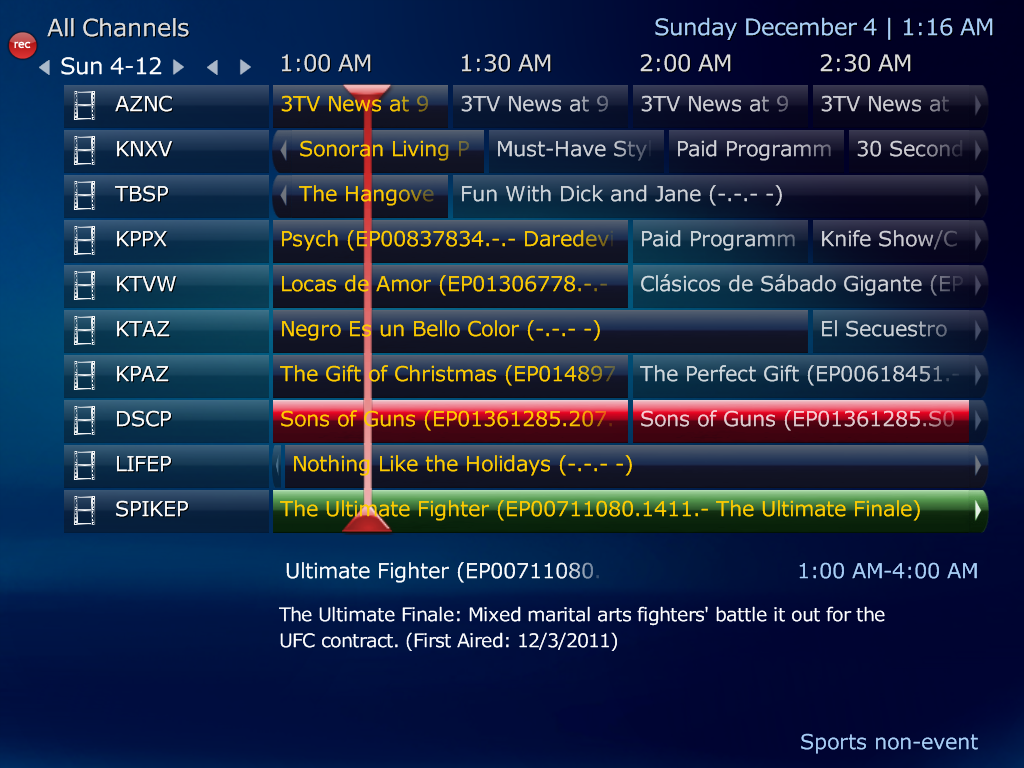
I'd suggest you use the same format for Series and Movie -- the only difference is MP considers a recording you want to be a Movie unless it's scheduled as a repeat every... So if you occasionally want to record a single show and want it in your TV Series, it'll have to have the same format as the Series filenames would.
What you're seeing in the guide is the data in the MP database associated with that particular episode. I believe the EP is the show's unique identifier while the text is the episode's name. Different skins display this differently - I use StreamedMP and never see what you're seeing. I'll let others more familiar with the SD plugin help direct you...
What you're seeing in the guide is the data in the MP database associated with that particular episode. I believe the EP is the show's unique identifier while the text is the episode's name. Different skins display this differently - I use StreamedMP and never see what you're seeing. I'll let others more familiar with the SD plugin help direct you...
- October 24, 2011
- 261
- 207
- 45
Ok, that might be the case.
Thanks for the advice on movies. Now that you said something, I did have a couplpe of episodes of mad men that I did as one off recordings, and you are right, they do not have any Season or Episode info because they were considered movies.
The other thing that is annoying, is that the ID is getting into the ts file titles. I think that I found the culprit though:
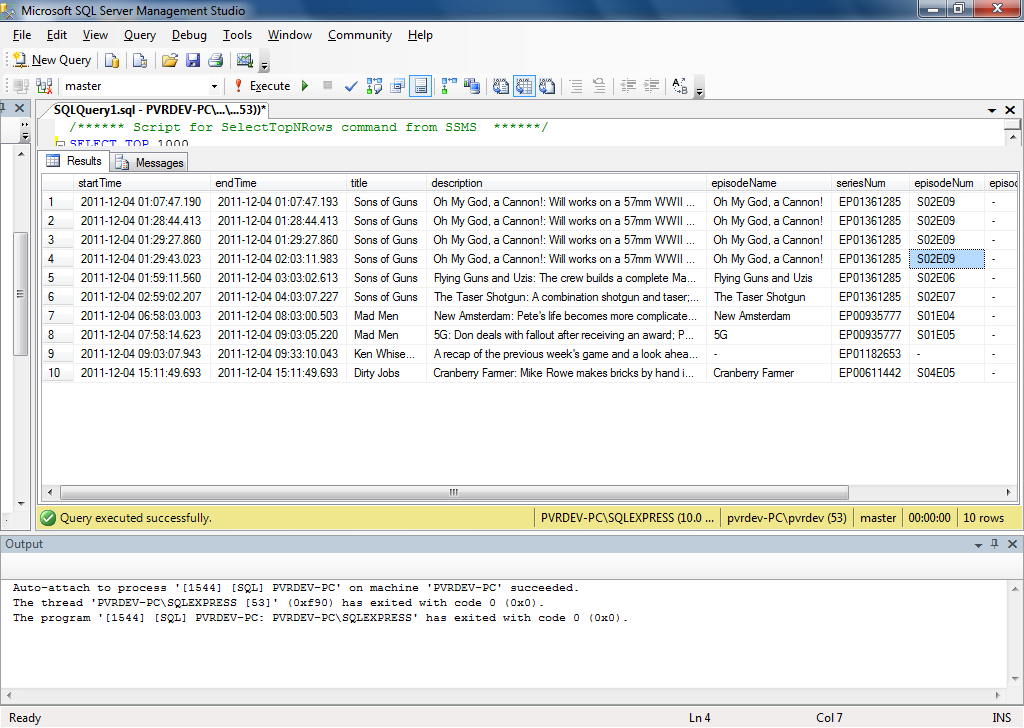
I did a query for recordings in the database and this is what I got:
[See attachment]
So it looks like I need to change the formatting to not include the series and it should work correctly for me.
Thanks,
Matt
**EDIT - I am an idiot... I should have read this a little closer:
http://code.google.com/p/mp-schedulesdirect/wiki/SupportForTheTvDbCom
look at the lost sentence.
Thanks for the advice on movies. Now that you said something, I did have a couplpe of episodes of mad men that I did as one off recordings, and you are right, they do not have any Season or Episode info because they were considered movies.
The other thing that is annoying, is that the ID is getting into the ts file titles. I think that I found the culprit though:
I did a query for recordings in the database and this is what I got:
[See attachment]
So it looks like I need to change the formatting to not include the series and it should work correctly for me.
Thanks,
Matt
**EDIT - I am an idiot... I should have read this a little closer:
http://code.google.com/p/mp-schedulesdirect/wiki/SupportForTheTvDbCom
look at the lost sentence.
Attachments
- June 28, 2011
- 86
- 6
- Home Country
-
United States of America
I am back making another attempt to get MediaPortal working on my system. I am now working a a new development computer so I can test things out without hampering things on the family HTPC.
So I have configured my HDHomeRun tuners and the SchedulesDirect plugin. I manually sorted the channels in All Channels so that they are ordered correctly in the MediaPortal Guide.
I have one channel that refuses to get the guide data 965 WFXSDT2. It is listed on SchedulesDirect.
Any thoguhts on how I can the guide info to show up on this channel?
So I have configured my HDHomeRun tuners and the SchedulesDirect plugin. I manually sorted the channels in All Channels so that they are ordered correctly in the MediaPortal Guide.
I have one channel that refuses to get the guide data 965 WFXSDT2. It is listed on SchedulesDirect.
Any thoguhts on how I can the guide info to show up on this channel?

- December 10, 2010
- 81
- 4
- Home Country
-
United States of America
I downloaded the sql workbench MySQL :: MySQL Downloads (Generally Available) open the "channel" table in the mptvdb database and modify the externalid field. You should be able to see the pattern in your working channels it should be something like numberfromSD.965.schedulesdirect.org. Be sure and click the green check mark "Apply Changes to date". After that set the plugin to download on next reboot and reboot the server. Hopes this helps.
I have sql workbench on my laptop which accesses the database on my mediacenter therefore my connection information is:
Name: MediaCenter
Host: mediacenter:3306
Server: MySQL
User: root
Your Password should be MediaPortal or Mediaportal. I don't remember the case of the "Pp" but it is important.
I have sql workbench on my laptop which accesses the database on my mediacenter therefore my connection information is:
Name: MediaCenter
Host: mediacenter:3306
Server: MySQL
User: root
Your Password should be MediaPortal or Mediaportal. I don't remember the case of the "Pp" but it is important.
- June 28, 2011
- 86
- 6
- Home Country
-
United States of America
Got it! Thanks for the help.
It IS case sensitive and it is: MediaPortal
This user is giving you the behind the scenes approach although I don't recall it being that difficult, or shall I say "technically challenging." I recall there is a way inside the SD Plug-in to align/assign stations, is there not?
I'm using mc2xml and the MediaPortal TV-Server plug-in XMLTV to obtain my guide data and I know inside the plug-in you have to perform a mapping of the channels that you gathered using the mc2xml download with the stations you have already scanned into your system's TV-Channels section. Once done, SAVE and do the import... but that's not the SchedulesDirect plug-in you're using here.
This user is giving you the behind the scenes approach although I don't recall it being that difficult, or shall I say "technically challenging." I recall there is a way inside the SD Plug-in to align/assign stations, is there not?
I'm using mc2xml and the MediaPortal TV-Server plug-in XMLTV to obtain my guide data and I know inside the plug-in you have to perform a mapping of the channels that you gathered using the mc2xml download with the stations you have already scanned into your system's TV-Channels section. Once done, SAVE and do the import... but that's not the SchedulesDirect plug-in you're using here.
Users who are viewing this thread
Online now: 2 (members: 0, guests: 2)