Germany
Hello,
i noticed a problem if i want to try to connect my Client to the Server.
Way to reproduce.
- I made a restrart of the TV-Server
- TV-Server is running. If I start Mediaportal local on it it works
- Now I start MediaPortal Configuration tool as an Adminstrator on my Client with a fresh installed MediaPortal
- I tell the client that it should use "htpc" as server
- Then It takes more than five ............ minutes before MediaPortal Configuration tool close
- I get an error in the configuration log:
Then I start Mediaportal
- On the Splash Screen it takes very long on "Loading window plugins"
- .....
- After about three Minutes. MediaPortal has started.
- I select MyTV
- You can wait seven minutes and nothing happens.
- I kill MediaPortal
I attached the logs of the Client.
With RC2 on client and server i didn´t have this problem.
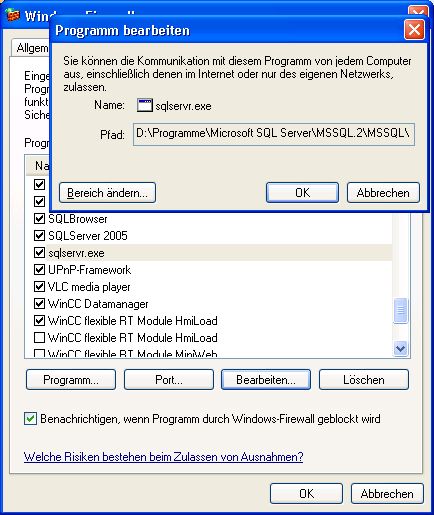
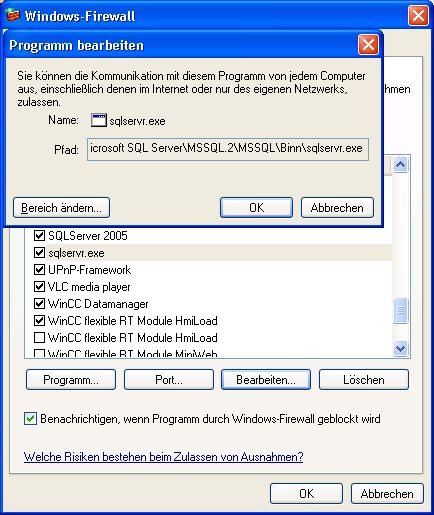
The Firewall settings are the same as with RC2.
But one thing is much better than with RC2 the MediaPortal runs more smoother on the Server!

I hope you can help me!
This is my Client:
TV-Server Version: 1.0 RC3
MediaPortal Version: 1.0 RC3
MediaPortal Skin: Blue3
Windows Version: Windows Vista x64
Die Hardware ist in etwa die: Der Dell Online-Shop: Stellen Sie Ihr eigenes System zusammen
MPEG2 Video Codec:
MPEG2 Audio Codec:
This is my Server:
TV-Server Version: 1.0 RC3
MediaPortal Version: 1.0 RC3
MediaPortal Skin: Blue3
Windows Version: Windows XP Prof SP2
CPU Type: AMD Sempron 2800+
HDD: Seagate ST3250620AS 250GB
Memory: 512 MB
Motherboard: Win Fast 760GXK8MC
Video Card: Nvidia Geforce 6200 A-LE 256MB Ram
Video Card Driver: 6.14.11.6921
Sound Card: onboard
Sound Card AC3:
Sound Card Driver:
1. TV Card: Twinhan DTV Mantis 1034 (DTV-BDA Mantis BDA Receiver)
1. TV Card Type: DVB-S
1. TV Card Driver: 1.0.8.0 BDA (I use it since May 2008))
2. TV Card:
2. TV Card Type:
2. TV Card Driver:
3. TV Card:
3. TV Card Type:
3. TV Card Driver:
4. TV Card:
4. TV Card Type:
4. TV Card Driver:
MPEG2 Video Codec: CyberLink
MPEG2 Audio Codec: CyberLink
h.264 Video Codec:
Satelite/CableTV Provider: 19,2°E
HTPC Case:
Cooling:
Power Supply:
Remote: MCE Model: 1039
TV: Philips PHL4650 (Bad PC Support)
TV - HTPC Connection: DVI
i noticed a problem if i want to try to connect my Client to the Server.
Way to reproduce.
- I made a restrart of the TV-Server
- TV-Server is running. If I start Mediaportal local on it it works
- Now I start MediaPortal Configuration tool as an Adminstrator on my Client with a fresh installed MediaPortal
- I tell the client that it should use "htpc" as server
- Then It takes more than five ............ minutes before MediaPortal Configuration tool close
- I get an error in the configuration log:
2008-10-13 22:19:00.667790 [Info.][Config Main]: Remote control:master server :htpc
2008-10-13 22:19:01.151390 [Info.][Config Main]: ChannelNavigator::Reload()
2008-10-13 22:19:01.260590 [Info.][Config Main]: get channels from database
2008-10-13 22:24:20.640390 [Info.][Config Main]: TVHome: Error in Reload - The database backend (provider SQLServer) could not be reached.
Check the connection string: Password=MediaPortal;Persist Security Info=True;User ID=sa;Initial Catalog=MpTvDbRC2;Data Source=htpc\SQLEXPRESS;Connection Timeout=300;
2008-10-13 22:24:20.640390 [ERROR][Config Main]: TVHome: Error in Reload - The database backend (provider SQLServer) could not be reached.
Check the connection string: Password=MediaPortal;Persist Security Info=True;User ID=sa;Initial Catalog=MpTvDbRC2;Data Source=htpc\SQLEXPRESS;Connection Timeout=300;
Then I start Mediaportal
- On the Splash Screen it takes very long on "Loading window plugins"
- .....
- After about three Minutes. MediaPortal has started.
- I select MyTV
- You can wait seven minutes and nothing happens.
- I kill MediaPortal
I attached the logs of the Client.
With RC2 on client and server i didn´t have this problem.
The Firewall settings are the same as with RC2.
But one thing is much better than with RC2 the MediaPortal runs more smoother on the Server!
I hope you can help me!
This is my Client:
TV-Server Version: 1.0 RC3
MediaPortal Version: 1.0 RC3
MediaPortal Skin: Blue3
Windows Version: Windows Vista x64
Die Hardware ist in etwa die: Der Dell Online-Shop: Stellen Sie Ihr eigenes System zusammen
MPEG2 Video Codec:
MPEG2 Audio Codec:
This is my Server:
TV-Server Version: 1.0 RC3
MediaPortal Version: 1.0 RC3
MediaPortal Skin: Blue3
Windows Version: Windows XP Prof SP2
CPU Type: AMD Sempron 2800+
HDD: Seagate ST3250620AS 250GB
Memory: 512 MB
Motherboard: Win Fast 760GXK8MC
Video Card: Nvidia Geforce 6200 A-LE 256MB Ram
Video Card Driver: 6.14.11.6921
Sound Card: onboard
Sound Card AC3:
Sound Card Driver:
1. TV Card: Twinhan DTV Mantis 1034 (DTV-BDA Mantis BDA Receiver)
1. TV Card Type: DVB-S
1. TV Card Driver: 1.0.8.0 BDA (I use it since May 2008))
2. TV Card:
2. TV Card Type:
2. TV Card Driver:
3. TV Card:
3. TV Card Type:
3. TV Card Driver:
4. TV Card:
4. TV Card Type:
4. TV Card Driver:
MPEG2 Video Codec: CyberLink
MPEG2 Audio Codec: CyberLink
h.264 Video Codec:
Satelite/CableTV Provider: 19,2°E
HTPC Case:
Cooling:
Power Supply:
Remote: MCE Model: 1039
TV: Philips PHL4650 (Bad PC Support)
TV - HTPC Connection: DVI